GENERATOR SERVICE AND TROUBLESHOOTING MANUAL — REV. #0 (08/29/23) — PAGE 43
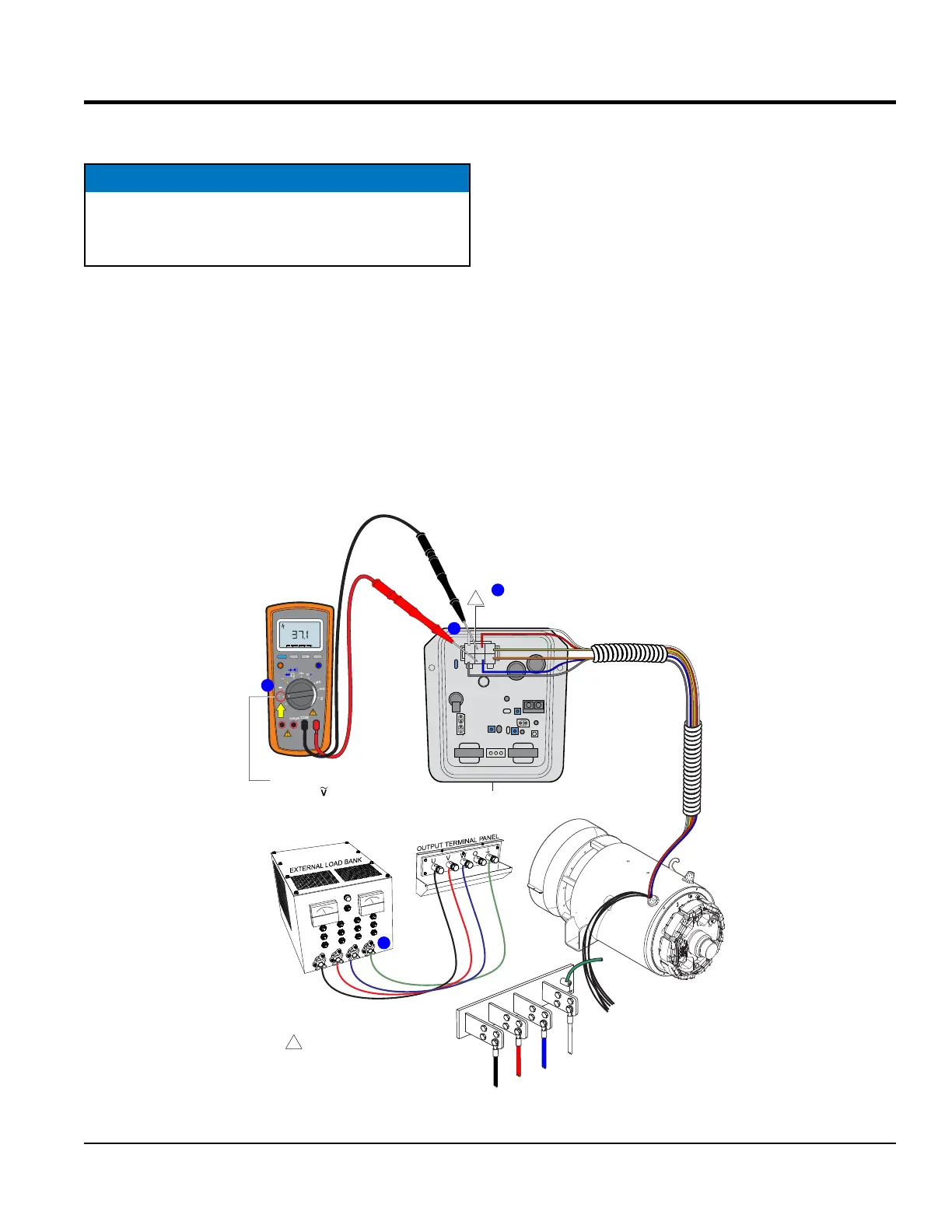
EXCITER FIELD VOLTAGE MEASUREMENT
(
LOAD
)
EXCITER FIELD VOLTAGE MEASUREMENT
(WITH LOAD)
1. Connect an external load bank to the output terminal
panel or buss bars on the generator as shown in
Figure 44A.
2. If equipped, set engine speed switch to the low position
(idle).
3. Start the engine as referenced in the operation manual.
4. If equipped, place engine speed switch in the high
position and run the engine at full rpm
NOTICE
Use extreme caution when performing this test. The
possibility exist of electrical shock which could cause
severe bodily harm.
5. Congure load bank for the specied rated load as
referenced in the data sheet. This example will use
a load rating of 20 kW/25 kVA for a DCA25SSIU4F
generator.
6. Next, open the control panel door on the generator and
locate the 6-pin plug (Figure 44B) on the AVR.
7. Set the selection dial on the multimeter to AC volts
(Figure 44C).
8. Place the multimter test leads arcoss pins J and K
on the 6-pin plug as shown in Figure 43Figure 44D.
Multimeter probe extenders are recommend for easy
access to the connector pins.
9. Verify that the exciter eld voltage (no load) reading
is within range as referenced in Table 7 , column D.
Figure 44. Exciter Field Voltage Measurement (With Load)
CN1
CN2
CN3
CN4
EXAMPLE:
DCA-25SSIU4F = 37.1 VAC
6-PIN
PLUG
2
C J A
BKD
1
3
YELLOW
WHITE
ORANGE
GRAY
BLUE
RED
AVR
REAR VIEW
WIRE SIDE
1
1
NOTES:
WIRE COLOR SHOWN IS FOR
A DCA-25SSIU4F GENERATOR.
ALL OTHER DCA GENERATORS
USE BLACK WIRES.
RANGE
MIN MAX
MULTIMETER
Auto0 600
OFF
Hz
C
A
mA
uA
F
V
Hz
V
mV
Hz %REL
HOLD/LIGHT
10 A MAX
mAµA
COM
V
AC
MULTIMETER
PROBE EXTENDERS
B
D
C
TURN
SELECTION
DIAL TO
POSITION
3-PHASE
USED ON DCA600
GENERATORS AND ABOVE
USED ON DCA400
GENERATORS AND BELOW
U
V
W
GND.
BLACK
RED
O
WHITE
GREEN
BLUE
BUSS BARS
A





 To Next Page