5). The “Parameters display”
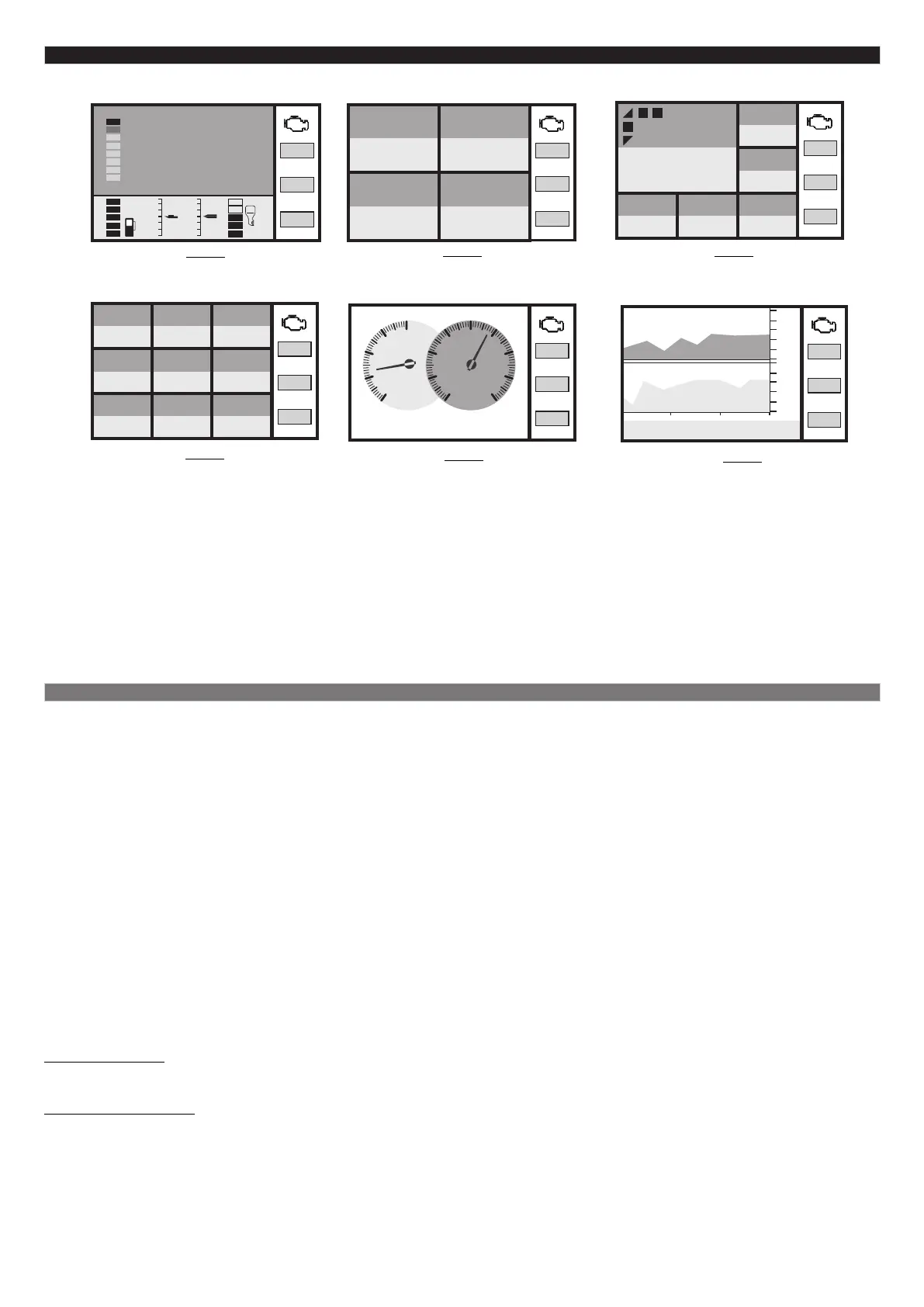
To select instantaneous parameter display press and release the “ button There are several layouts to choose for PAR” .
displaying instantaneous parameters on the screen of the trip computer:
To switch between types of displays press and release the “SET” button.
To switch between multi-displays of the same type press and release € or ‡.
To change between modes (multi-display settings) go to the “Settings display - Display - Digital/ Graphic/ Arrow”.
To call out the “Parameters Hot menu” press and release “F”.
Press “ESC” to exit the “Parameters Hot menu”.
The additional panel on the left shows 4 parameters which can be seen on all displays. To choose required parameters go
to the “Settings display - Display - Add.panel”.
Type 6
Displays 1 or 2 parameters in the form of
graphics.
Quantity of multi-displays: 8
Type 2
Displays 4 parameters simultaneously
(multi-display).
Quantity of multi-displays: 6
Type 4
Displays 9 parameters (multi-display).
Quantity of multi-displays: 3
Type 5
Displays 2 parameters simultaneously in the
form of arrow pointers.
Quantity of multi-displays: 8
12:14
Time
99
Speed
km/h
7.5 31
Consumption
l/100
Tank
liters
6.9
Consumption
l/100
5.6 99
0:30 50.8 204
13.1 41 501
Cons./Trip
l/100
Speed
km/h
Time/Trip Mileage/Trip
km
Cost/Trip
currency
Battery
Volt
Fuel left
liters
Mileage progn.
km
0
2
4
6
8
0
3
6
9
12
15
18
21
24
rpm
х1000
Battery
Volt
8000
0
24
0.0
2360
rpm
14,3
Battery, Volt
1с 1с
12:41:08 12:42:35 12:44:02
Type 3
Displays 6 parameters simultaneously (multi-
display).
Quantity of multi-displays: 1
89
204
13.1 41 501
Coolant temp.
Celcius
Cost/Trip
currency
Battery
Volt
Fuel left
liters
Mileage progn.
km
60
Speed
km/h
5.1. List of available parameters
The list of parameters available in the “Parameters display” depends on the protocol through which the trip computer
communicates with your water vehicle. If some parameter exists in the list it does not mean that it will be shown for all
engines. Possible variants:
1. The parameter can be retrieved within the selected diagnostic protocol and it is supported by the ECU of the engine. In
this case it will be shown in the “Parameters display” and will be available for customizing in the multi-display.
2. The parameter can be retrieved within the selected protocol but it is not supported by the ECU of your engine. In this
case the parameter will be available when customizing the multi-display but in the “Parameters display” you will see
zero value or dashes.
3. The parameter is not supported by the selected diagnostic protocol. In this case you will not see it in the “Parameters
display” and it will not be available when customizing the multi-display.
The minimum list of parameters is available in the universal performance mode with injection and carburetor engines
when retrieving data from the ECU is not provided for.
Attention! It is impossible to determine which parameters will appear on the screen of the trip computer before
connecting it to the engine.
All parameters on the display can be divided into the following groups:
- basic parameters
- additional parameters and service records
It is possible to select basic parameters in the “User’s displays” and place them on the display in random order (through
the “Settings display” or Params32 program).
Additional parameters and service records can be viewed only in the “Service display”.
Basic parameters are the data retrieved by the trip computer from sensors, calculated by the user and received from the
electronic engine control unit. Each diagnostic protocol has its own set of parameters which can be
viewed in the “User’s displays”.
Additional parameters are the data retrieved from the electronic engine control unit and serve for more profound
diagnostics of electronic engine control systems (additional parameters, bits, sensors ACD etc.
can be found in the menu “Service display - Tr.codes/Diagnost. - ECU - Add.parameters”. Each
diagnostic protocol has its own set of parameters. Parameters from this list are not displayed in
the “User’s display”.
-14-
20
10
-10
Tri
3
-3
92
Speed, km/h
Т cyl.
71
trim
7
rpm
2560
Т cyl.
71
trim
7
rpm
2560
Т cyl.
71
trim
7
rpm
2560
Т cyl.
71
trim
7
rpm
2560
Т cyl.
71
trim
7
rpm
2560
Т cyl.
71
trim
7
rpm
2560
Type 1
Displays 1 parameter in digital form and 4
parameters in graphical form.


 To Next Page
 Loading...