5.2. The Parameters hot menu
This menu enables quick access to 10 functions in the “Settings display”. To activate it press “F” when you are in the
“Parameters display” .
By pressing on € ‡ select the wanted line and press to confirm. “SET”
To exit the hot menu press and release “ESC”.
The hot menu can be customized in the “Settings display”: select the line which you want to see in the hot menu, press
and release “F” then press “SET” to confirm. The digit in the line on the left shows the sequence number of the selected
line in the hot list.
To clear the hot menu list go to the “Settings display - HotLists clear”.
5.3. Countdown
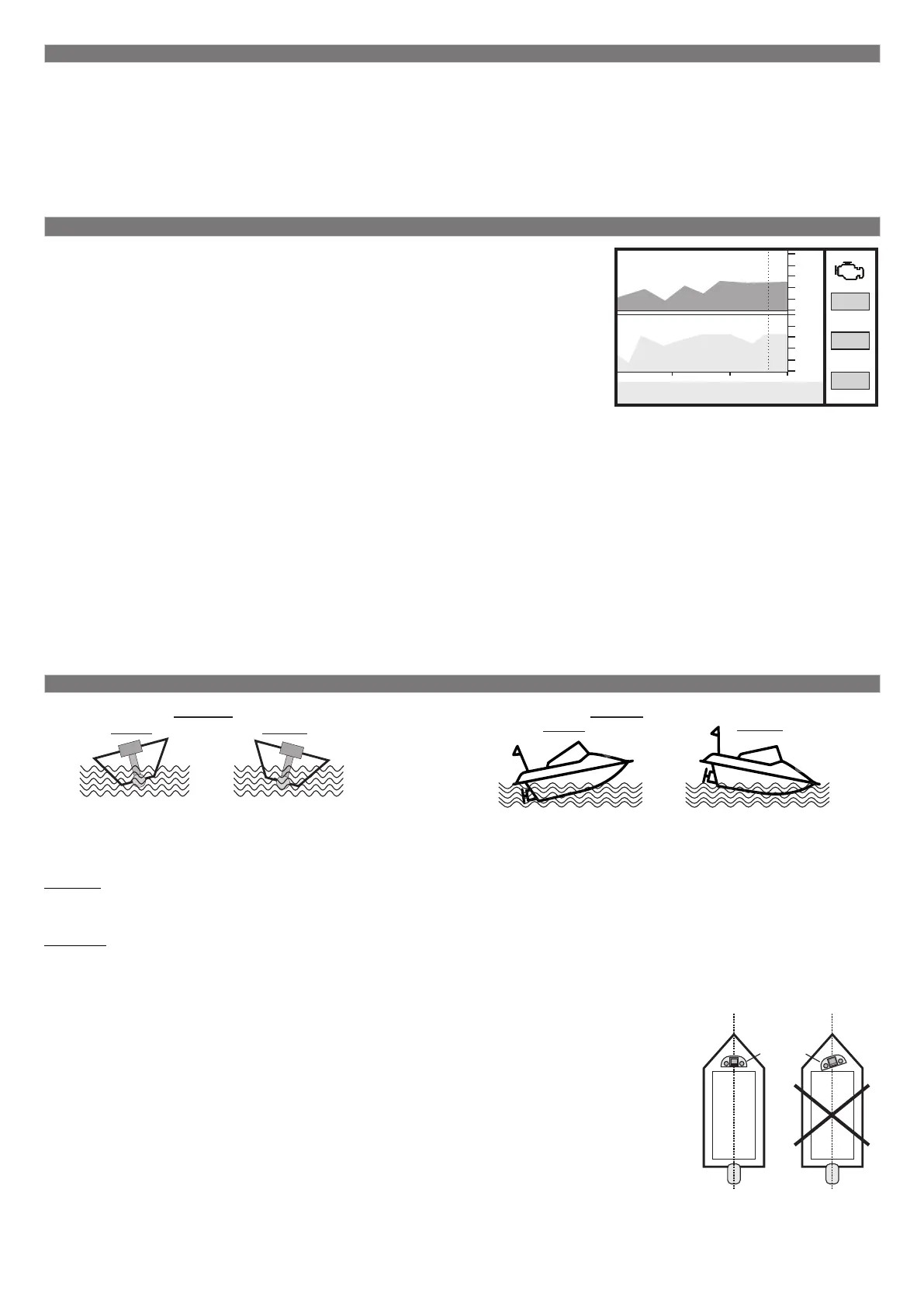
The countdown function helps to determine numerical values of parameters in
“the past time”. This function is available in graphic displays (type 6) when the
engine is off.
1. Go to the “Settings display - Display - Graphic”, select “Countdown”, press
“SET”, select “Yes”, then press “ESC” three times until you reach the graphic
display.
2. Using € ‡ move along the graphic. To see other graphics in the wanted
time moment select the “Countsdown - No”, press “ESC” three times to return to
the graphic display, pressing on € ‡ select another graphic display. If you want
to continue moving along the graphic do step 1.
The vertical line shows the selected time point. Respective values of
parameters, time and countdown periods are placed in the bottom line.
If you are in the graphic display when the engine is stopped, by default this function can be called out from the hot
menu.
1. Press “F” and using € ‡ select the “Countdown” line, by pressing “SET” select the variant “Yes”, then press “ESC”
to return to the graphic display.
2. Pressing € ‡ move along the graphic. To see other graphics in the wanted time moment press “F” to select the
“Countdown - No”, then press “ESC” to return to the graphic display, tapping on € ‡ select another graphic display. If
you want to continue moving along the graphic do step 1.
This function will be turned off automatically after: the engine is switched on (with a physical engine switch), the engine
is started (with a virtual ignition lock) or the virtual ignition lock is turned on forcibly.
5.4. Roll and trim
Multitronics CL-950E measures roll and trim angels with the help of the in-built accelerometer and displays
these parameters in the “User’s displays” which helps to prevent a water vehicle from capsizing, to determine
the optimal trim angle of the engine and to pass on to the planning mode.
The roll is the angle of transverse inclination of a water vehicle along the axis of movement:
when positive - tilt to the left;
when negative - tilt to the right.
The trim- is the angle of longitudinal inclination of a water vehicle along the axis of movement:
when positive - upward lift;
when negative - descent down.
Calibration is required before using the accelerometer:
1. Install the device in the panel and tighten the mounting elements. The device must be
positioned strictly perpendicular to the axis of movement of the vessel.
2. Position the water vehicle on a flat surface not allowing rocking.
3. Go to the “Settings display - Correction - Incline calibr.” and press “SET”.
4. Check that the device has been installed correctly and confirm calibration by pressing
“SET”.
5. After the confirmation window appears the device will memorize the current position of
the vessel and in the future the angles of roll and the heading angle (trim) will be
calculated relrelatively to the current position of the water vehicle.
ROLL TRIM
15 deg. -15 deg.
-15 deg.
15 deg.
-15-
axis of movement
8000
0
24
0.0
2360
rpm
14,3
Battery voltage, V
1с 1с
12:41:08 12:42:35 12:44:02
23.0с
Т cyl.
71
trim
7
rpm
2560
dash
board
correct
mounting
incorrect
mounting
incorrect
mounting


 To Next Page
 Loading...