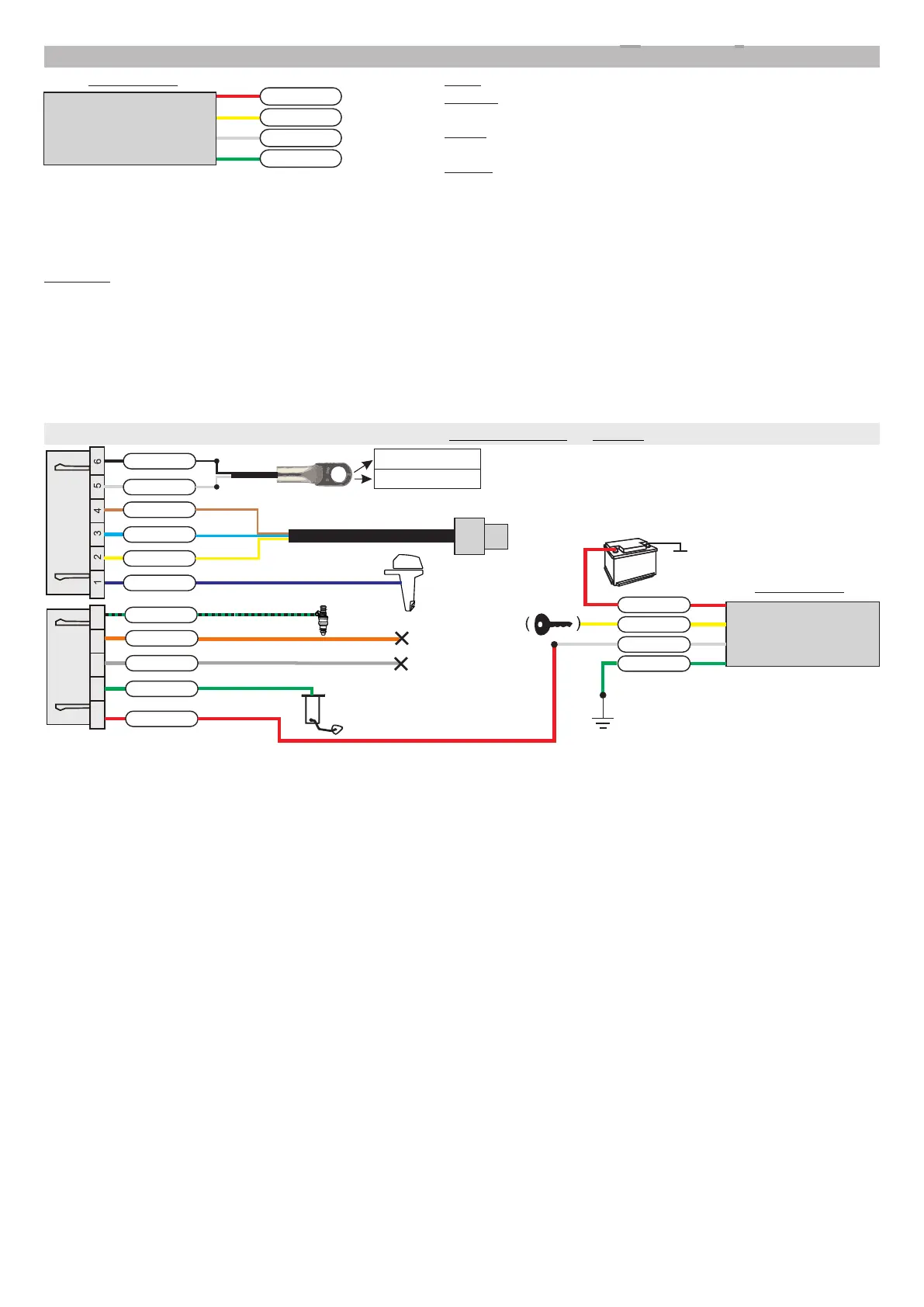
speed sensor
ground
+12V
speed
ignition
MULTITRONICS
2.5. Connection of Multitronics GPS speed sensor (option)
+12V - connection to the battery
ignition - connection to the ignition lock (electricity supply while
the engine is running)
speed - connection to the speed center input of the trip
computer
ground - connection to mass (ground)
red
yellow
white
green
It is possible to combine the outputs "+12V" and "Ignition", in this case the speed sensor will start working as soon as
power is supplied (establishing connection with satellites can take some time).
If you choose separate connection of the "+12V" and "Ignition" outputs connecting them to assigned sockets, the trip
computer retains the GPS speed sensor working for 5 minutes after the ignition is turned off, which reduces the time to
search for satellites during short stops.
Attention! Performance of the GPS sensor may deteriorate when the vehicle is blocked by surrounded objects or in bad weather
conditions. After long idle periods "cold" switching may take a few minutes.
Connection of an external speed sensor to the Multitronics CL-950E is optional and should be performed in case of unstable GPS
signals reception by the built-in GPS sensor of the trip computer.
Connect the Multitronics speed sensor to the "Ignition" output of the trip computer and complete the settings:
Settings display - Sources - Lock - Virt.
Settings display - Sources - Speed - Sens.
An example of connection using Yamaha, Suzuki and Honda cables
+
battery
to trim sensor
(trim)
temperature sensor (option)
to diagnostic connector
on engine
air temperature
water temperature
purple
yellow
blue
brown
+12V
K-line
ground
white
black
7 8 9 10 11
to speed
sensor
to fuel sensor
red
green
grey
orange
black-green
to injection plug (if desired)
ground
ignition lock
CAN-low
CAN-high
not used
not used
speed sensor
MULTITRONICS
red
yellow
white
green
+12V
Connections with other cables is identical to the scheme above.
-9-



 To Next Page