20
3
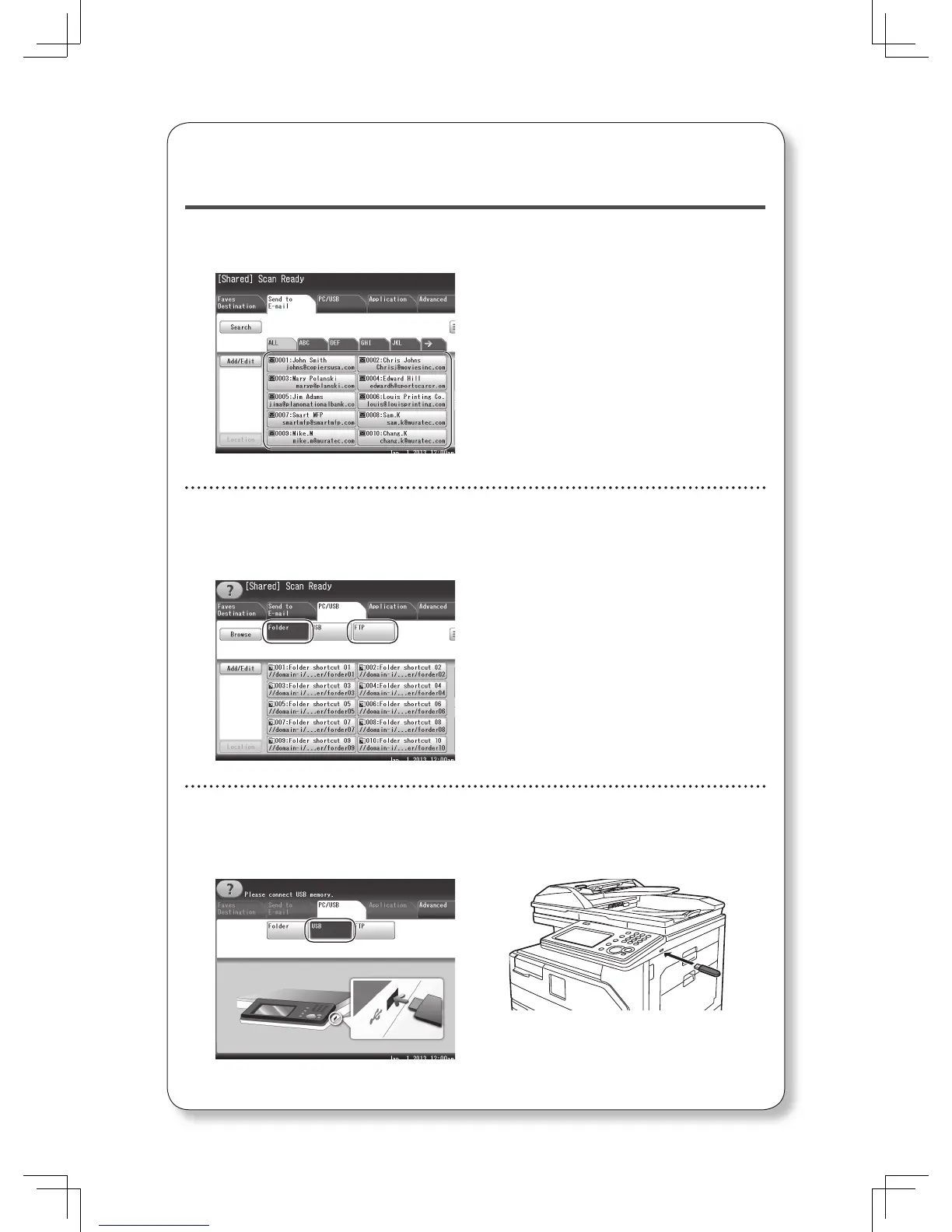
Select the destination.
Scan to e-mail
Press [Send to E-mail].
Specify the destination.
Select your desired destination from
the display.
or
Press [Advanced]
[Mail Address]
and enter the e-mail address of your
desired destination. Press [Enter].
Scan to Folder / Scan to FTP
Press [PC/USB].
Press [Folder] or [FTP].
Specify the destination.
Select your desired destination from
the display.
or
Press [Browse] and browse to your
desired folder. Select the folder and
press [Enter]. Enter the user ID
and password to enter the folder, if
required.
or
Press [Host] and enter the details
on your desired FTP server. Press
[Enter].
Scan to USB
Press [PC/USB].
Press [USB].
Connect the USB memory device to
the control panel.








 To Next Page