Forwarding/rewinding media from printer driver/VSM 31
1 Forwarding/Rewinding media
Forwarding/rewinding media from printer driver/VSM
[1]
Display the Printing Preferences screen of printer driver.
"Displaying the Printing Preferences screen of printer driver" on page 8
[2]
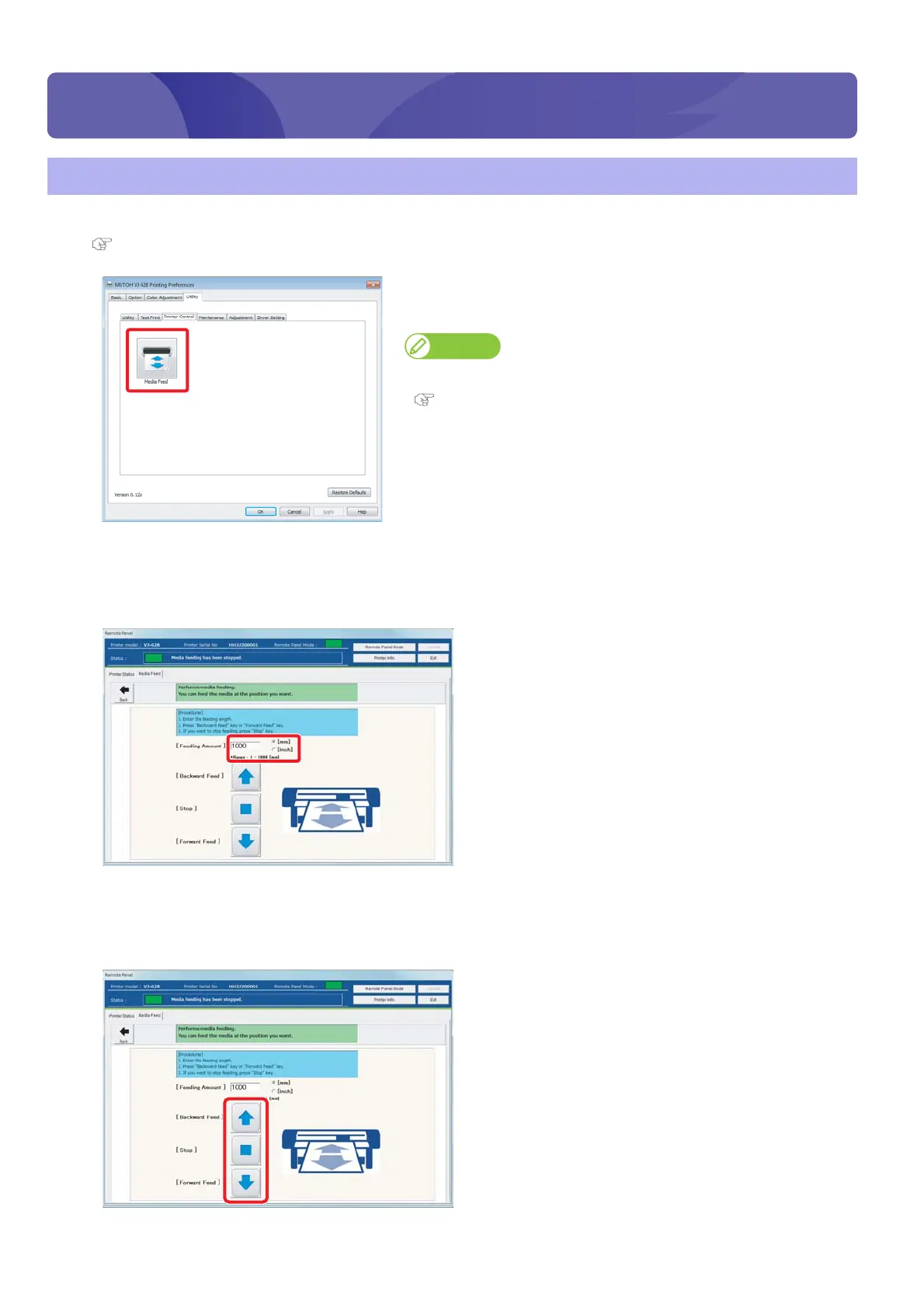
Click [Media Feed] in the [Printer Control] under the [Utility] tab.
• The remote panel of VSM launches.
Note
VSM can be launched directly.
"Launching VSM" on page 9
[3]
Enter [Feed Amount].
• The unit of [Feed Amount] can be selected from [mm] and [inch].
• The media is forwarded/rewound by the entered length in the [Feed Amount].
[4]
When [Forward Feed]/ [Backward Feed] is clicked, the media is forwarded/rewound.
• Click [Stop] during forwarding/rewinding to stop the operation.
• Or short press the operation key on the operation panel to stop the operation.
Forwarding/Rewinding media















 To Next Page