Nozzle check and cleaning 33
When using white ink
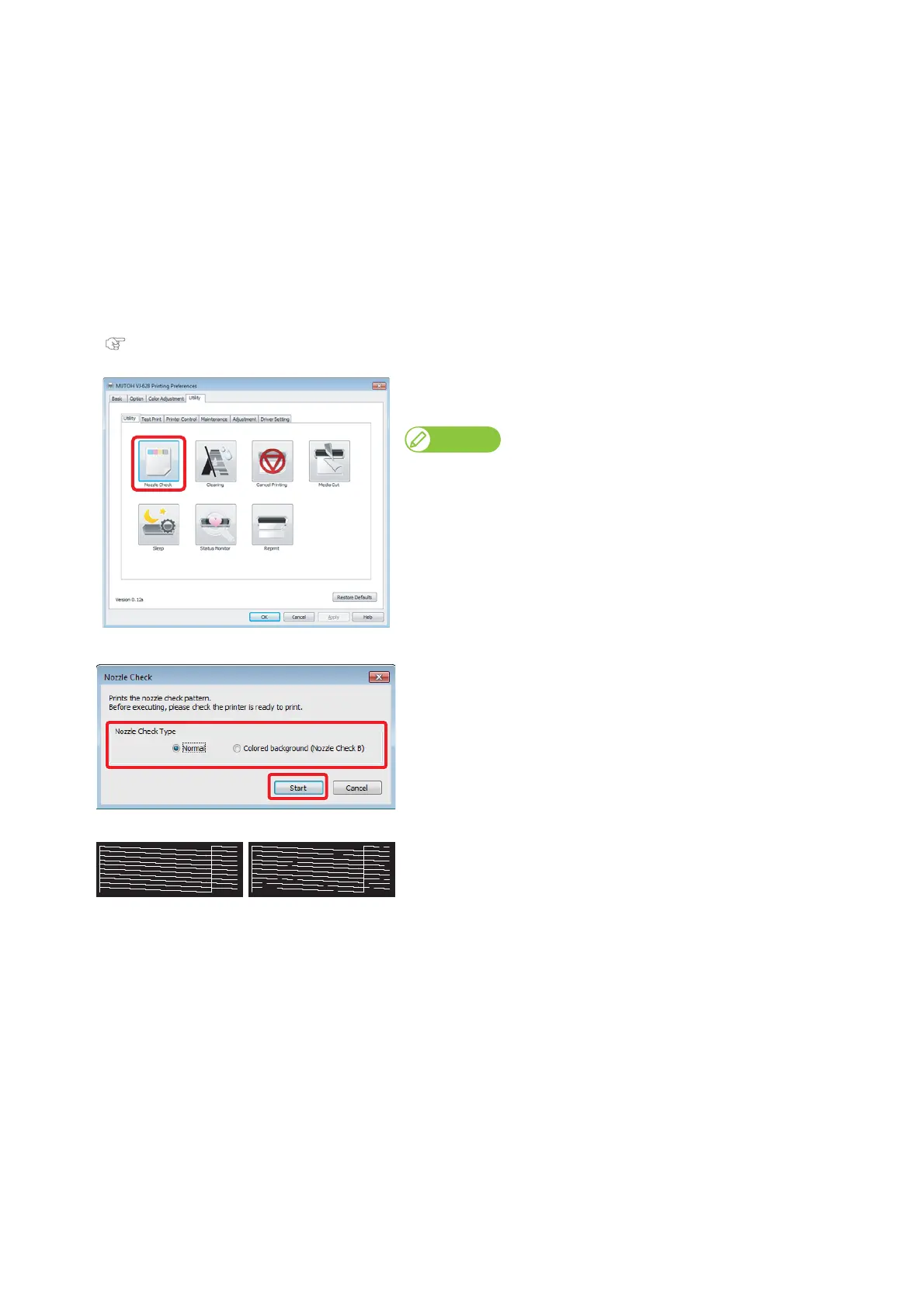
When you are using white ink, you can select from regular nozzle check and nozzle check for white ink.
If you select the background color (nozzle check B), the background for some of the nozzle check patterns are printed in color
so that the nozzle condition is easy to see.
• Part of the background for the white nozzles is black.
• Part of the background for the white nozzles is not printed.
• The background of the KCMY nozzles are white.
[1]
Displays the Printing Preferences screen for the printer driver.
"Displaying the Printing Preferences screen of printer driver" on page 10
[2]
Click [Nozzle Check] from the [Utility] tab on the [Utility] tab.
• The selection window opens.
Note
You can also do this for MSM remote panel.
[3]
Select the nozzle check type, and then click [Start].
•Normal
Prints the standard nozzle check pattern.
• Colored background(Nozzle Check B)
Prints the nozzle check pattern for white ink.
[4]
Check the adjustment pattern.
• The illustration on the left is the image of when selecting "Colored
background(Nozzle Check B)".
• If the nozzles are clogged, proceed to
"Cleaning steps" on page 34.
• If there are no clogged nozzles, proceed to
"Starting printing" on page
35
.
Nonozzleclog Nozzleclogged















 To Next Page