Chapter 5. MvixFTS Use and Share
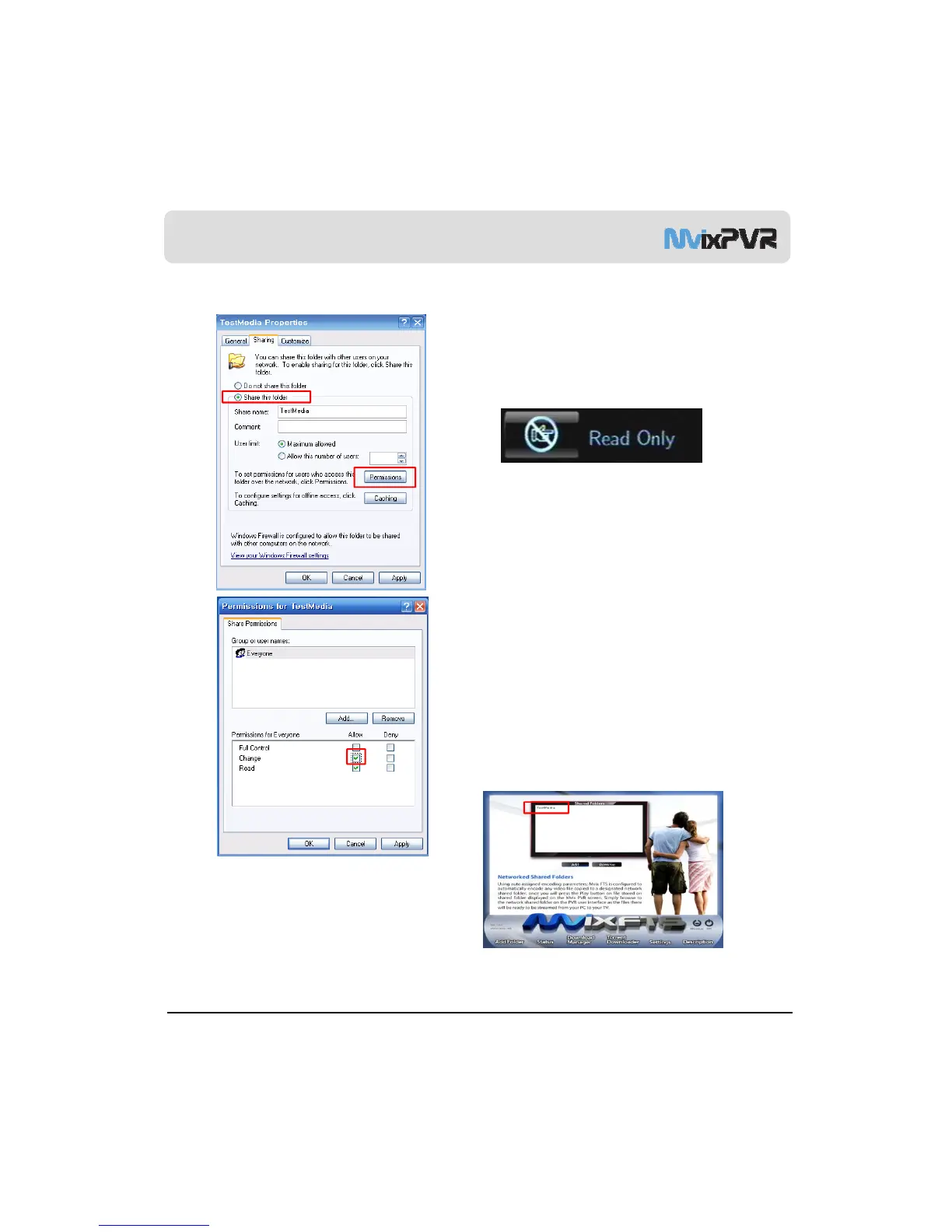
3) Change/ Give Power for Windows XP Share Folder (Copy Function)
Share setting screen of folder registration info. is
displayed as of the following.
Check ‘share this folder in network’ and press OK.
<Ref. #1>
Check share attributes of share folder if ‘Read Only’ is
displayed as of the above when copying a file to the
share folder of NET PC using COPY function. Check
‘network user can change my file’. Then, you can copy
files to the share folder of PC in network when using
MvixPVR COPY function.
※ COPY function can be used not only for video files,
but also for all other files.
Run Mvix FTS program again and press OK in Net
Share Dialog menu. You will see that a folder
designated of network share setting is automatically
added.
Video files of H.264/ WMV/ PMVB/ RM/ MOV mode
contained in a share folder registered in MvixFTS can
be played by streaming in MvixPVR.
MvixFTS program must be kept on in PC. Play will be
stopped if PC is turned off or program is closed
.
MvixUSA
59
※ MvixFTS program does not operate when playing CODEC supported by PVR in network. Therefore, it is not necessary to
execute the program. Run MvixFTS program when playing the movies of H.264/WMV/RMVB/MOV/RM, etc.



 To Next Page