Chapter 3. For Advanced Users
2) FILE MANAGER
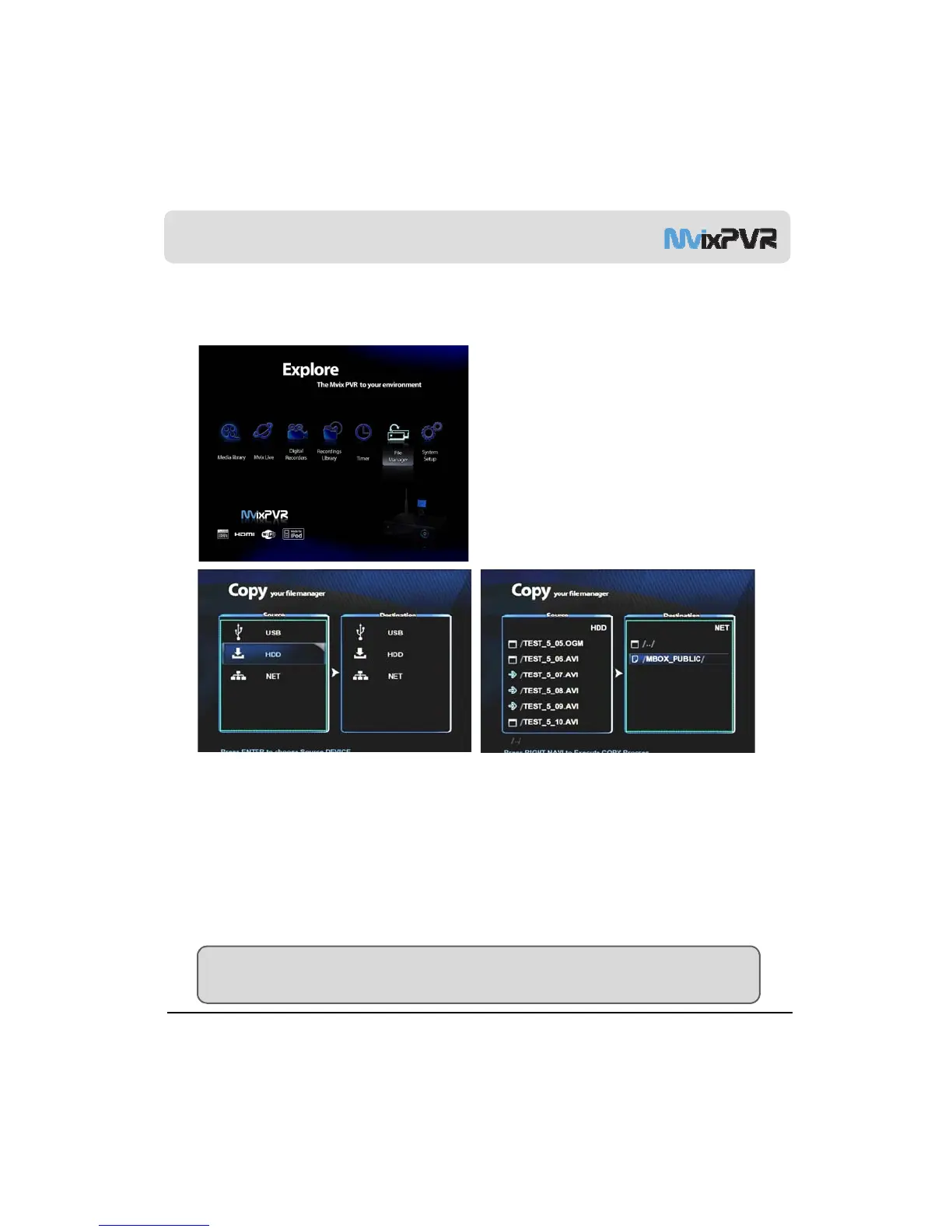
1-1. Copy Function
Copy
File is copied to either the storage device that is
connected to MvixPVR or to a share folder on a network-
connected PC. File can be is copied both ways by using
USB, HDD and NET.
This function enables you to use USB->HDD,NET /
HDD-> USB, NET / NET -> USB, HDD.
o
s not
oss
e
n
e
a
rar
e s
stem amon
target disks (Copy Recordings Here (FAT32)/ Media
Library (NTFS)). Copy is possible to Copy Recordings
Here disk. As for partition, copy is possible at present
only to disk of FAT32 file system.
MvixPVR supports the function to conveniently copy files among USB/ HDD/ NET only with a remote controller.
Firstly, search file to copy in source window screen. Place cursor over the file and press Select in remote controller to
select the file. If a folder is selected, all files in the folder are copied. MvixPVR also supports the function to select and
copy files from various folder
MvixUSA
42
TIP
Copy function can be used for all files in addition to video files. Two drives appear when accessing HDD mounted in
PVR. Each drive holds the file system of Media Library : NTFS/ Copy Recordings Here : FAT32.



 To Next Page