Nasuni Edge Appliance Initial Configuration Guide 8.3 45
Accessing Volumes Cloud Credentials
access. Credential editing is to update access after changes to the cloud storage
parameters.
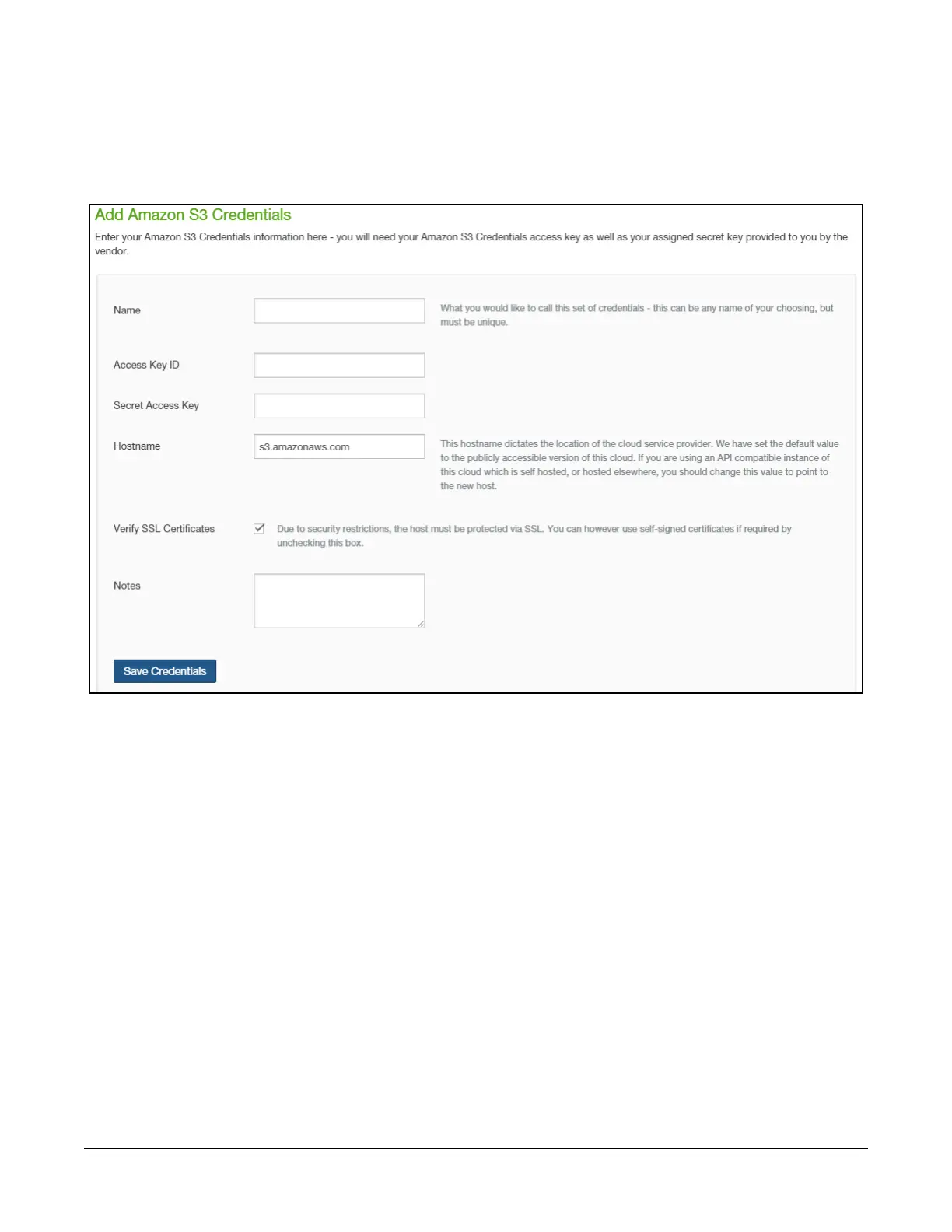
3. A page appropriate to your selected platform appears. We show the page for Amazon S3 cloud
credentials as an example only.
Figure 2-3: Add Amazon S3 Credentials page.
4. Enter the credentials for your platform.
For Amazon S3, credentials include the following:
• Name: A name for this set of credentials, which is used for display purposes.
• Access Key ID: The Amazon S3 Access Key ID for this set of credentials.
• Secret Access Key: The Amazon S3 Secret Access Key for this set of credentials.
• Hostname: The hostname for the location of the cloud service provider. Use the default
setting: s3.amazonaws.com
• Verify SSL Certificates: For self-signed certificates, certificates generated with a private
root CA, or a default certificate: Off. For fully valid SSL certificate: On.
• Notes: Optional information to save.
For Microsoft Azure, credentials include the following:
• Name: A name for this set of credentials, which is used for display purposes.



 To Next Page