194
8. User Supportware
Holding Conferences
•Holdingconferences
1 Followsteps1through4in“Connectingprojector”of“SendingImagestoProjector”(→page191).
The screen of your computer will be projected from the projector.
•Disclosealetotheparticipantsoftheconference.
NOTE:
Todisclosealetotheparticipants,selectioncanbemadeonlyinfolderunits.
Therefore,afolderonlyhavinglesthatcanbedisclosedtotheparticipantsmustbecreatedinadvance.
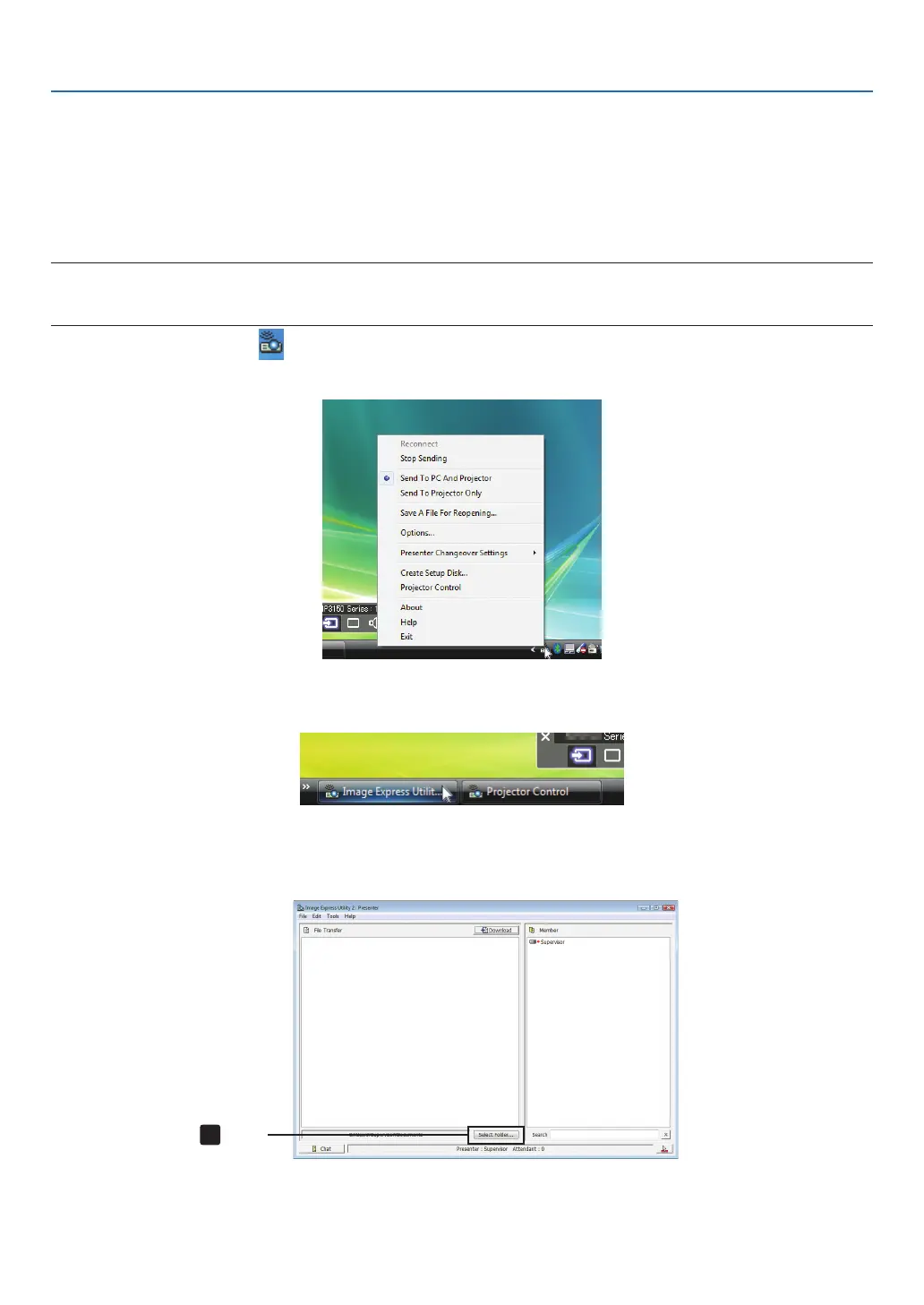
1 Clicktheprojectoricon( )ontheWindowstaskbar.
A pop-up menu will be displayed.
2 Beforeclicking[SendtoPCandProjector],checkthatthereisa“•”markapplied.
3 Clickthe[ImageExpressUtility2.0]buttononthetaskbar.
The presenter window will be opened.
4 Click[SelectFolder].
Click



 To Next Page