21
2. Projecting an Image (Basic Operation)
Adjusting the Picture Size and Position
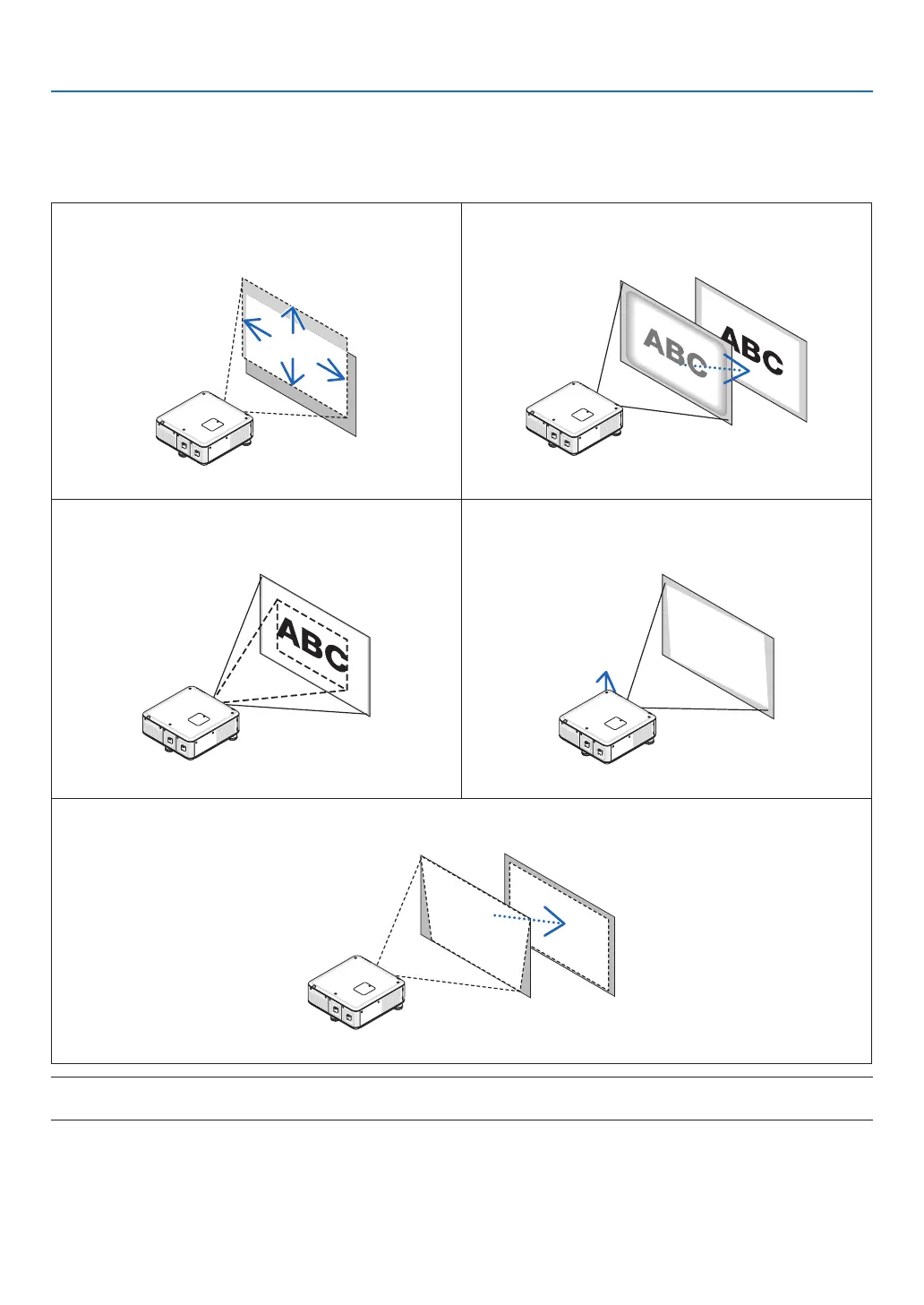
Usethelensshiftdial,theadjustabletiltfootlever,thezoombuttonsandthefocusbuttonstoadjustthepicturesize
andposition.
Inthischapterdrawingsandcablesareomittedforclarity.
Adjustingtheprojectedimage’sverticalandhorizontal
position
[Lensshift]
Adjustingthefocus
[Focus]
(→ page 22) (→ page 24)
Finelyadjustingthesizeofanimage
[Zoom]
Adjustingthe projected image’s heightand horizontal
tilt
[Tiltfoot]*¹
(→ page 25) (→ page 25)
Adjustingthekeystonecorrection
[Keystone]
(→ page 26)
NOTE*1: Adjusttheprojectedimage’sheightusingthetiltfeetwhenyouwanttoprojecttheimageatapositionhigherthanthe
lens shift adjustment range.
TIP:
• Built-intestpatternscanbeconvenientlyusedforadjustingthepicturesizeandposition.(→ page 102)



 To Next Page