197
8. User Supportware
•Savingreceivedimages
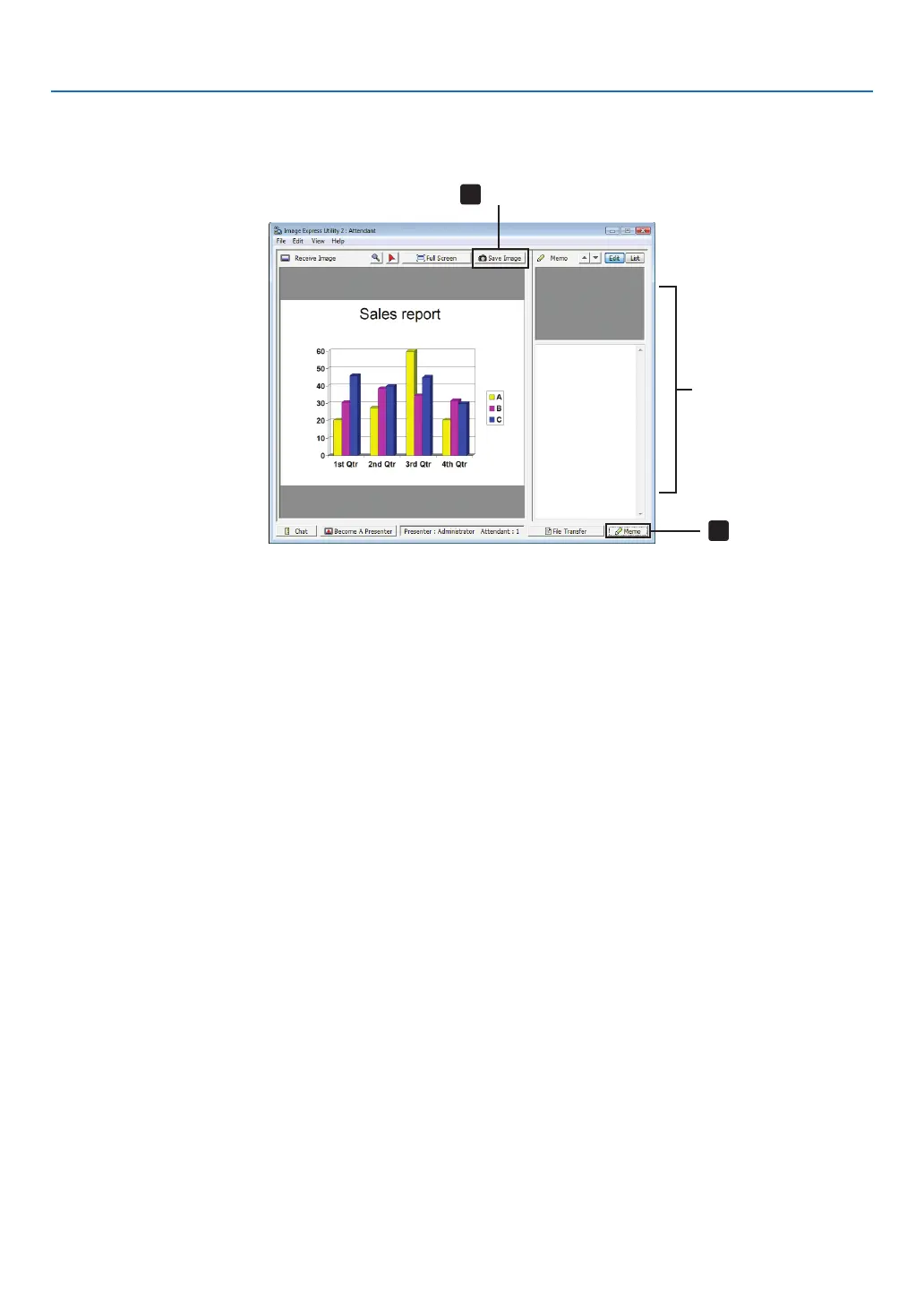
1 Click[Memo]intheattendantwindow.
A memo pane will be displayed.
Click
Memo pane
Click
2 Click[SaveImage]intheattendantwindow.
The image displayed in the attendant window will be saved.
• Thesavedimageisaddedtothememolistandathumbnailisdisplayed.
• Amemocanbeattachedtothesavedimage.
REFERENCE:
• IncaseofWindowsXP,acreatedleissavedto“MyDocuments\ImageExpress\”underthedefaultsettings.IncaseofWindows
7/WindowsVista,“Document\ImageExpress\”isthedefaultfoldertosaveacreatedle.
• Afolderiscreatedbelowthedefaultfolderbasedonthetimeanddateoftheconference,andtheimageissavedtoaleinthe
created folder.
Forexample,ifaconferenceisheldat11:20onMay14,2009,thedefaultfoldernameonWindowsXPwillbe“MyDocuments\
ImageExpress\2009-05-14_11-20_MeetingRecords”.
Inthisfolder,anHTMLlenamed“MeetingRecords”iscreated.
Thesavedimageissavedin“Images”folder.



 To Next Page