Installation Guide for the Model FS562 and Model FS566 Fiber Switches
Physical Description 2-3
Fast Ethernet Ports
As Figure 2-1 and Figure 2-2 show, the Model FS562 and Model FS566 switches are equipped
with six autosensing 10/100 Mbps Fast Ethernet UTP ports. The network access speed for the
10/100 Mbps ports is automatically sensed and displayed on the front panel by the 10 Mbps or
100 Mbps LEDs.
The 10/100 Mbps ports support only unshielded twisted pair (UTP) cable using an 8-pin RJ-45
plug.
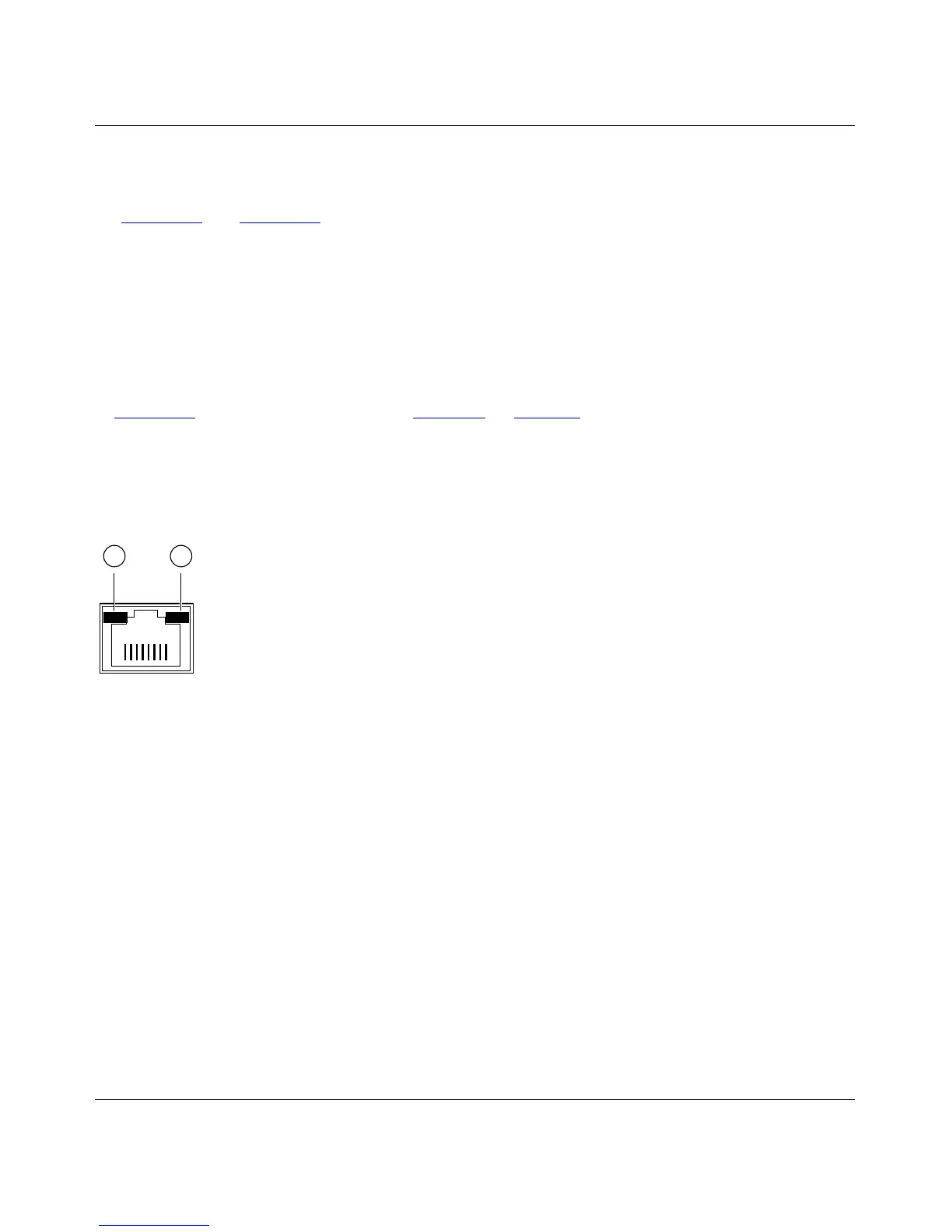
Each of the 10/100 Mbps ports uses vista RJ-45 connectors that have built-in LEDs, as illustrated
in Figure 2-3
. The LEDs, as described in Ta ble 2-1 on page 2-6, indicate that the connection to the
port is valid and that the port is operating at either 10 or 100 Mbps.
For further information about the vista RJ-45 connector and the RJ-45 plug, refer to Appendix B,
“Connector Pin Assignments,” and Appendix C, “Cabling Guidelines.”
Key:
1 = 100M link LED
2 = 10M link LED
Figure 2-3. The Vista RJ-45 Connector with Built-In LEDs
735EA
1 2









 To Next Page