Installation Guide for the Model FS562 and Model FS566 Fiber Switches
3-2 Applications
Desktop Switching
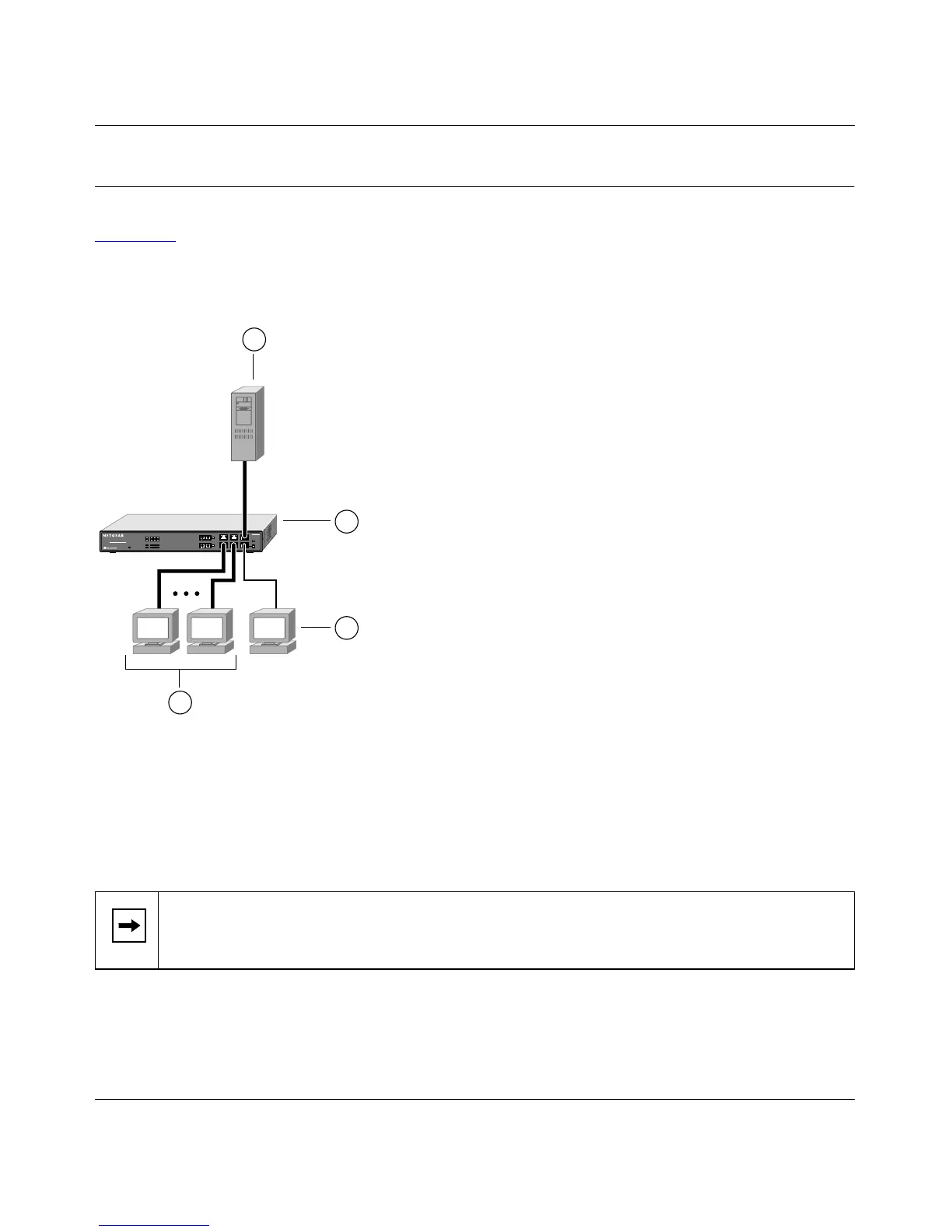
Figure 3-1 illustrates the Model FS562 Fiber Switch used as a desktop switch to build a small
network that enables users to have 100 Mbps access to a file server. The Model FS566 Fiber
Switch can also be used in this manner.
Key:
1 = Server with 100 Mbps connection
2 = Model FS562 Fiber Switch (Normal/Uplink push button set to Normal position)
3 = PCs with 100 Mbps Fast Ethernet adapter cards installed
4 = PC with 10 Mbps connection
Figure 3-1. Using the Model FS562 Switch for Desktop Switching
Note:
If a full-duplex adapter card is installed in the server or PC, a 200 Mbps
connection is possible on the port where the server or PC is connected.
1 123
FS562
MODEL
Fiber Switch
8
PORT
10/100Mbps
Power
2456
8887FA
3
4
2
1









 To Next Page