Installation Guide for the Model FS562 and Model FS566 Fiber Switches
B-2 Connector Pin Assignments
Table B-1 lists the pin assignments for the RJ-45 plug and the vista RJ-45 connector.
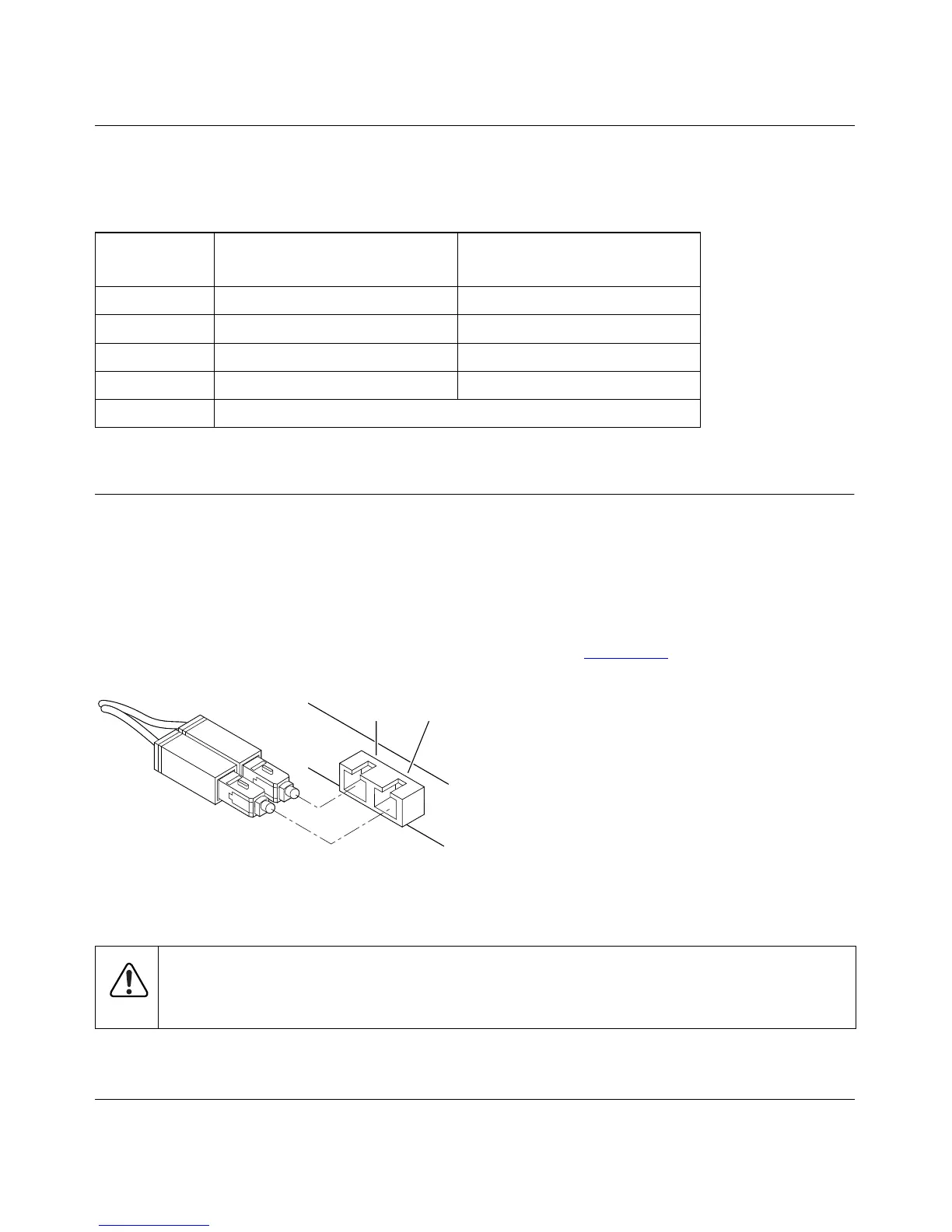
Duplex SC Plug and Duplex SC Connector
The duplex SC connector connects stations, hubs, and switches that support the 100BASE-FX
fiber interface. Each fiber link needs a clearly defined, external crossover. In other words, the
transmit port of one interface must be wired to the receive port of the opposite interface and vice
versa. Fiber cables must be connected in this manner to transmit and receive data.
The duplex SC connector and duplex SC plug are illustrated in Figure B-2
.
Figure B-2. Duplex SC Connector and Duplex SC Plug Connection
Table B-1. RJ-45 Plug and Vista RJ-45 Connector Pin Assignments
Pin
Normal Assignment
on Ports 1 to 16
Uplink Assignment
on Port 16
1 Input Receive Data + Output Transmit Data +
2 Input Receive Data – Output Transmit Data –
3 Output Transmit Data + Input Receive Data +
6 Output Transmit Data – Input Receive Data –
4, 5, 7, 8 Internal termination, not used for data transmission
Warning:
Fiber optic equipment can emit laser or infrared light that might injure your
eyes. Never look into an optical fiber or connector port. Always assume that fiber optic
cables are connected to a light source.
8895FA
TX RX









 To Next Page