Installation Guide for the Model FS562 and Model FS566 Fiber Switches
3-4 Applications
Extending a Network
As a result of signal degradation, unshielded twisted pair (UTP) cable allows for a maximum
distance of only 100 meters between each node connection. By adding a fiber switch between
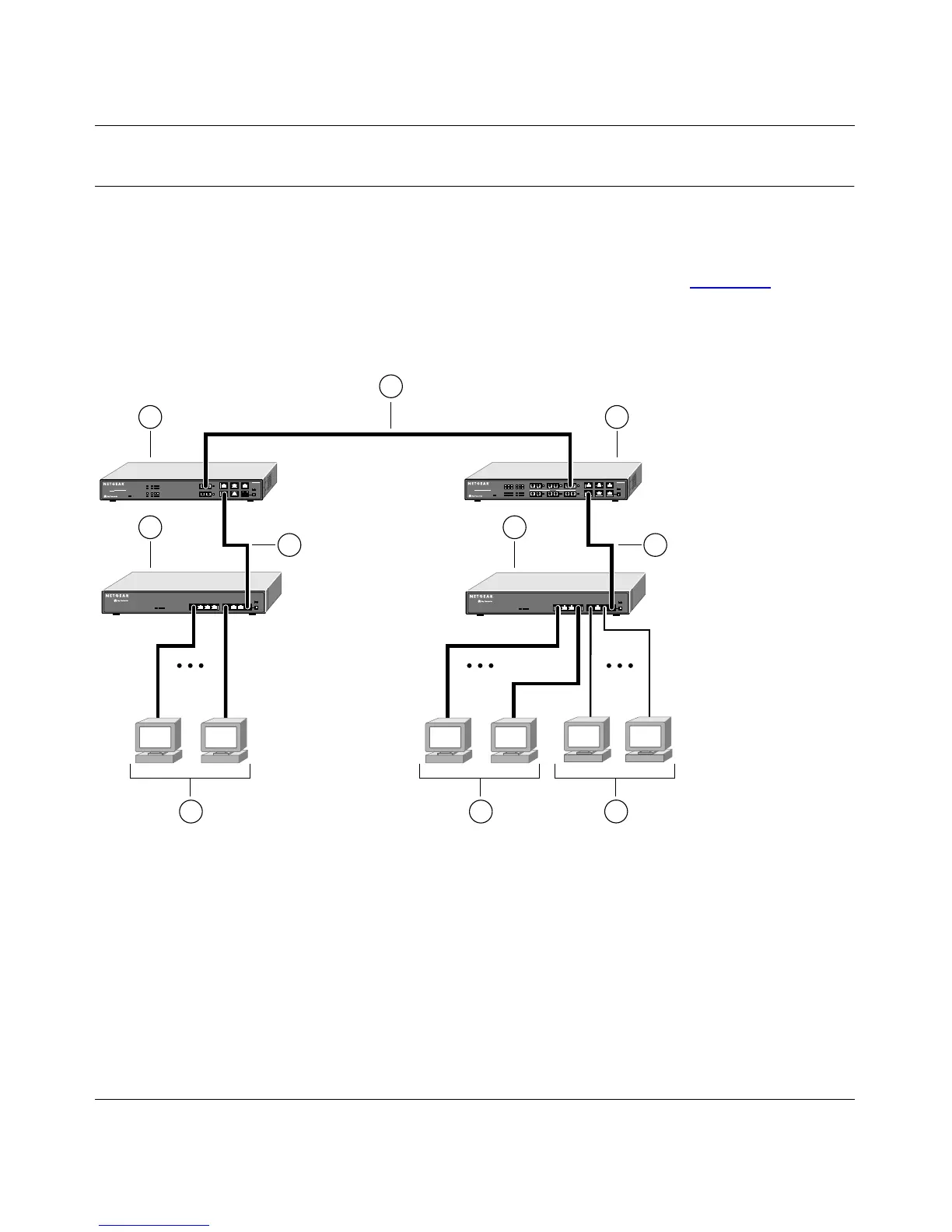
network segments, the network is expanded by as much as 2 kilometers (km). Figure 3-3 illustrates
a Model FS562 Fiber Switch and a Model FS566 Fiber Switch connecting two network segments
consisting of a Model FE508 Fast Ethernet Hub and a Model DS508 Dual Speed Hubs.
Key:
1 = Model FS562 Fiber Switch
2 = 2 km 200 Mbps full-duplex fiber connection
3 = Model FS566 Fiber Switch
4 = 100 Mbps connection with UTP cable
5 = Model FE508 Fast Ethernet Hub
6 = Model DS508 Dual Speed Hub
7 = PCs with 100 Mbps connection
8 = PCs with 10 Mbps connection
Figure 3-3. Using the Model FS562 and Model FS566 Switches for Network Extension
FS562
MODEL
Fiber Switch
8
PORT
10/100Mbps
FS566
MODEL
Fiber Switch
12
PORT
10/100Mbps
8896FA
7
4
1
7
8
5 6
3
2
4









 To Next Page