Installation Guide for the Model FS562 and Model FS566 Fiber Switches
Applications 3-3
Segment Switching
The Model FS562 and Model FS566 switches can segment a network into multiple connected
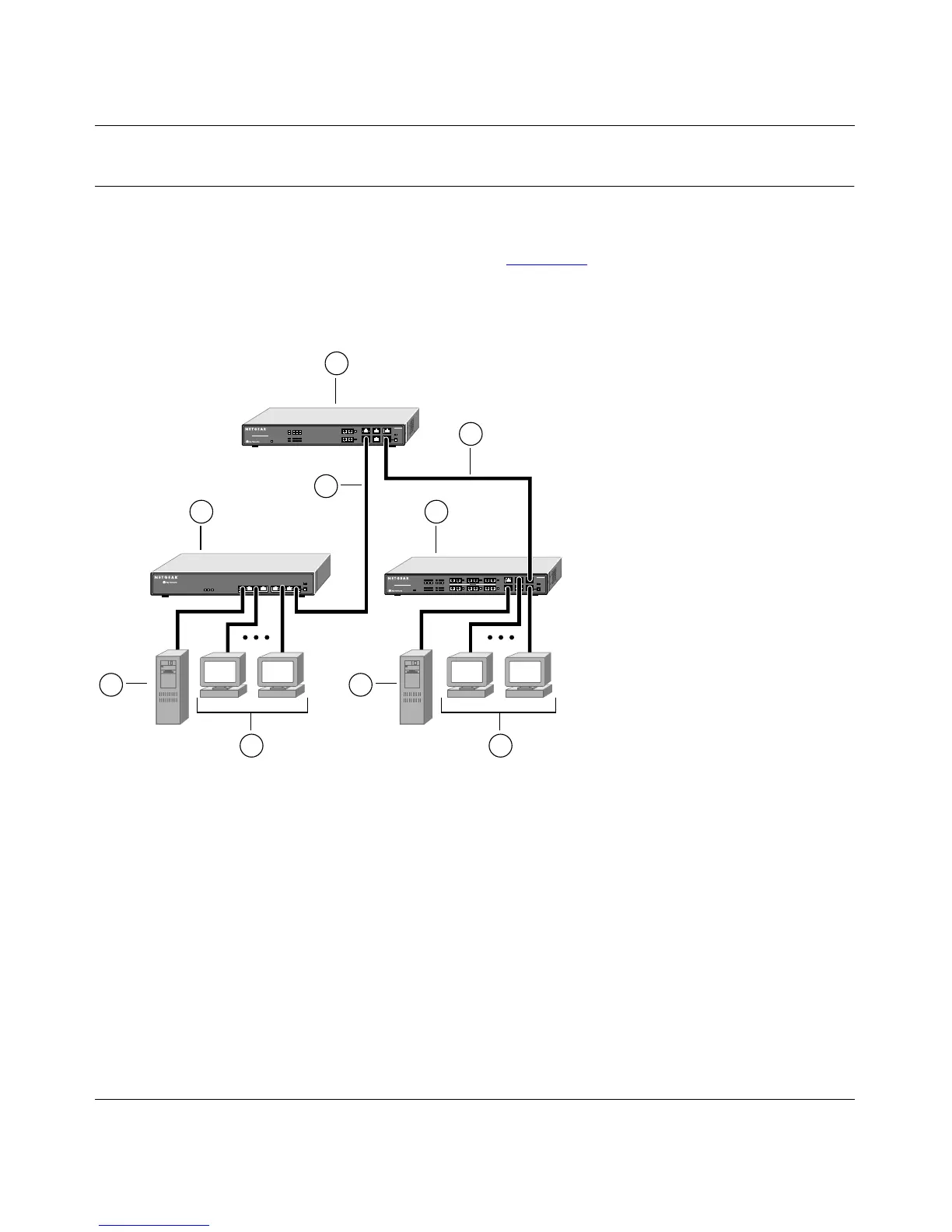
pieces, increasing overall bandwidth and throughput. Figure 3-2 illustrates the Model FS562 Fiber
Switch and the Model FS566 Fiber Switch segmenting networks that are built with a NETGEAR
Model FE508 Fast Ethernet Hub.
Key:
1 = Model FS562 Fiber Switch (Normal/Uplink push button set to Uplink position)
2 = 100 Mbps connection
3 = Model FE508 Fast Ethernet Hub (Normal/Uplink push button set to Uplink position)
4 = Model FS566 Fast Ethernet Switch (Normal/Uplink push button set to Normal position)
5 = Servers with 100 Mbps connection
6 = PCs with network adapter installed, enabling 100 Mbps connection
Figure 3-2. Model FS562 and Model FS566 Switches Used as Segment Switches
FS566
MODEL
Fiber Switch
12
PORT
10/100Mbps
FS562
MODEL
Fiber Switch
8
PORT
10/100Mbps
8888FA
6
1
6
5
2
3 4
5
2









 To Next Page