Installation Guide for the Model FS562 and Model FS566 Fiber Switches
C-4 Cabling Guidelines
Patch Panels and Cables
If you are using patch panels, make sure that they meet the 100BASE-TX requirements.
NETGEAR recommends Category 5 UTP cable for all patch cables and work area cables
to ensure that your UTP patch cable rating meets or exceeds the distribution cable rating.
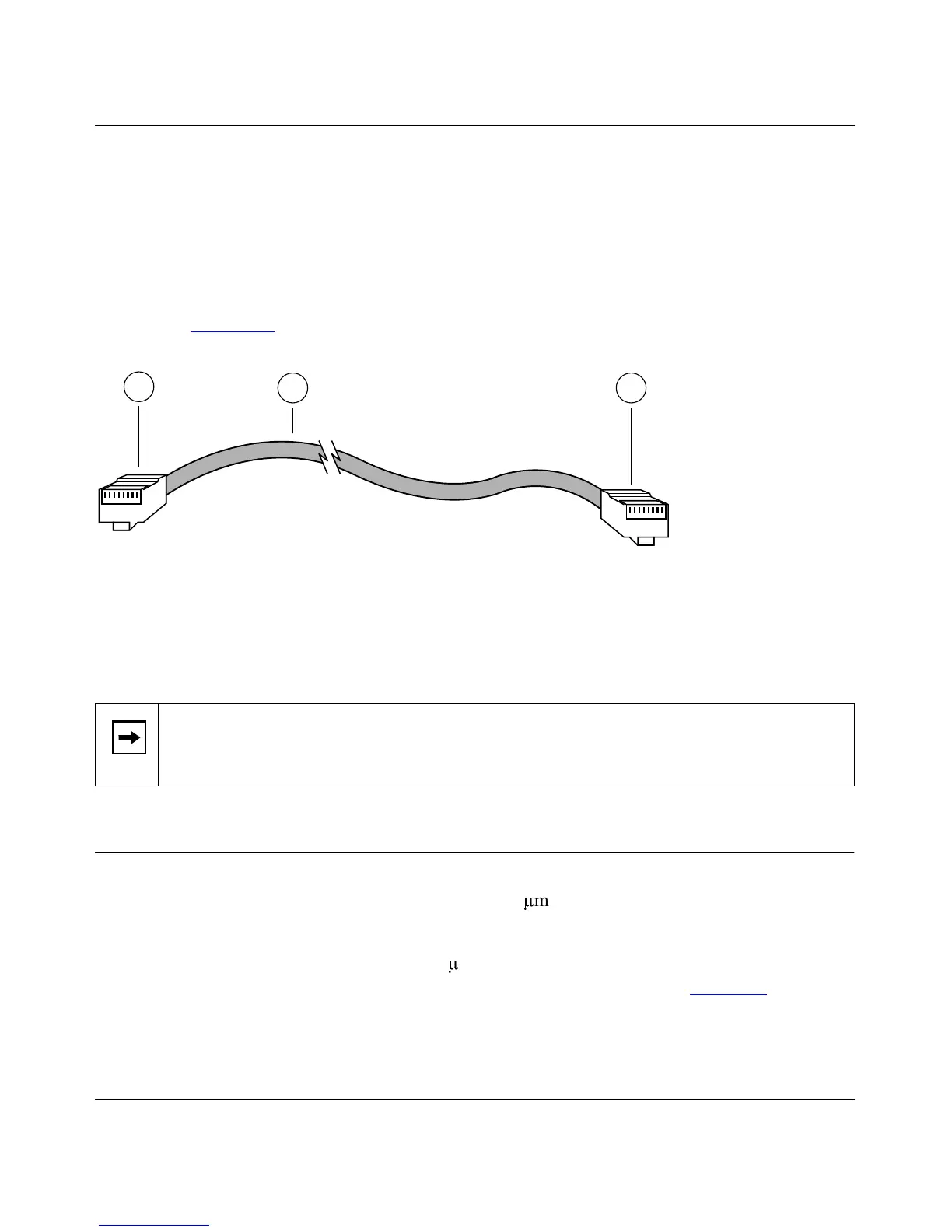
To wire patch panels, you need two Category 5 UTP cables with an RJ-45 plug at each end,
as shown in Figure C-3
.
Key:
1 = RJ-45 plug
2 = Category 5 UTP patch cable
Figure C-3. Category 5 UTP Patch Cable with Male RJ-45 Plug at Each End
Fiber Optic Cables
In North America, use EIA-569-A horizontal 62.5/125-
P
m multimode optical fiber cable
(ANSI/EIA/TIA-492AAAA).
Internationally, use ISO/IEC 11801 62.5/125-
P
m multimode optical fiber cable (IEC 793-2
type A1b, with 1.0db/km attenuation and 500 MHz/km bandwidth). Refer to Table C-2
for the
minimum requirements of fiber optic cable.
Note:
Flat “silver satin” telephone cable may have the same RJ-45 plug. However, using
telephone cable will result in excessive collisions and cause the attached port to be
partitioned or disconnected from the network.
87654321
87654321
5525.1
2 1
1









 To Next Page