3.4.1. WPS Settings
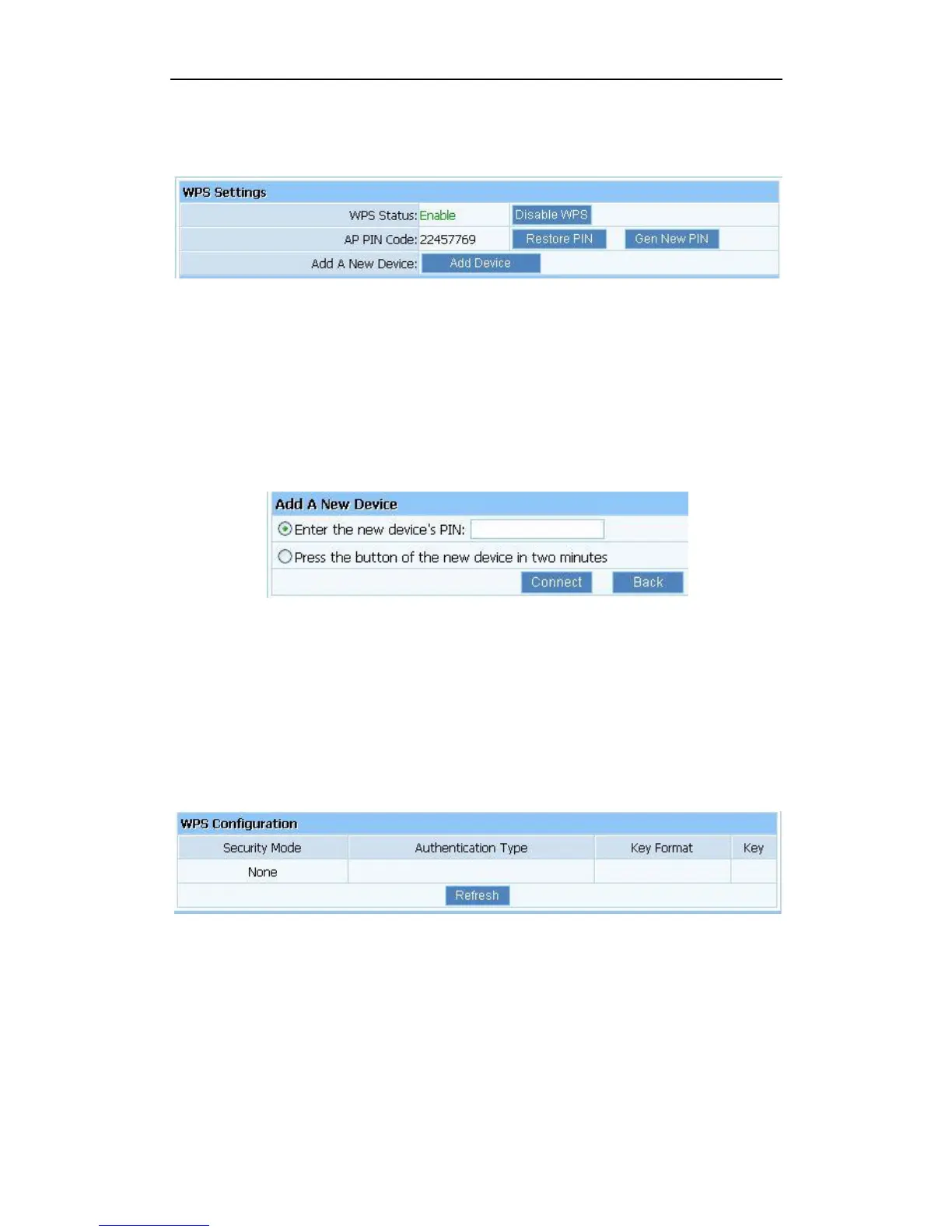
Figure 3-20
WPS Status: You can use this function to setup the wireless connection between this router
and wireless network card. The default is Enable.
AP PIN Code: This code can mark a wireless product.
Add A New Device: Add a new device by WPS.
3.4.2. Add a New Device
Figure 3-21
Enter the new device’s PIN: This code can mark a wireless product.
Press the button of the new device in two minutes: New device will send a PIN code to
wireless router.
3.4.3. WPS Configuration
Display the encryption information.
Figure 3-22
WPS can connect the wireless adapter and the router in a safe way. If you have a wireless
network card which has WPS button, you may set up a safe network via the following methods
Method 1:
1. Push the WPS button in the Router until the WPS LED is flashing several times
2. Push the WPS button in the wireless network card for about 3-5seconds
3. The safe connection will be established automatically


 To Next Page