3.11. QOS Settings
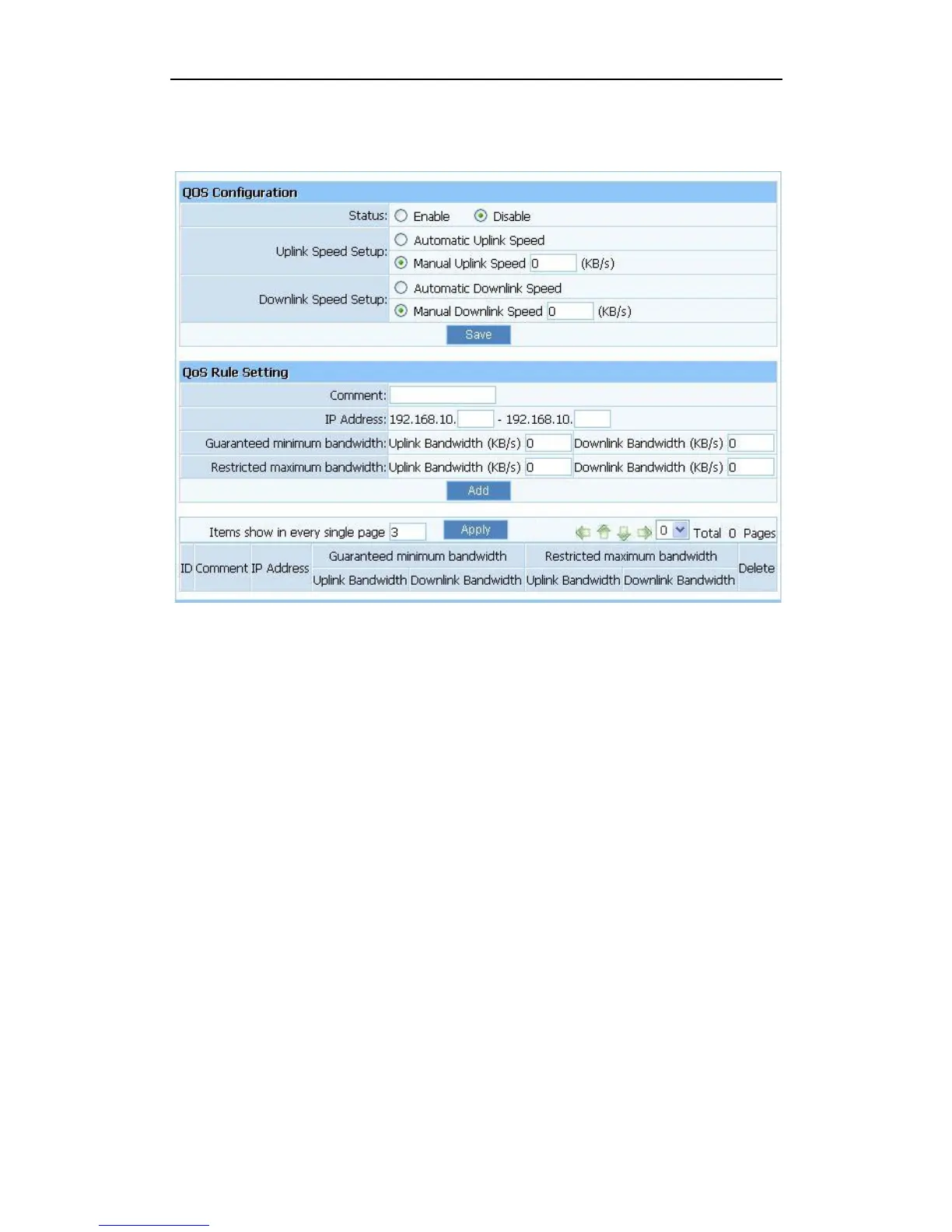
Figure 3-53
Status: QOS switch.
Automatic Uplink Speed: Router adjusts uplink bandwidth automatically.
Manual Uplink Speed (Kbps): User configures uplink bandwidth manually.
IP Address: Set the IP address range for restricted hosts.
Minimum bandwidth: setup uplink and downlink bandwidth.
Maximum bandwidth: setup uplink and downlink bandwidth.
3.12. Dynamic DNS
The DDNS feature allows you using domain name (not IP address) to access Internet. Before
you can use this feature, you need to register an account for DDNS service at DDNS service
providers, such as “roay.cn”, ”TZO.com”, ”DynDNS”. For more information, you can visit
http://www.oray.net/Help.


 To Next Page