R3.1_v1.2
43/76
Modem Web Interface
User Manual MDM3X00
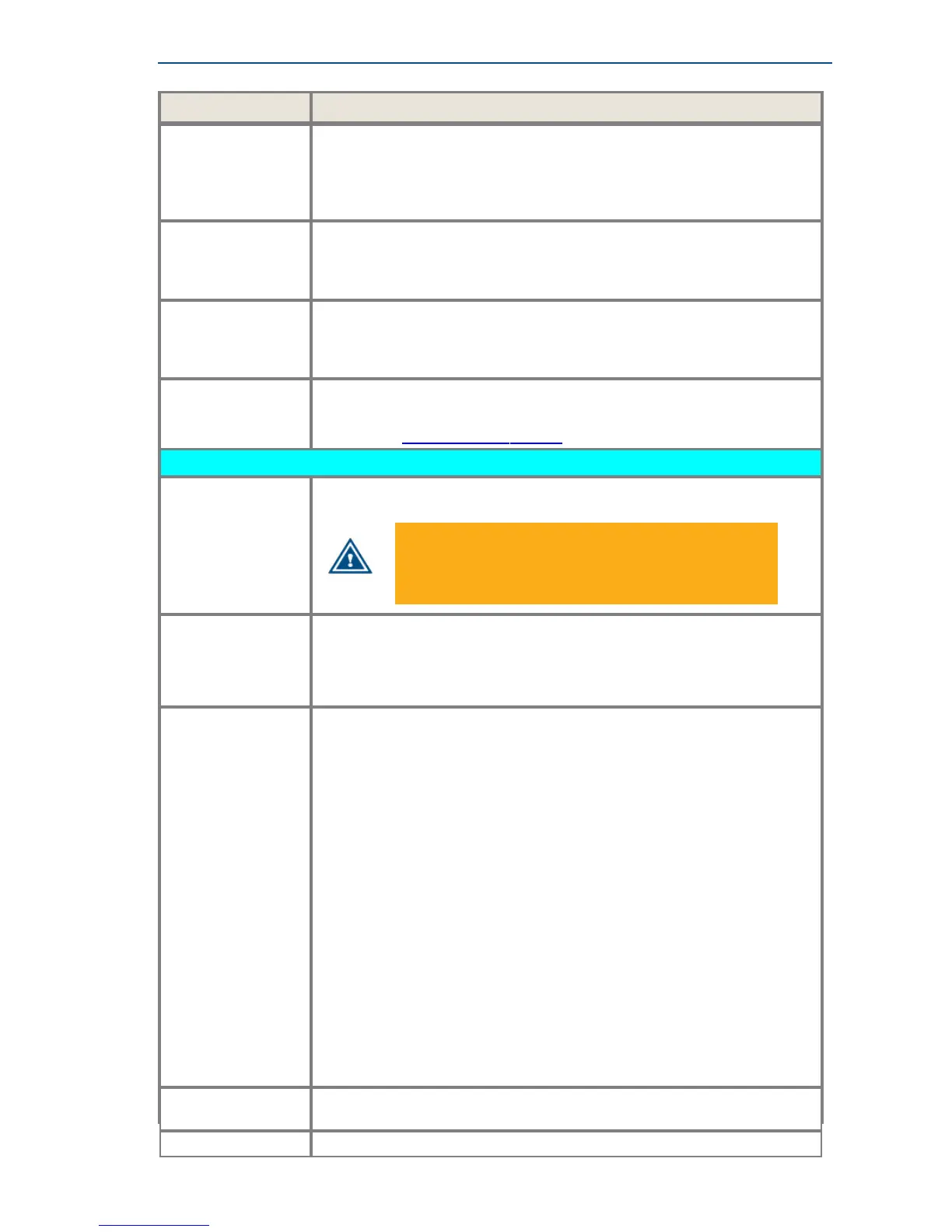
Parameter Description
High Band L.O. Local oscillator frequency (in GHz) used when the LNB is operating in high
band, which can typically be found in the LNB datasheet. Only applicable if
‘Band selection’ is used in 22 kHz or Voltage settings. If ‘Band selection’ is
not used, then only one local oscillator frequency needs to be set (as there
is no distinction between high and low band).
High Band RF
Start
Minimum frequency used by the LNB when operating in high band. Only
applicable if ‘Band selection’ is used in 22 kHz or Voltage settings. If ‘Band
selection’ is not used, then only one RF Start frequency needs to be set
(as there is no distinction between high and low band).
High Band RF Stop Maximum frequency used by the LNB when operating in high band. Only
applicable if ‘Band selection’ is used in 22 kHz or Voltage settings. If ‘Band
selection’ is not used, then only one RF Stop frequency needs to be set (as
there is no distinction between high and low band).
Current Min / Max Minimum/maximum allowed current on the RX interface. This input is
required for correct functioning of the current measurement test.
(See section HardwareTestonpage57).
Transmit
DC output By default a DC output voltage is present on the TX connector. The DC
voltage is typically used to power a BUC.
Make sure to disable the DC output voltage when using
a BUC that is externally powered!
Or use a DC blocker to avoid damaging the externally
powered BUC.
BUC 10 MHz
output
By default a 10 MHz output reference frequency is available on the TX
connector.
Disable the 10 MHz output if the BUC uses an internal reference or is
slaved to a reference source other than the modem.
BUC Synchronized
to Modem
This parameter is by default enabled.
In this case, the variations between the clock used by the modem and the
BUC are reduced to a minimum. The advantage is that the terminal logon
times are kept as low as possible. In this way the Maximum Frequency
Uncertainty range is limited to a minimum.
When disable the Maximum frequency uncertainty must be increased
resulting in a higher terminal logon times.
It is recommended to enable the BUC 10 MHz Output in combination with
this synchronization parameter.
Typically the parameters "BUC 10 MHz Output" and "BUC Synchronized
to Modem" have the same configuration. Only in special uses cases the
configuration can differ from one another.
For example when one BUC is used by multiple modems.
In this case:
• Enable the BUC 10 MHz Output on only one modem.
(This 10 MHz is used as the reference signal for the BUC.)
• Enable BUC Synchronized to Modem on all modems to keep the
devices in sync.
BUC L.O. Local oscillator frequency (in GHz) used by the BUC, which can typically
be found in the BUC datasheet.
BUC RF Start Minimum RF frequency the BUC can transmit.



 To Next Page