7.6 FUNCTION KEYS IN EDIT EFFECT MODE
GB
In EDIT EFFECT mode there are 6
ffuunnccttiioonn kkeeyyss
see (Fig. 36 par
77..55
).
SAVE
key
:
Press this key to save the
effect
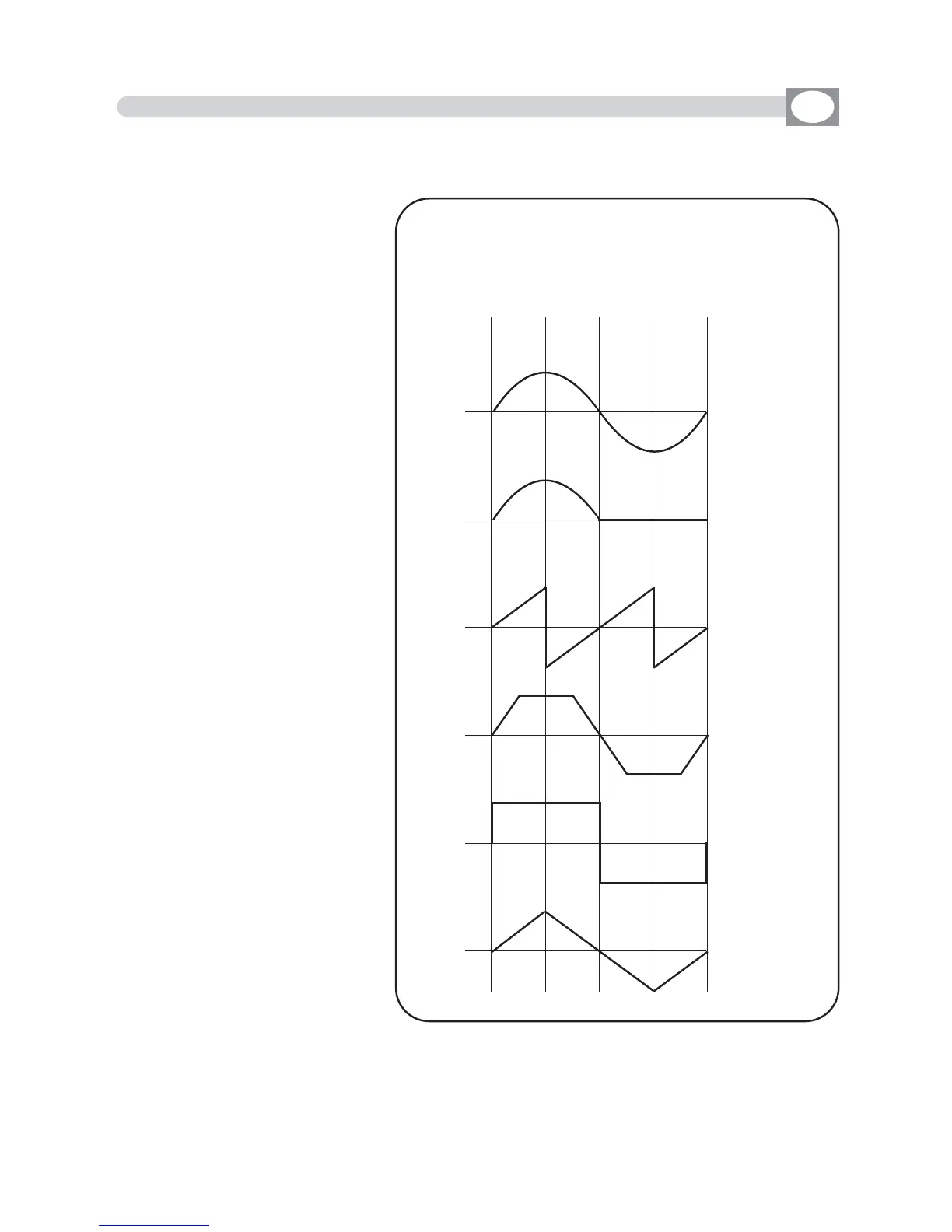
SHAPE
key
:
Press this key to select the
shapes, that are:
Circle, Hola, Ladder, Square,
Vertex, and Zigzag.
The parameters that the
operator could change corre-
spond to:
SIZE
key
:
Press this key to change the
size of the shape (from 1 to
128)
RPM
key
:
Press this key to change the
speed and direction of the
shape (from -60 to +60)
PHASE
key
:
Press this key to change the
the start corner of the shape
(from 0 to 359).
DELAY
key
:
Press this key to change the
delay of the shape between
an unit and the next
(from 0
to 359).
0
Circle
Hola
Ladder
Square
Vertex
Zigzag
0
0
0
0
0
900 180 270 360
Wave’ s forms of the SHAPE



 To Next Page