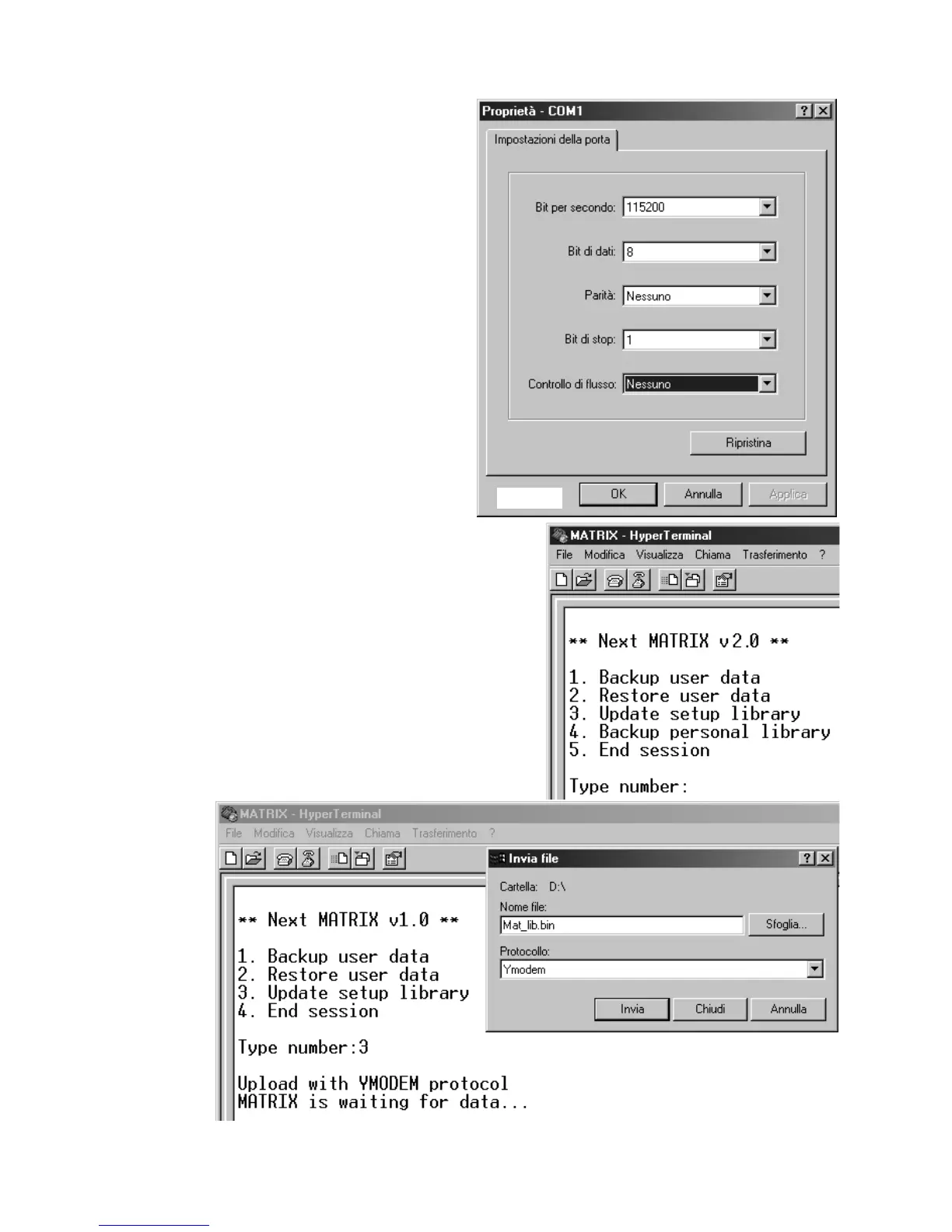
Fig. 68
Fig. 69
Press
22
to restor the data of pro-
gramming;
You must select from the menù
TTrraannssffeerr>> SSeenndd ffiillee
. search the
file with
MMAATTRRIIXX..BBAAKK
name, set
YYmmooddeemm
protocol then click to
SSeenndd
.
Press
33
to update setup library;
you must select from the file
menù
TTrraannssffeerr>> SSeenndd ffiillee
. search
the file with
MMaatt__lliibb..bbiinn
name
((ddoowwnnllooaaddeedd ffrroomm iinntteerrnneett))
, set
YYmmooddeemm
protocol then click to
SSeenndd
see
ffiigg..6699
.
Press
44
for personal library
backup;
You must select from the menu
TTrraannssffeerr>> RReecceeiivvee ffiillee
. Set
YYmmooddeemm
protocol then click on
RReecceeiivvee..
The file will be saved on compu-
ter hard drive with this name:
mmyylliibb..BBAAKK..
Press
55
to exit.
Close the application and discon-
nect the cable.
Fig. 67



 To Next Page