May 2023 32
f. Creating a Connection from your EVO to the WAVE Portal
The connection method should be determined, and prepared, prior to the EVO installation.
This will ensure that the portal is connected and available for commissioning and settings once
EVO is powered ON.
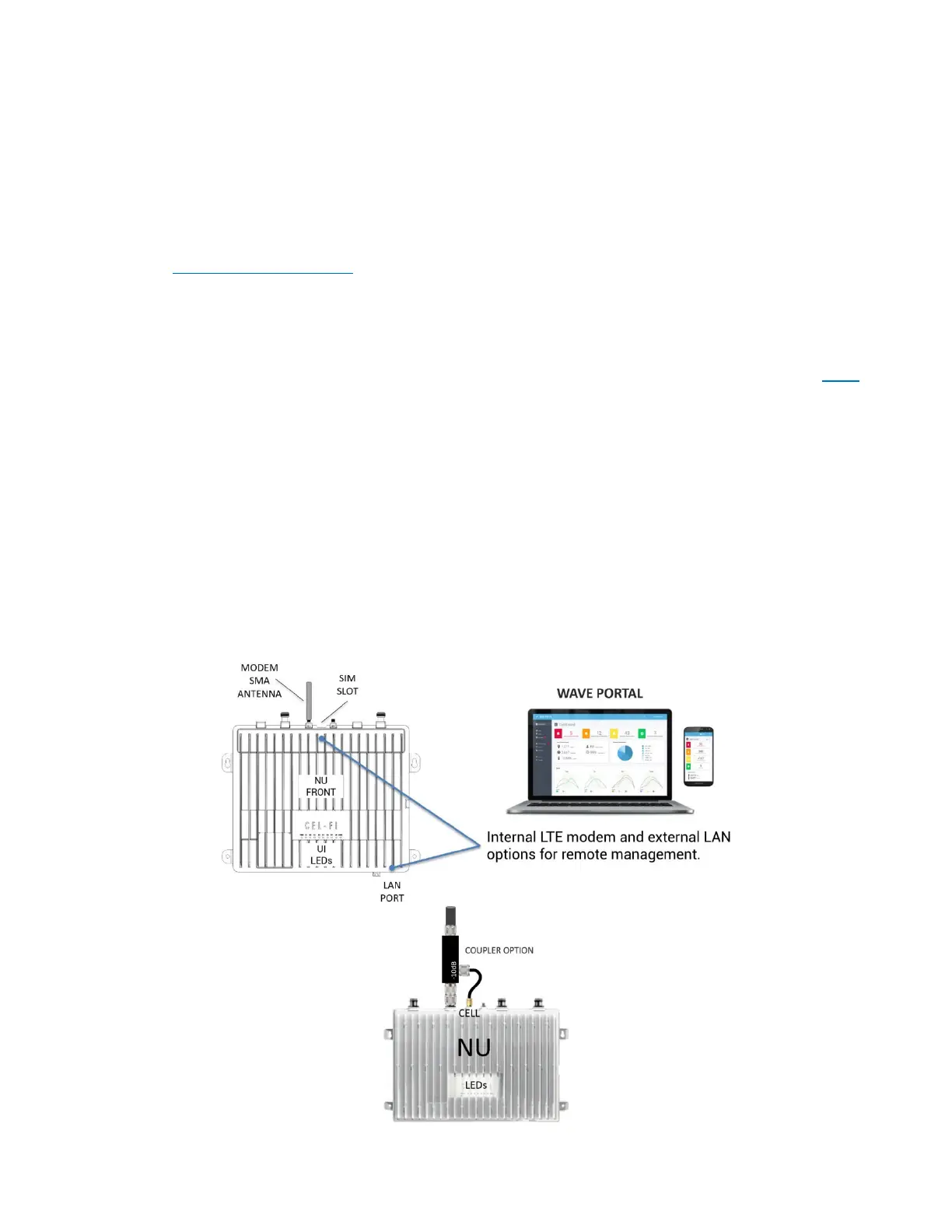
There are two ways to connect the NU to the cloud portal. If you do not have a portal login,
please Request Portal Access.
The first connection method is through a wired LAN connection, which requires that firewall
settings have been prepared ahead of time. Learn More about LAN Firewall Settings. You can
test your firewall settings by plugging the LAN cable into a Windows 10 and higher PC, and
running the Connectivity Test on the WAVE Field Tool that may be downloaded from here.
The second connection method is to use the cellular modem that is built into the NU. To use
this method, screw an SMA(m) cellular antenna onto the SMA(f) port labeled CELL (GPS does
not need to be connected). If there is no cellular service where the NU is located, you can also
connect the SMA(f) CELL port to one of the donor antenna feeds using an RF coupler (e.g., -
10 dB tap value).
Your modem SIM may be factory installed, or you will need to insert it once located with
product packaging. If the SIM is not provided, or it does not work in your country, you may
configure your own SIM APN using the WAVE Field Tool (for more information, please see
your point of sale, or contact Nextivity Support).



 To Next Page