May 2023 34
VII. Commissioning and Settings on the WAVE Portal
The full functionality of the WAVE Portal goes beyond the scope of this user guide. However,
it is an integral component of any installation. It is accessible using your PC, Tablet, or
cellphone internet browser.
Each cloud-connected system sends hourly performance data to the portal, so performance is
trackable over time. If you are actively viewing the Radio Data page for a system on the portal,
the portal requests real time data updates from the NU. Some of the portal features are:
• Installed systems Map (global)
• Statistics and alarms
• Notifications (alarms, texts, email)
• Installation Site details
• Detailed system performance information
• Settings and control
• Software updates
• Remote diagnostics
• Automated analysis and guidance with improvement suggestions for each install
• Floorplan coverage grid test interface for the COMPASS XR (Cellular and Public Safety)
• Grid test automated report generation
• Cloud storage for your site documentation
The purpose of the portal is to save you time and money, and to help you realize maximum
performance from each system you install. If you do not already have portal access, you may
request it on our Support page: https://www.cel-fi.com/support/
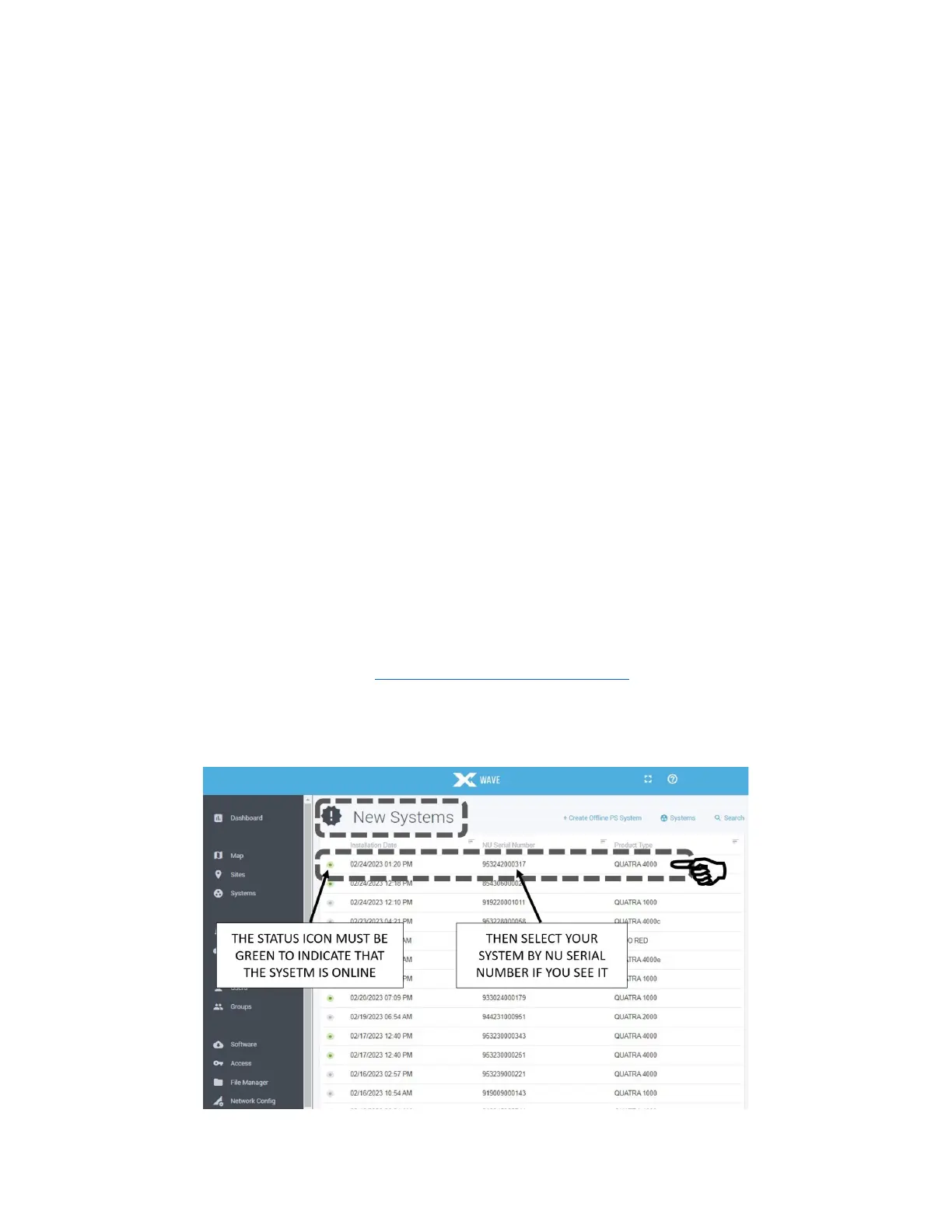
Go to the New Systems page and select your NU by its serial number and follow the
commissioning prompts.
Figure 21: Selecting NU Serial Number in WAVE Portal



 To Next Page