May 2023 40
WAVE Portal Guidance Alerts
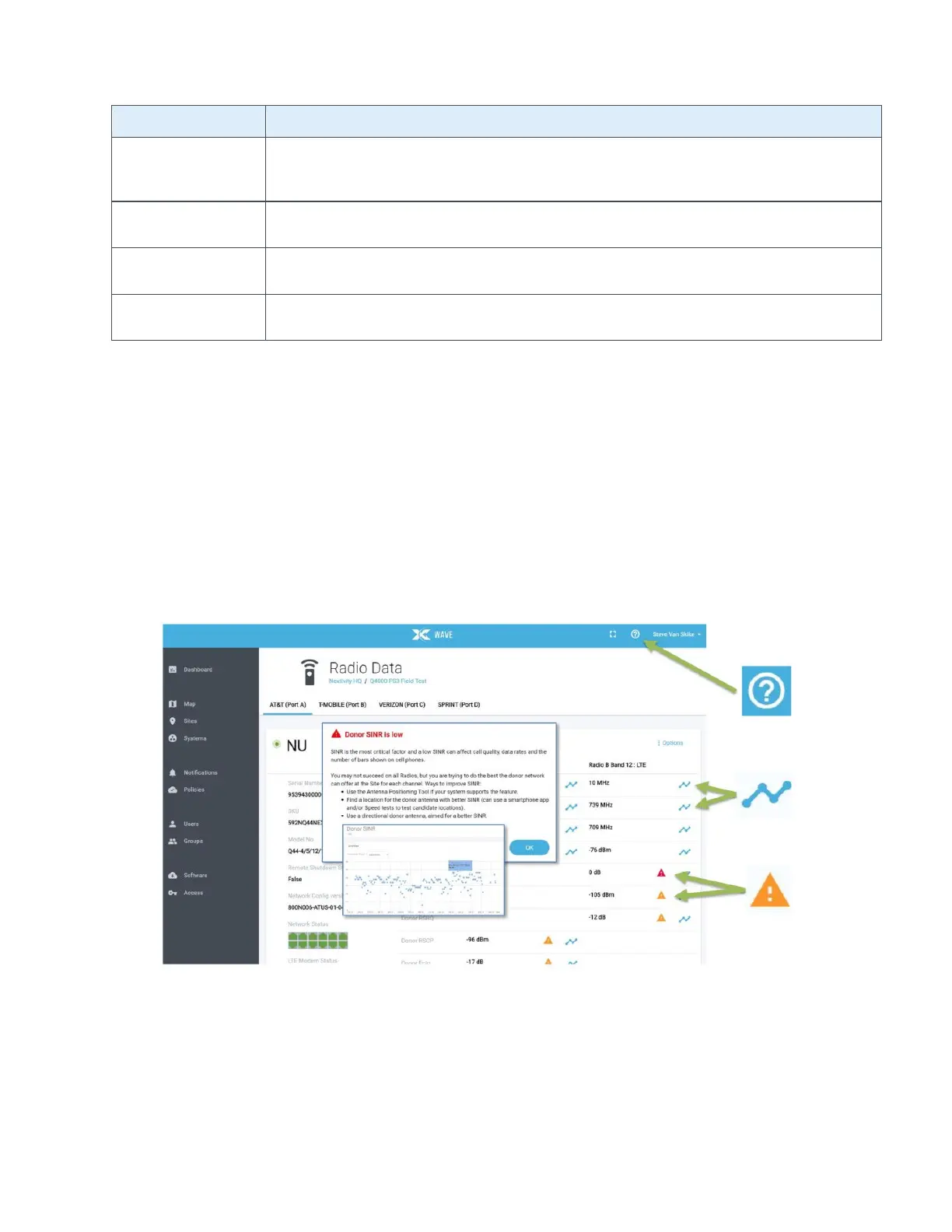
The portal has many useful features for evaluating service or diagnosing issues, all without the
need to visit a Site.
• If you need help on a portal topic, select the (?) Help icon for more information.
• If you want to see how RF service parameters have been behaving over time, select the
blue Chart icon next to the KPI for a chart of the data over time.
• If you see a guidance alert icon, you can select it to bring up helpful advice on how to
improve performance.
Figure 28: WAVE Portal Guidance Alerts
You will find more information and tutorial videos at cel-fi.com to help you become a portal
expert.
Antenna
Configuration Error
Too Many CU connected. More than one CU is in use for Off-Air configuration. Use the
WAVE Portal to set Mode to External Antenna, and NU should be connected to an
Antenna Positioning
Required
Antenna positioning needs to be completed. Use the WAVE Portal to aim the NU
donor antenna.
CU Link Lost
The cable link between NU and CU behaves unreliably or reports an error. Ensure the
CU cable is not damaged, and its connectors are securely plugged in on both ends.
CU's 1 through 6 have been shut down from the Portal.



 To Next Page