May 2023 33
g. Power on the Completely Installed System
Now that all hardware, antennas, cabling, donor signals, and a portal connection have been
installed, it is time to power up the system.
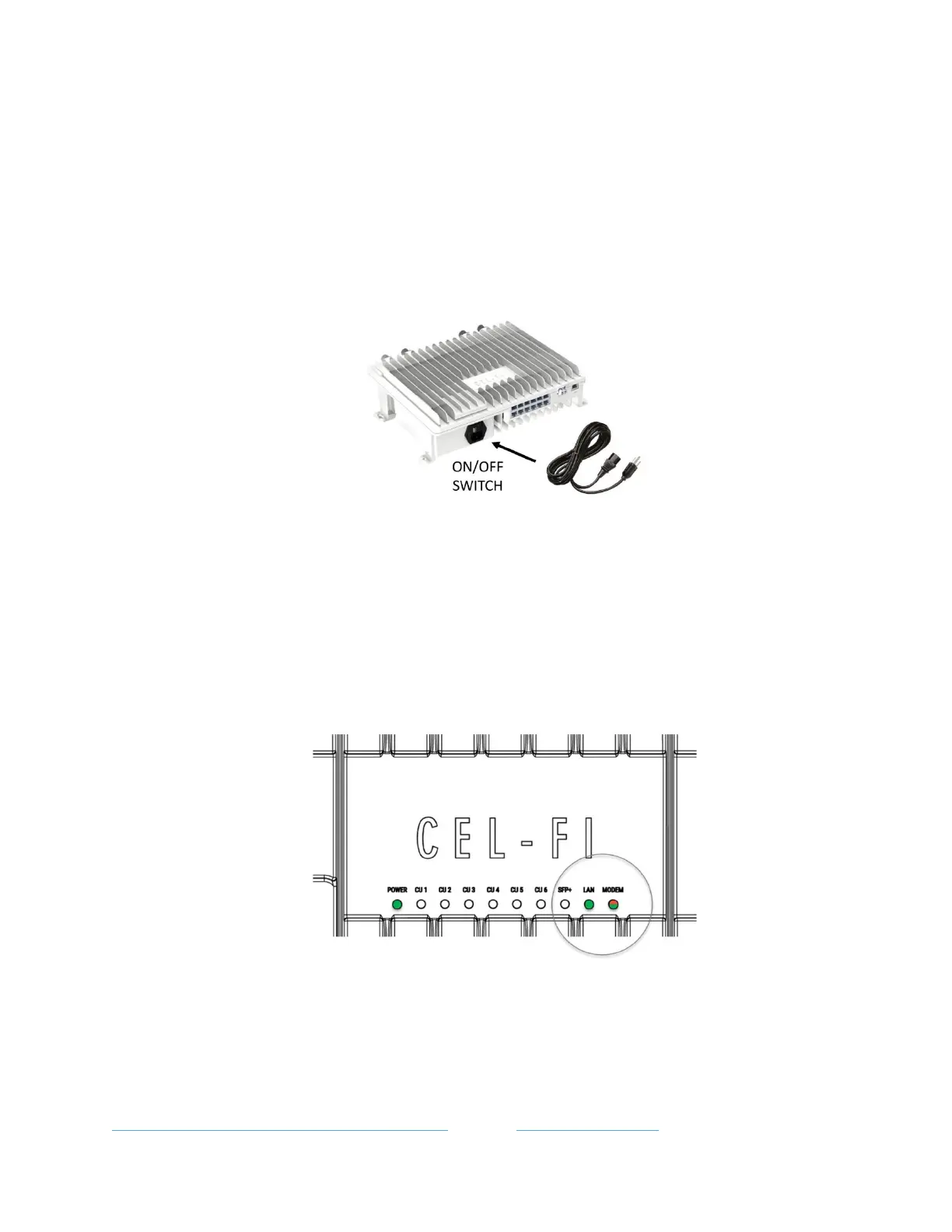
The QUATRA EVO system is powered from the NU (and HUB if used). The NU and optional
HUB come with a power cord that plugs into the bottom of the unit. The CUs are Powered-
over-Ethernet (PoE) and therefore do not have independent power supplies that need to be
plugged in.
Note
It is recommended to zip-tie or otherwise secure the power cord once the system is powered-
up, to prevent accidental unplugging.
Note
Once the NU, and optional connected HUB, are powered ON, the NU will automatically reach
out to the WAVE Portal in the cloud and the LAN LED should be solid green, or blinking green
to indicate traffic. If the NU internal modem is being used, then the Modem LED should blink
Green-Red to indicate proper operation.
If your system is visible on the NEW SYSTEMS page, select it to begin commissioning. Note
that the status icon must be green to indicate that the system is online. Otherwise,
troubleshoot the portal connection and then retry. You may use the WAVE Field Tool link
below to test the portal firewall connection using a Windows 10 or later PC. This tool has many
features, including the Connectivity Test to emulate the NU connection to test your firewall.
Learn More about LAN Firewall Settings or go to WAVE Field Tool



 To Next Page