11
Introduction—Getting to Know the COOLPIX5000
11
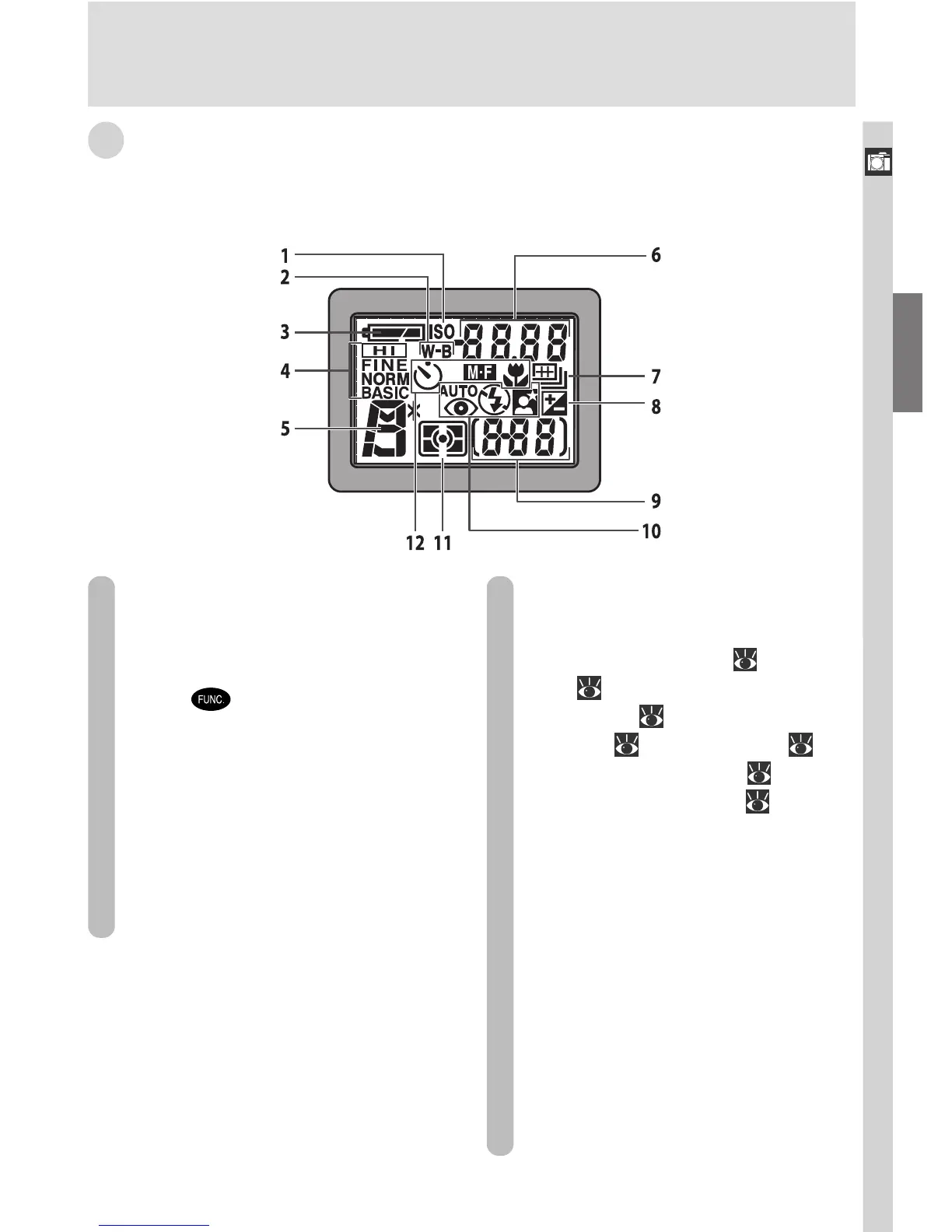
C The Control Panel
The indicators in the control panel show the status of the following camera
settings:
1 Sensitivity (ISO equivalency)
indicator ............................... 96
2 White balance indicator (appears
when
button is used to set
white balance; shutter-speed/ap-
erture display shows white bal-
ance mode selected) ........... 149
3 Battery level indicator ........... 39
4 Image quality ........................ 72
5 Exposure mode ..................... 89
6
Shutter-speed/aperture display
(depending on control in use,
shows shutter speed [
89], aper-
ture [ 89], exposure compensa-
tion value [ 85], manual focus
distance [ 98], sensitivity [ 96],
white balance setting [ 149], or
image transfer status [ 183])
7 Continuous shooting mode
.......................................... 108
8 Exposure compensation
indicator ............................... 85
9 Exposure count display.......... 46
Exposure indicator ................ 94
10 Flash mode ........................... 82
11 Metering mode ................... 105
12 Focus mode .......................... 76

















 To Next Page