34
Tutorial—First Steps
2
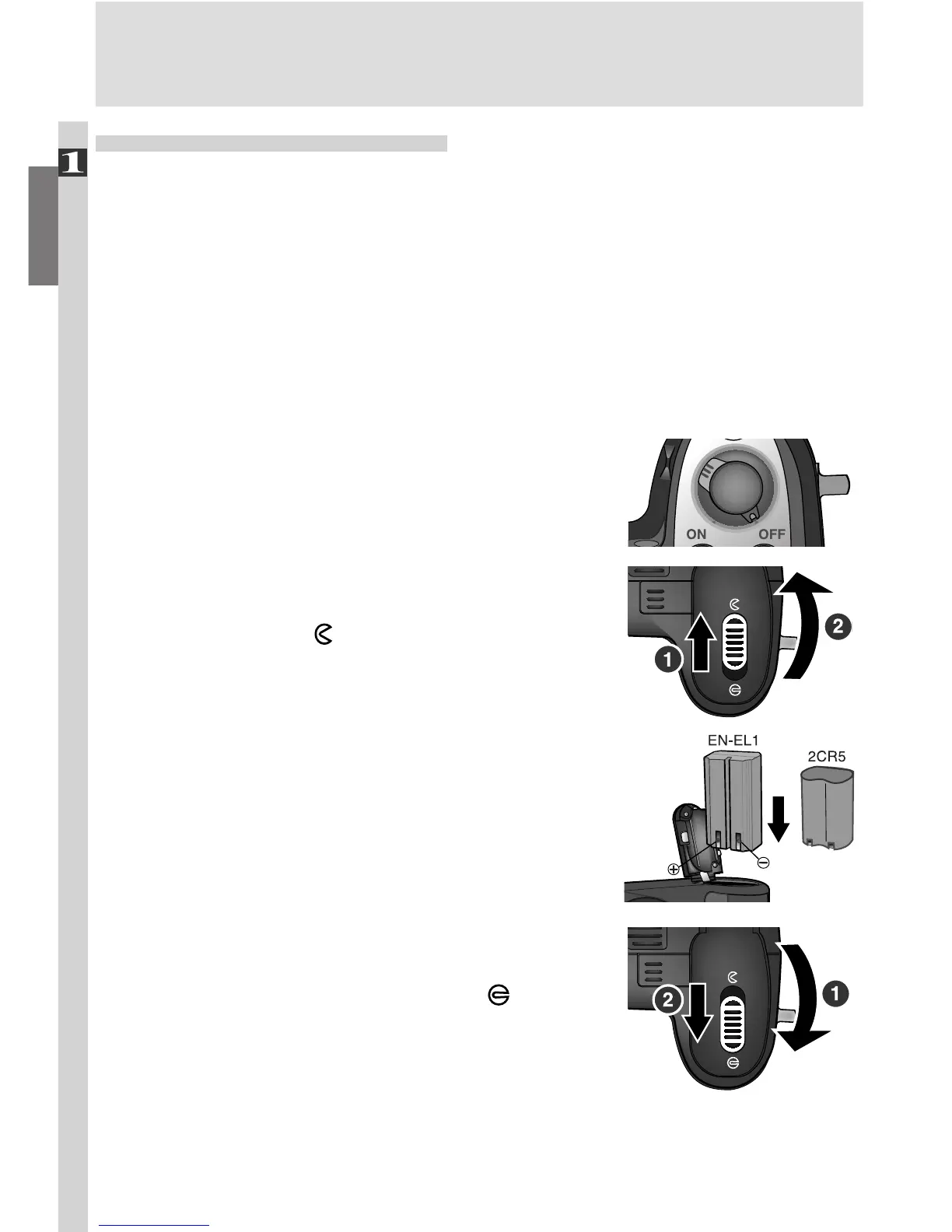
.4 Insert the battery
Insert a fully-charged Nikon EN-EL1 lithium-
ion battery (provided) or 2CR5 (DL245)
lithium battery (available separately) as
shown at right.
2
.5 Close the battery-chamber cover
Close the battery chamber cover (1) and slide
the latch to the closed position ( ; 2). To
prevent the battery being dislodged during
operation, be sure that the battery-chamber
cover is properly latched.
Step 2—Insert the Battery
Your camera is powered by a single rechargeable Nikon EN-EL1 lithium-ion
battery (provided) or a non-rechargeable 2CR5 (DL245) lithium battery (avail-
able separately).
2
.1 Charge the battery
The rechargeable Nikon EN-EL1 lithium-ion battery supplied with your
camera is not fully charged at shipment. A battery charger is provided
with the camera; we recommend that you charge the battery before use.
Instructions for charging the battery may be found in the instruction
manual included with the charger.
2
.2 Turn the camera off
If the camera is on a tripod, remove it from
the tripod before proceeding to the next
step.
2
.3 Open the battery-chamber cover
Slide the battery-chamber cover latch to the
open position ( ; 1) and flip the battery-
chamber cover open (2).

















 To Next Page