16
Introduction—Getting to Know the COOLPIX5000
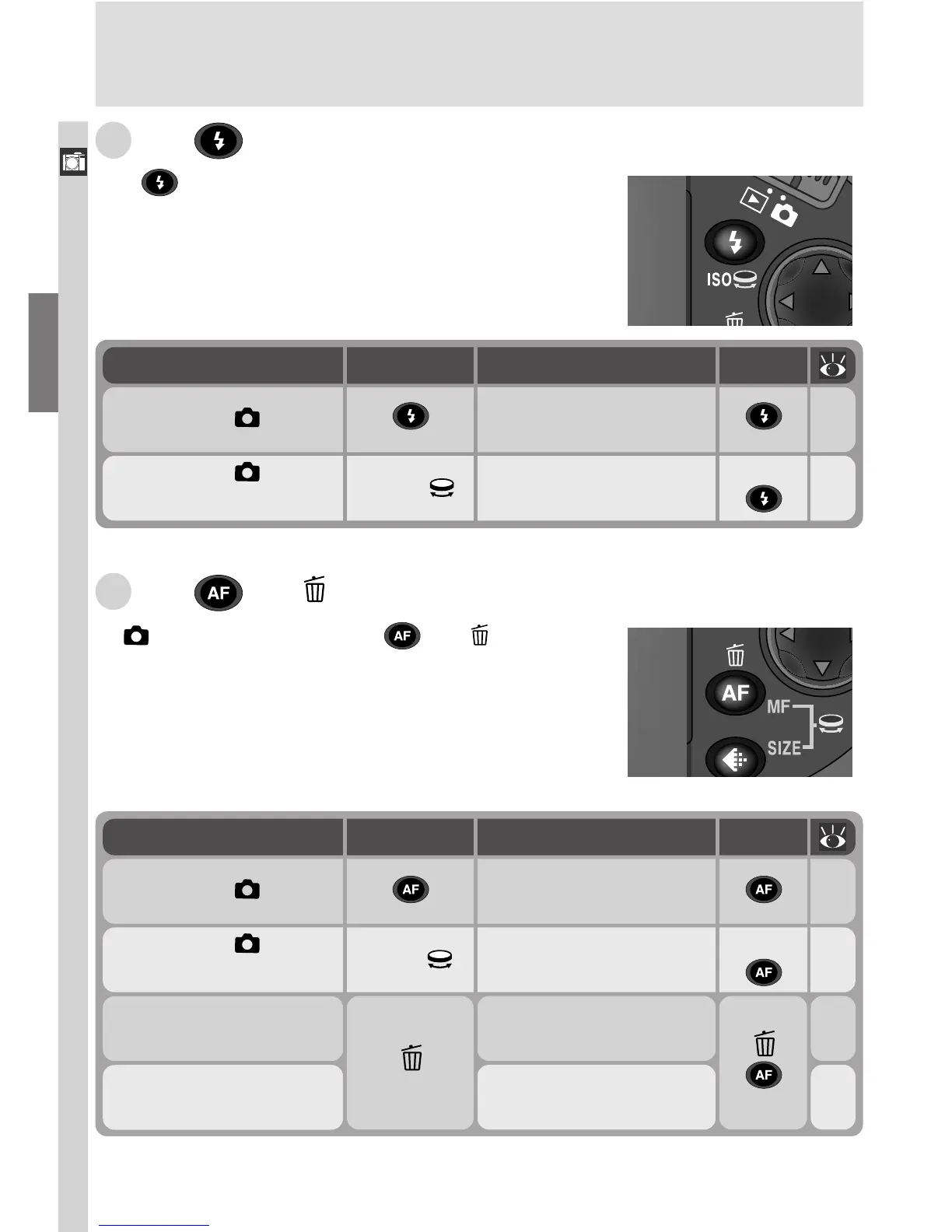
M The /MF/ Button
In (shooting) mode, the /MF/ button is
used to select the focus mode. In User Sets 1, 2,
and 3, it can be used in combination with the com-
mand dial to select a distance for manual focus. In
quick review and playback, it is used to delete in-
dividual images.
76
98
Operation
MF +
Function
Focus mode selection
Manual focus
Button
MF
( )
Situation
Camera in
mode
Camera in
mode
(User Set 1, 2, 3)
82
96
58
158
60
160
Operation
ISO +
Function
Flash mode selection
Sensitivity
(ISO equivalency)
Delete image currently
displayed in monitor
Delete highlighted
image
Button
ISO
( )
( )
Situation
Camera in
mode
Camera in
mode
(User Set 1, 2, 3)
Full-screen review
Full-frame playback
Thumbnail review
Thumbnail playback
L The /ISO Button
The /ISO button controls two settings: flash
mode and, when used in combination with the
command dial, sensitivity (ISO equivalency, avail-
able only in User Sets 1, 2, and 3).







 To Next Page