25
Introduction—Menu Guide
Accessing the Shooting Menu
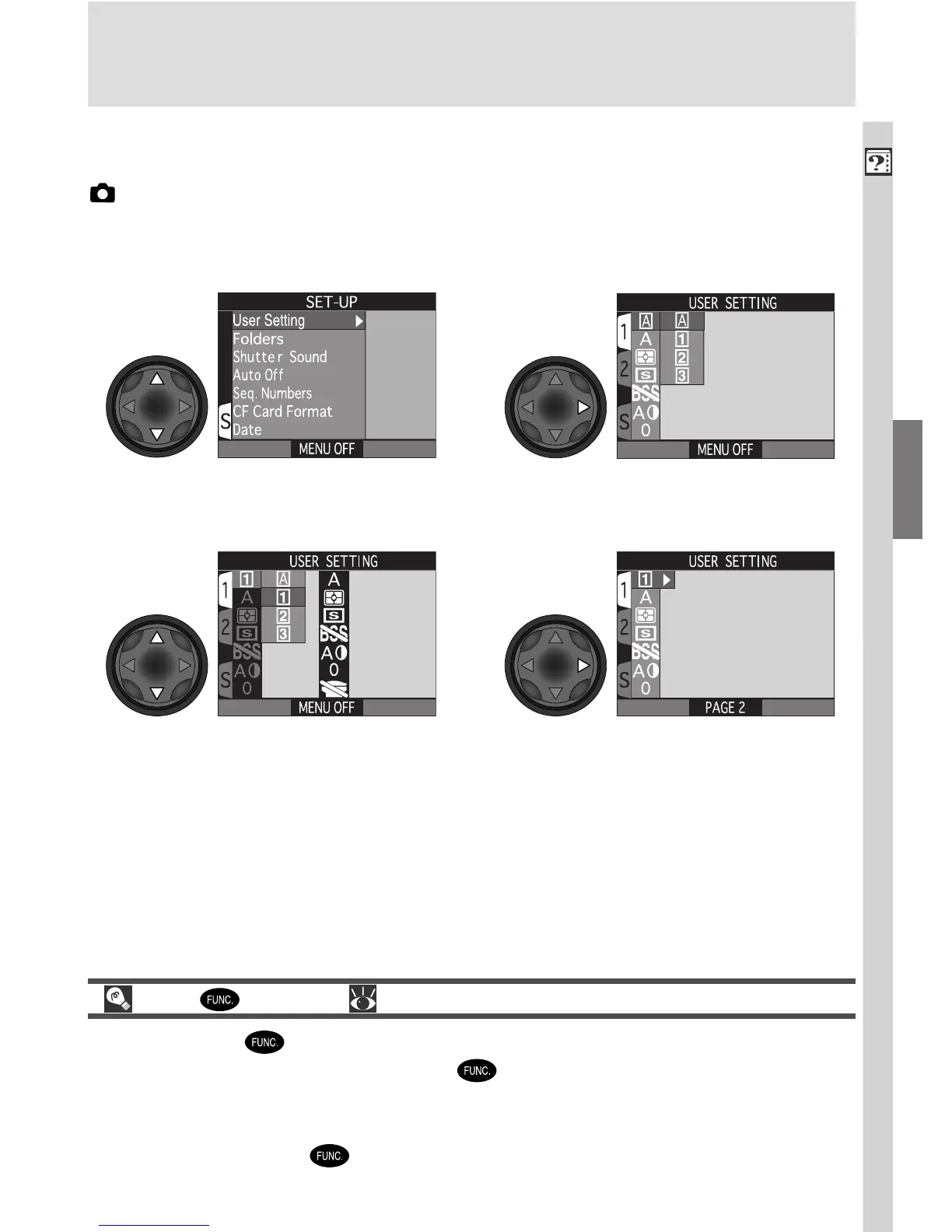
The SHOOTING menu is only available when User Set 1, 2, or 3 is selected in
(shooting) mode. To access the SHOOTING menu from the SET-UP menu
for User Set A:
• Settings for each of User Sets 1, 2, and 3 are stored separately in memory
and recalled the next time the mode is selected, allowing you to create up
to three combinations of custom settings for common tasks or shooting situ-
ations and recall them as desired.
• To return to the SET-UP menu for User Set A, follow the steps above to select
User Set A and position the cursor in the SET-UP menu.
Display list of User SetsHighlight User Setting
12
The Button ( 149)
By default, the button can be used to change the User Set without ac-
cessing the camera menus. Press the button while rotating the command
dial. The current User Set will be displayed in the top left corner of the moni-
tor (User Sets 1, 2, and 3 only), and in the control panel shutter-speed/aper-
ture display while the button is pressed.
Position cursor in SHOOTING menuHighlight 1, 2, or 3
34

















 To Next Page