49
Tutorial—Taking Photographs
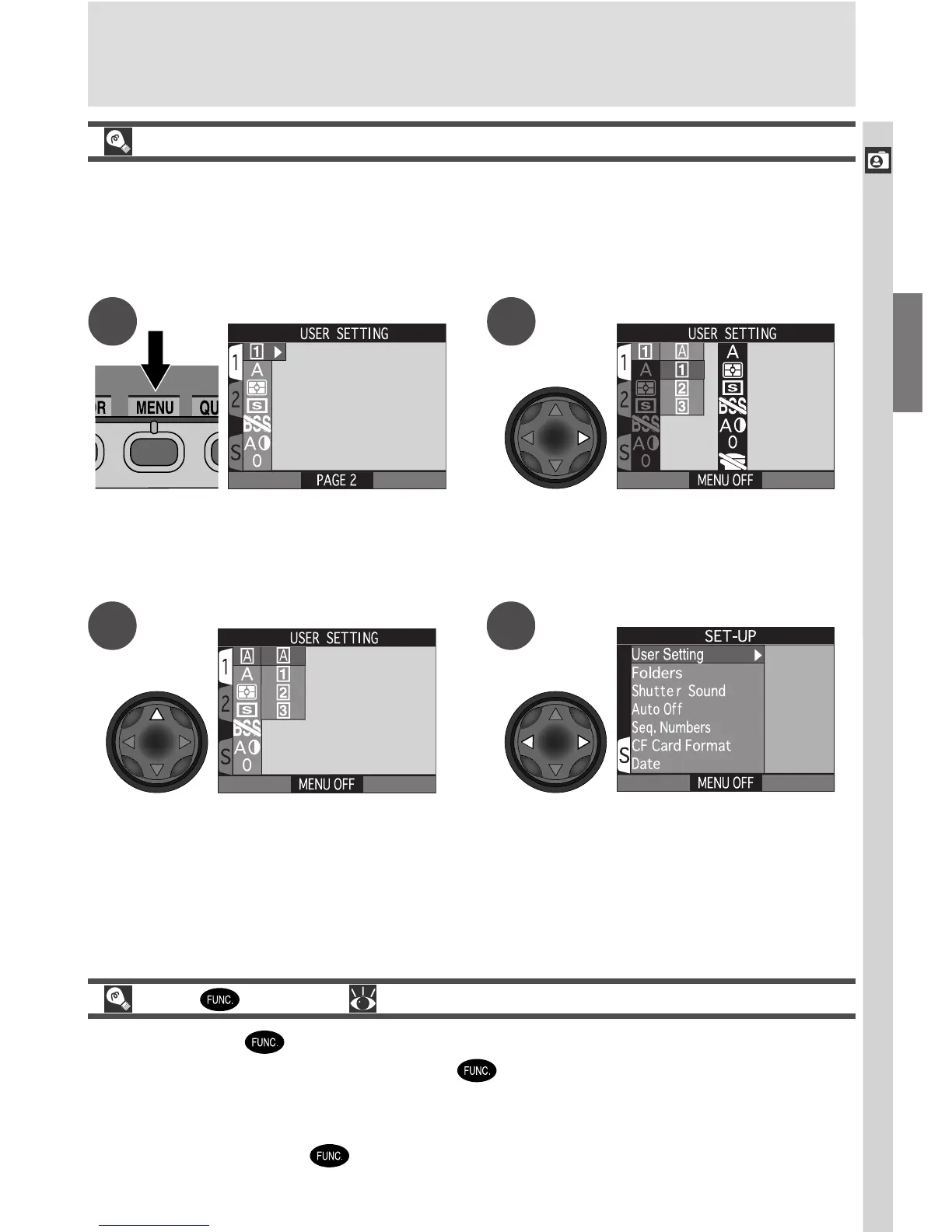
Restoring User Set A
If you have selected User Set 1, 2, or 3 to use advanced camera settings, you
can restore User Set A as shown below. If you later return to User Set 1, 2, or
3, the settings in effect in the last time you used the selected mode will auto-
matically be restored.
Press MENU button to display
SHOOTING menu with USER SETTING
option highlighted
Display SET-UP menu for User Set A.
Press MENU button to exit SET-UP
menu and return to shooting mode.
A
D
The Button ( 149)
By default, the button can be used to change the User Set without ac-
cessing the camera menus. Press the button while rotating the command
dial. The current User Set will be displayed in the top left corner of the moni-
tor (User Sets 1, 2, and 3 only), and in the control panel shutter-speed/aper-
ture display while the button is pressed.
Display list of User Sets
Highlight A
B
C

















 To Next Page