i¸¸ en HMedes)
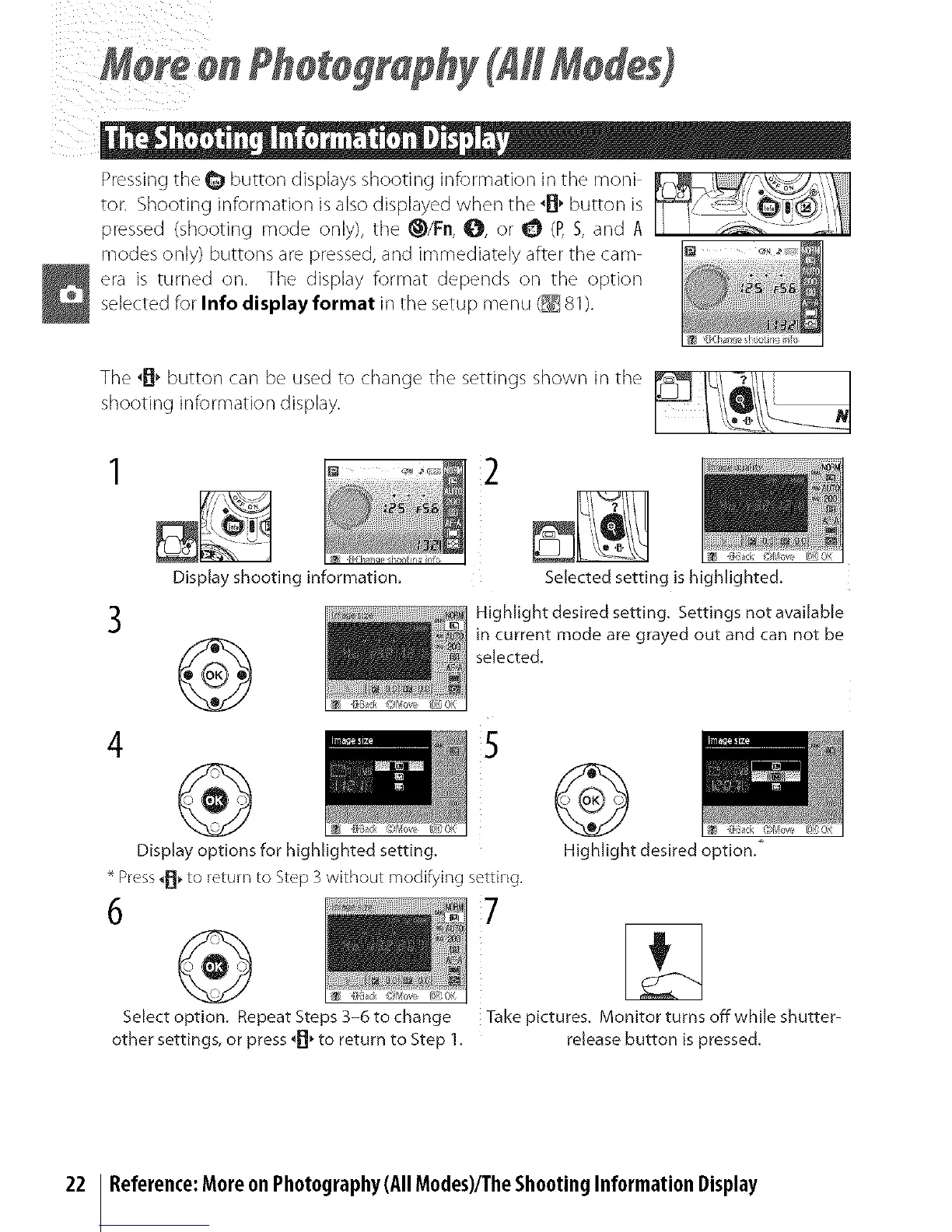
Pressing the _ button displays shooting information in the moni
tot: Shooting information is also displayed when the _B' button is
pressed (shooting mode only), the _/Fn, O, or _ (P,S, and A
modes only) buttons are pressed, and immediately after tile cam
era is turned on. The display format depends on the option
selected for Info display format in the setup menu (_ 81).
3
Display shooting information.
®
2
Selected setting ishighlighted.
Highlight desired setting. Settings not available
in current mode are grayed out and can not be
selected.
4 S
Display options for highlighted setting.
* Press_H_to return to Step 3 without modifying setting,
6 7
®
Select option. Repeat Steps 3-6 to change
other settings, or press _, to return to Step 1.
Highlight desired option.*
Take pictures. Monitor turns offwhile shutter-
release button ispressed.
22 Reference:Moreon Photography (All Modes)/TheShootingInformationDisplay



 To Next Page