143
Z
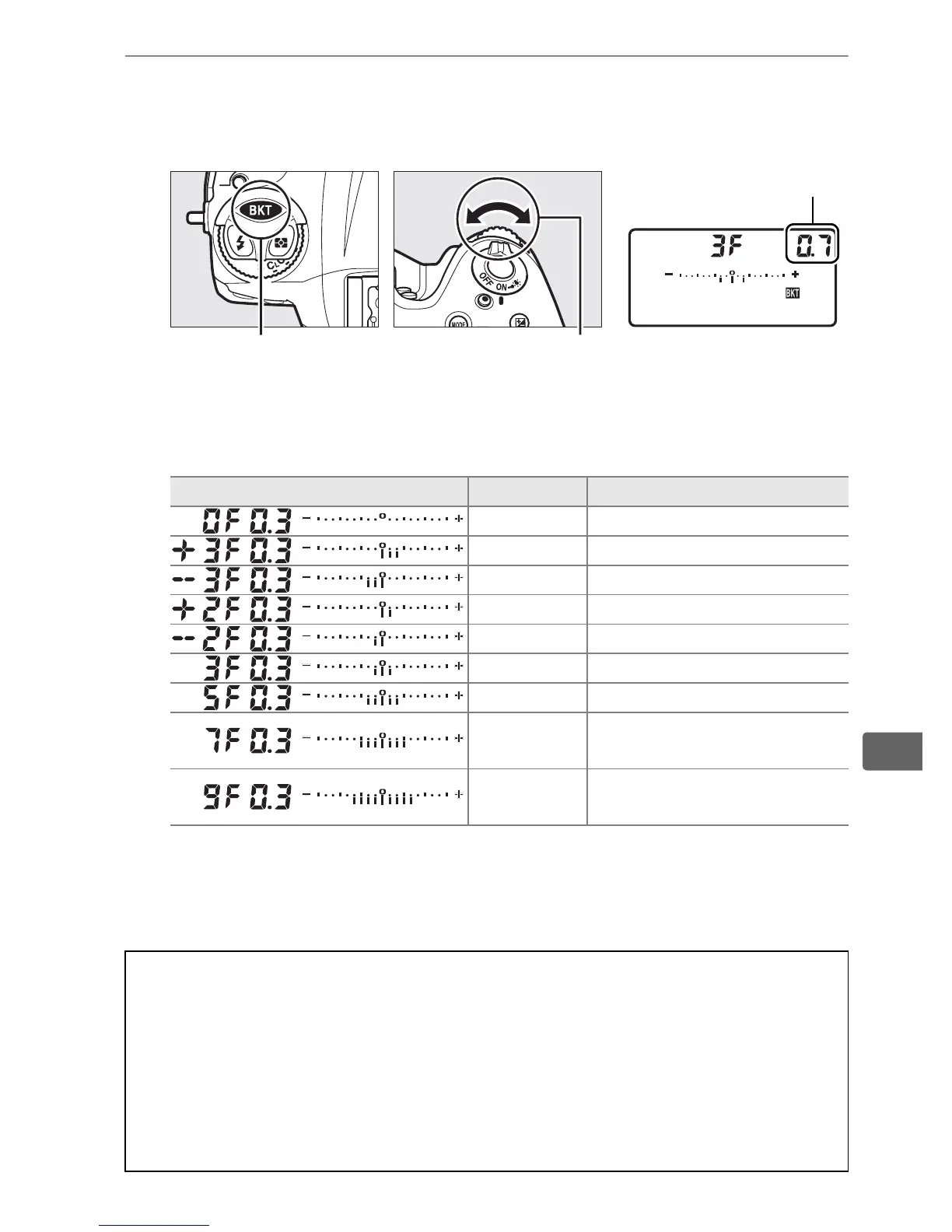
3 Select an exposure increment.
Pressing the D button, rotate the sub-command dial to
choose the exposure increment.
At default settings, the size of the increment can be chosen
from 0.3 (
1
/3), 0.7 (
2
/3), 1, 2, and 3 EV.
The bracketing programs
with an increment of 0.3 (
1
/3) EV are listed below.
Note that for exposure increments of 2 EV or more, the
maximum number of shots is 5; if a higher value was selected
in Step 2, the number of shots will automatically be set to 5.
D button Sub-command dial Top control panel
Control panel display No. of shots Bracketing order (EVs)
00
3 0/+0.3/+0.7
3 0/–0.7/–0.3
20/+0.3
20/–0.3
3 0/–0.3/+0.3
5 0/–0.7/–0.3/+0.3/+0.7
7
0/–1.0/–0.7/–0.3/+0.3/
+0.7/+1.0
9
0/–1.3/–1.0/–0.7/–0.3/
+0.3/+0.7/+1.0/+1.3
A See Also
For information on choosing the size of the exposure increment, see
Custom Setting b2 (EV steps for exposure cntrl, 0 321).
For
information on choosing the order in which bracketing is performed,
see Custom Setting e8 (Bracketing order, 0 334).
For information on
choosing the role of the D button, see Custom Setting f9 (Assign BKT
button, 0 344).
Exposure increment



 To Next Page