EasyManua.ls Logo

Nikon D4s - Page 468

Nikon D4s
500 pages
Print Icon
To Next Page IconTo Next Page
To Previous Page IconTo Previous Page
Loading...
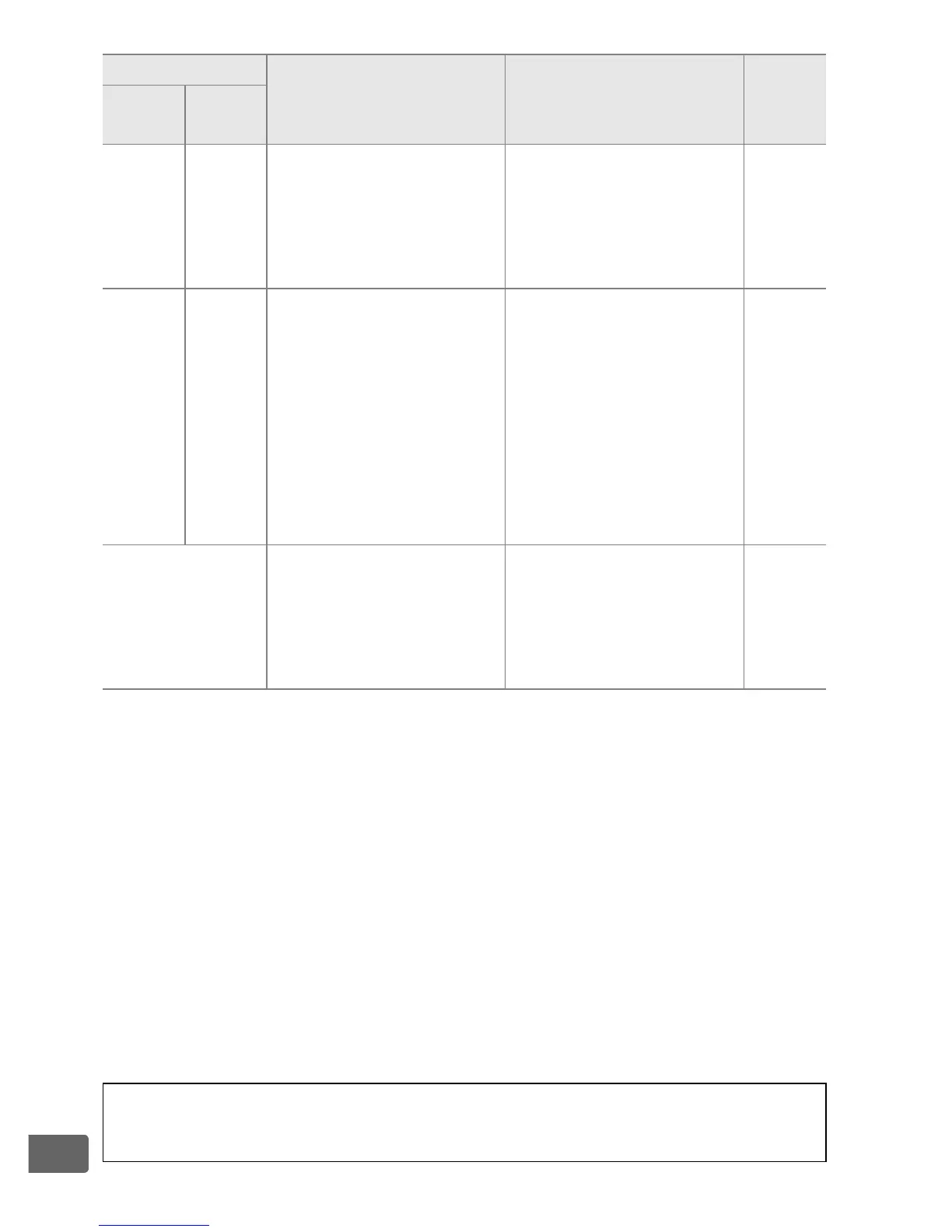
446
n
Y
(flashes)
Flash unit that does not
support red-eye
reduction attached and
flash sync mode set to
red-eye reduction.
Change flash sync
mode or use flash unit
that supports red-eye
reduction.
197,
204
n
i/j
(flashes)
j
(flashes)
Memory insufficient to
record further photos
at current settings, or
camera has run out of
file or folder numbers.
Reduce quality or
size.
90, 94
Delete photographs
after copying
important images to
computer or other
device.
257,
269
Insert new memory
card.
32
O
(flashes)
Camera malfunction.
Release shutter.
If error
persists or appears
frequently, consult
Nikon-authorized
service representative.
A The i and j Icons
These icons flash to show the card affected.
Indicator
Problem Solution 0
Control
panel
View-
finder

Table of Contents

Other manuals for Nikon D4s

Related product manuals