852
A
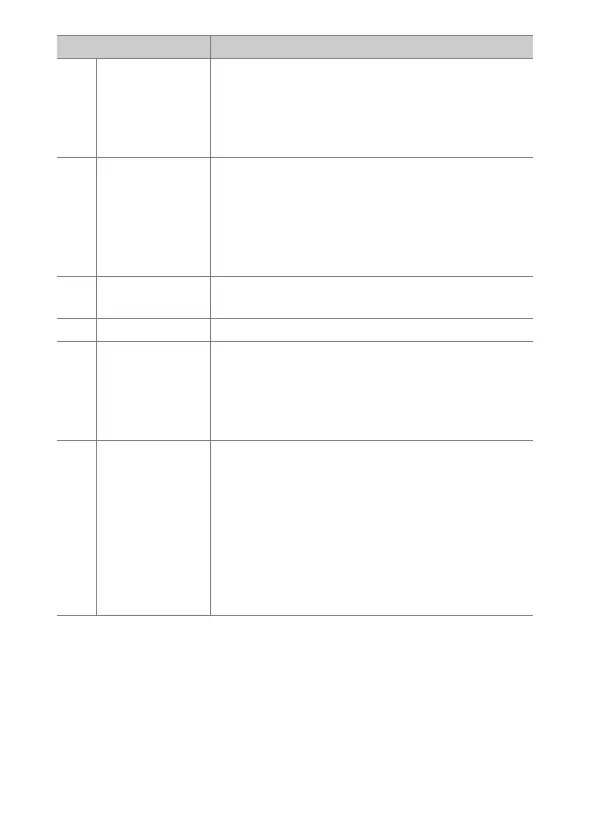
Custom Settings: Fine-Tuning Camera Settings
x
[AF-area
mode]
Holding the control selects a preset AF-area
mode. The mode previously in effect is restored
when the control is released.
•
To choose the AF-area mode, press
2
when
[AF-area mode] is highlighted.
q
[AF-area mode
+ AF-ON]
Holding the control selects a preset AF-area
mode and initiates autofocus. The AF-area mode
previously in effect is restored when the control
is released.
•
To choose the AF-area mode, press
2
when
[AF-area mode + AF-ON] is highlighted.
A
[AF-ON]
Pressing the control initiates autofocus,
duplicating the function of the AF-ON button.
F
[AF lock only] Focus locks while the control is pressed.
E
[AE lock (Hold)]
Exposure locks when the control is pressed.
Exposure lock does not end when the shutter is
released. Exposure remains locked until the
control is pressed a second time or the standby
timer expires.
X
[AE/AWB lock
(hold)]
Exposure locks when the control is pressed. If
[Auto] or [Natural light auto] is selected for
white balance, white balance will lock at the
value for the most recent photograph (white-
balance lock). Exposure and white-balance lock
do not end when the shutter is released. The
lock will however be released when the control
is pressed a second time or the standby timer
expires.
Role Description



 To Next Page