40
Readying the Camera
A
Two Memory Cards
When two memory cards are inserted (one in each of Slots 1 and 2), the
role played by the card in Slot 2 can be selected using [Role played by
card in Slot 2] in the photo shooting menu.
•
[Overflow]: Pictures will be recorded to the card in Slot 2 only when the
card in Slot 1 is full.
•
[Backup]: Two identical copies are recorded, one to each memory card
and each with the same image quality and size.
•
[RAW Slot 1 - JPEG Slot 2]: The NEF (RAW) copies of photos taken at
settings of NEF (RAW) + JPEG are recorded only to the card in Slot 1, the
JPEG copies only to the card in Slot 2.
•
[JPEG Slot 1 - JPEG Slot 2]: Two JPEG copies are recorded, one to each
memory card, but at different sizes.
❚❚
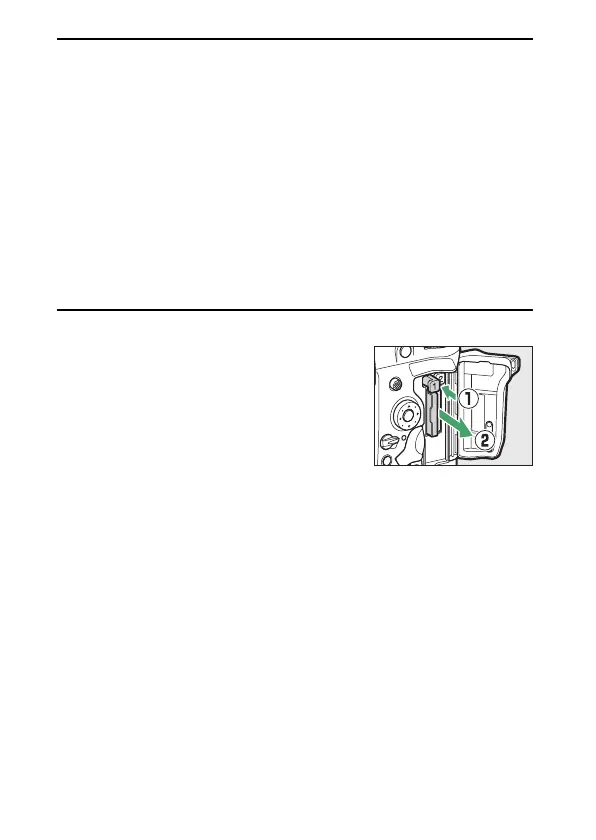
Removing Memory Cards
After confirming that the memory card
access lamp is off, turn the camera off
and open the memory card slot cover.
Press the eject button (
q
) to partially
eject the card (
w
); the memory card can
then be removed by hand.



 To Next Page