VBA10401-R.3623.A
- A22 ・ -
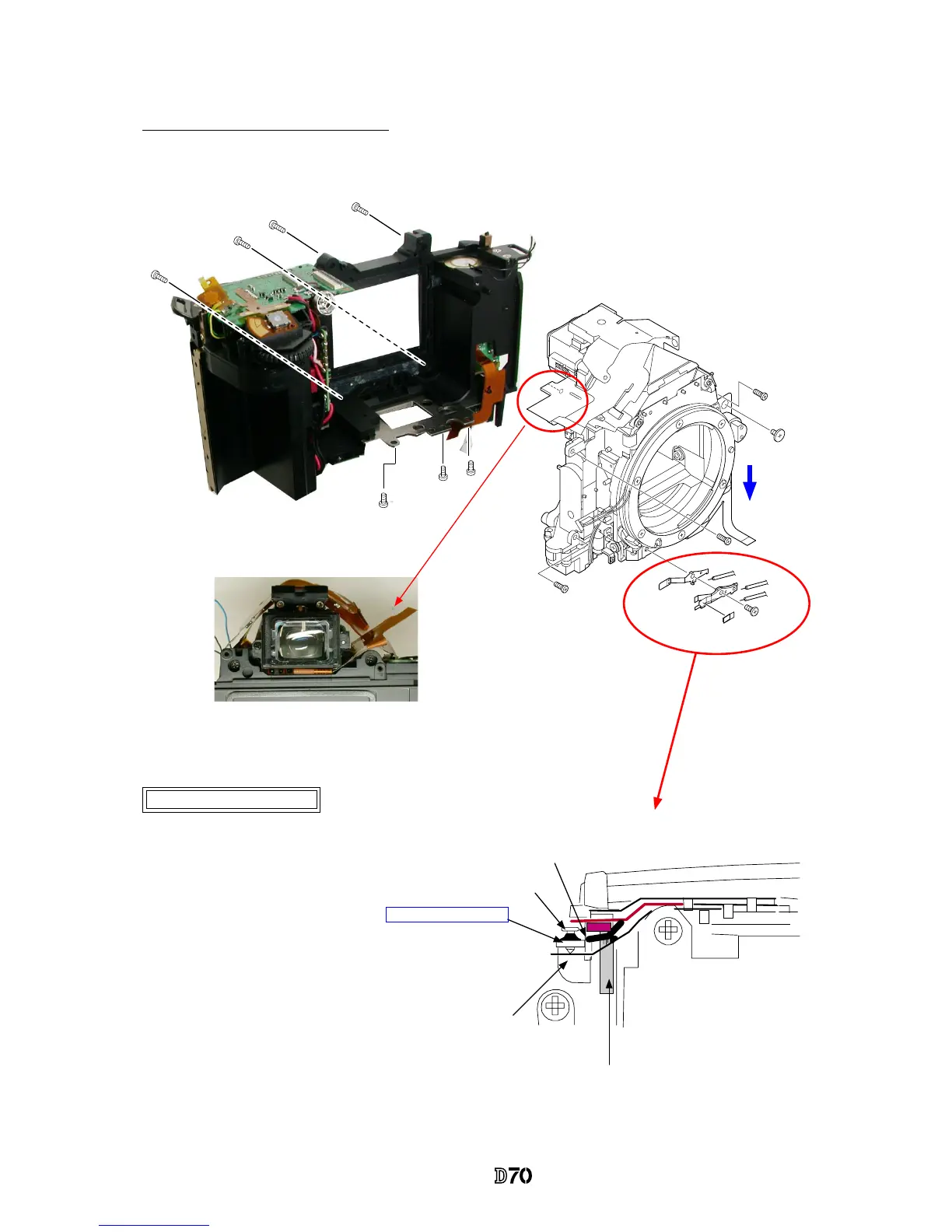
3. Mount Front body on Rear body
Mount the front body on the rear body
Preview SW Adjustment
①
Press the lever (#224) with screw driver, etc
from the bottom of the body so that it touches
the uppermost part.
②
In the state of
①
, make an adjustment by
turning the screw #652 so that #227 and #B225
slightly touch with each other.
③
Adhere the screw (#652) with screw lock.
#
652
Adhesive: Screw lock
#
222
#
227
#
B225
・
Do NOT pinch wires and FPCs.
・
Attach screws by the following order. #642×3 → #634×4 → #699×3
Direction for
positioning to
attach the front
plate.
Arrange FPCs of the inner LCD by putting them into the
clearance between rear body and eyepiece.
#642×3
#634×4
#699×3
#227
#B225
#714
#649
*
Note:
Preview switch blade is easily bent, so handle it with care.



 To Next Page