E–19
E
Functions
Power zoom function canceled ■
Power zoom function can be canceled in the custom settings. (0B-18)
An “•
” above the “ ” indicator appears on the LCD panel when the
power zoom function is canceled.
The zoom head position must be manually set. The zoom head position does not •
automatically change when the lens focal length is changed, the lens is replaced
or the Speedlight is turned off/on.
To set the zoom head position manually, see “Setting the zoom head position •
manually” above.
AF-assist illumination
When light is too low for normal autofocus operation, the SB-910’s AF-assist
illumination enables autofocus photography.
The SB-910’s AF-assist illumination is compatible with the multi-point AF system.•
AF-assist illumination cannot be used with non-CLS-compatible cameras and •
COOLPIX cameras.
Notes on using the AF-assist illumination ■
AF-assist illumination can be used if an AF lens is mounted and the camera’s •
focus mode is set to S (single-servo AF with focus priority), AF-A, or AF.
The effective flash-to-subject distance with AF-assist illumination is approx. 1 m •
to 10 m (3.3 ft to 33 ft) for the center of the image with a 50 mm f/1.8 lens. The
flash-to-subject distance varies depending on lens in use.
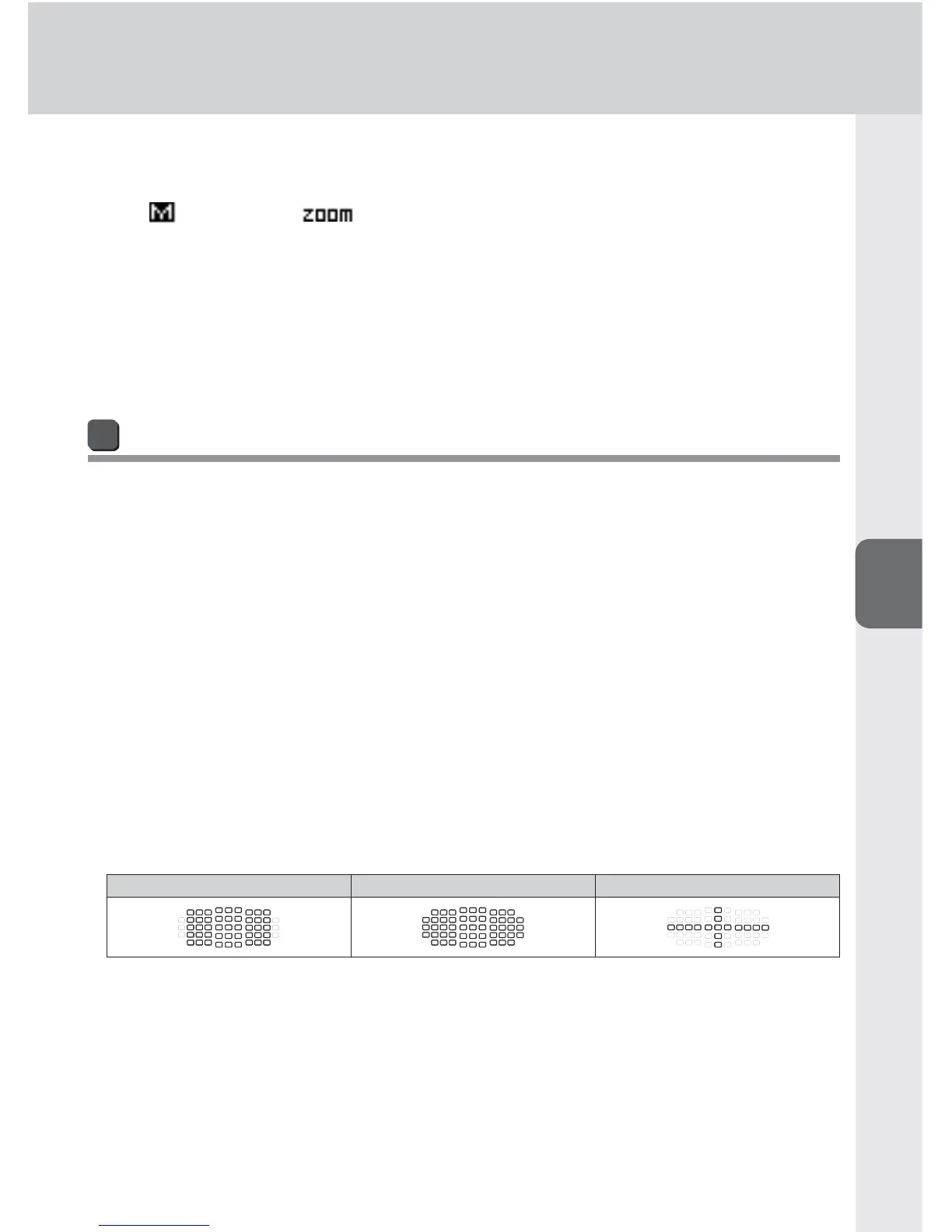
Suitable lens focal length is between 17 mm and 135 mm. Focus points for each •
focal length in which autofocusing is possible are:
D3 series camera focus points
17 – 19 mm 20 – 105 mm 106 – 135 mm
AF-assist illuminator will not light up if the camera’s focus is locked or the •
SB-910’s flash-ready indicator does not come on.
Refer to the camera user’s manual for more information.•


 To Next Page