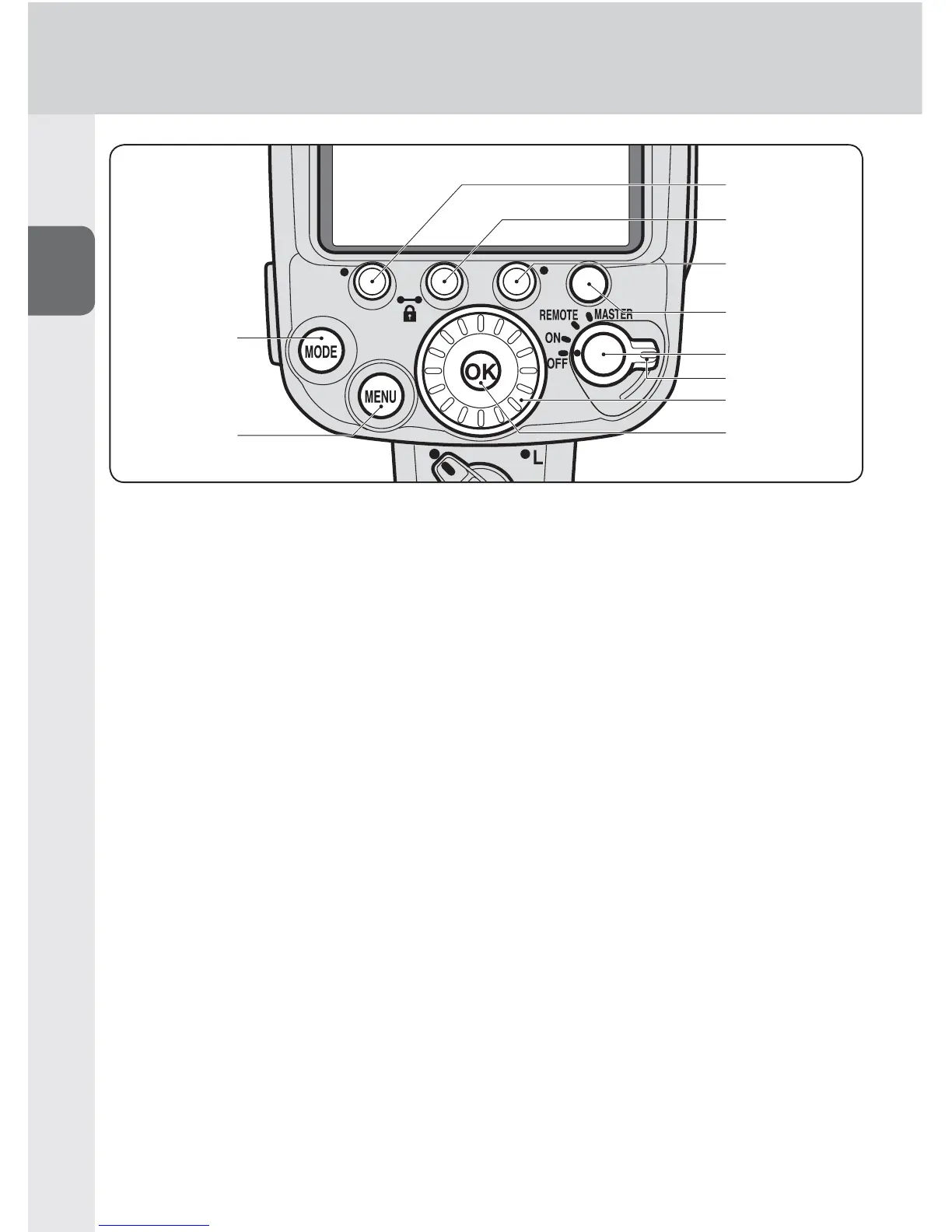
25 [MODE] button
Selects fl ash mode (0B-11)
26 [MENU] button
Displays custom settings (0B-13)
27 Function button 1
28 Function button 2
29 Function button 3
Selects item to be confi gured•
The assigned function or setting •
for each button differs according
to the fl ash mode and settings of
the SB-910. (0B-5)
30 Test fi ring button
Controls test fi ring (• 0E-21) and
modeling illumination (0E-21)
The button function, test fi ring •
and modeling illumination can be
changed in the custom settings.
(0B-17)
31 Lock release
To set wireless mode for multiple
fl ash units, rotate the power
switch/wireless mode switch for
multiple fl ash units while holding
down the lock release in the center
of the switch. (0D-6, D-7)
32 Power switch/wireless mode
switch for multiple fl ash units
Rotate to turn power on and off. •
Selects the master or remote •
mode in wireless multiple fl ash-
unit photography (0D-6, D-7)
33 Selector dial
Rotate to change selected item.
The selected item is highlighted on
the LCD. (0B-12)
34 [OK] button
Con
fi rms selected setting (0B-12)



 To Next Page