B–5
B
Operation
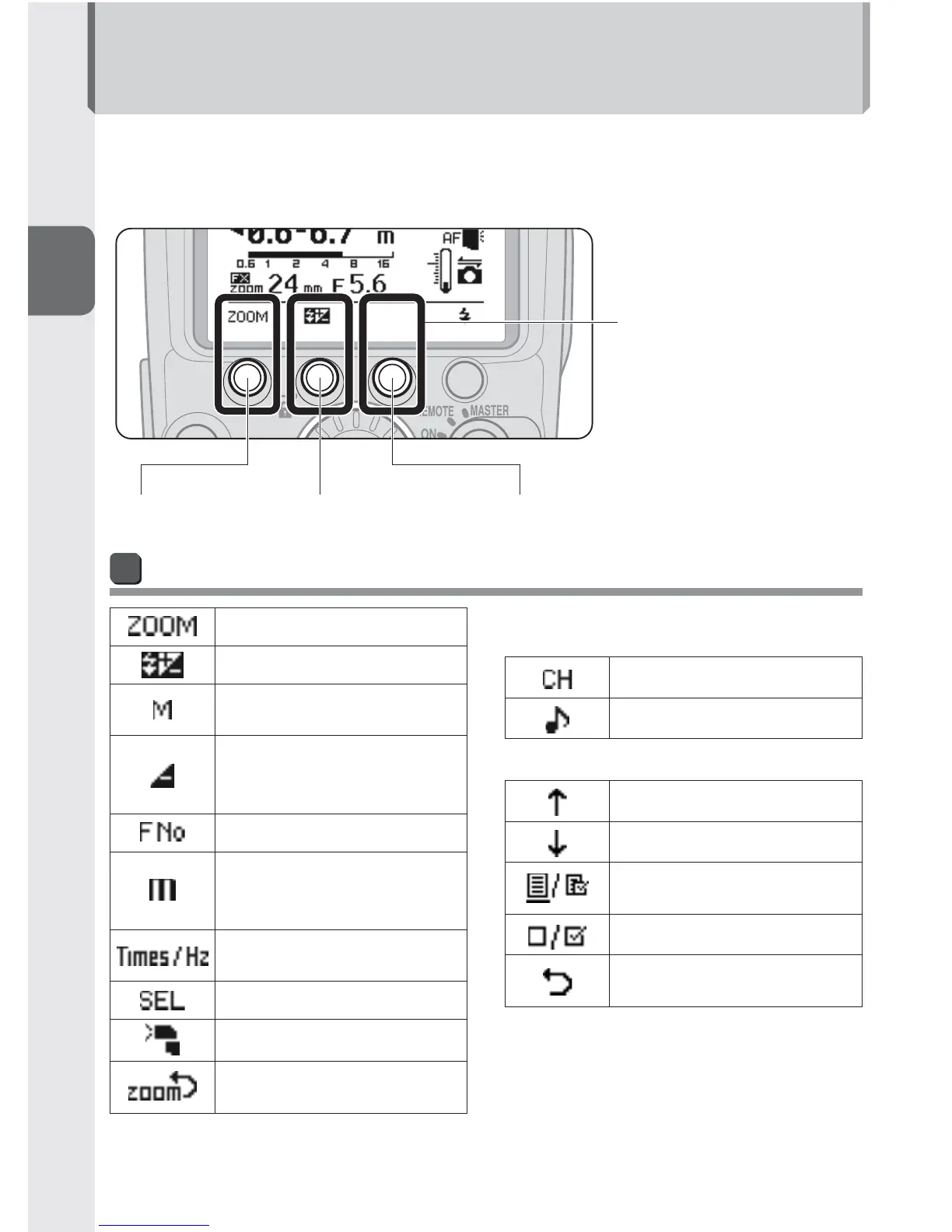
Function Buttons
The assigned function or setting for each button differs according to the fl ash mode
and settings of the SB-910.
Function button 1
The assigned function or •
setting for each button is
indicated by an icon.
When no function is •
assigned to a button, no
icon appears above the
button on the LCD.
Function button 2 Function button 3
Functions and settings icons
Zoom head position
Flash compensation value
Flash output level in
manual fl ash mode
Amount of underexposure
due to insuffi cient fl ash
output in i-TTL mode
Aperture
Flash-to-subject distance
(in distance-priority manual
fl ash mode)
Number and frequency of
fl ash fi rings
Change setting items
Illumination pattern
Activate power zoom
function
[With wireless multiple fl ash-unit
photography] (0D-1)
Channels
Sound monitor
[In custom settings] (0B-13)
Go to previous page
Go to next page
Display My Menu or Full
Menu
Change My Menu items
End changing My Menu
items



 To Next Page