C–10
C
Flash Modes
Taking a picture in non-TTL auto flash mode
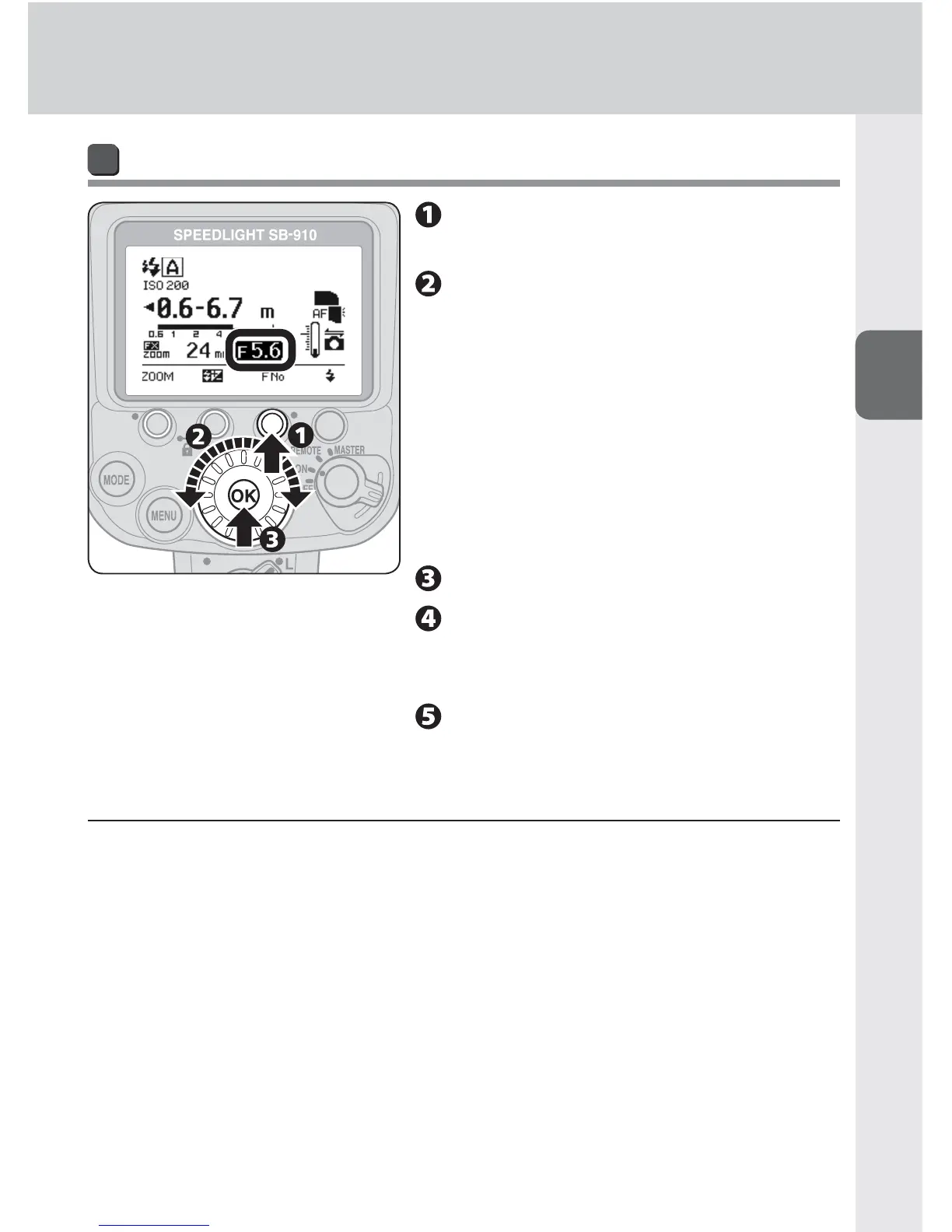
Press function button 3 to
highlight the aperture.
Rotate the selector dial to
set aperture. Note that the
effective fl ash output distance
range varies depending on
aperture.
Aperture can be changed with function •
button 3.
Correct exposure can be obtained when •
the actual flash-to-subject distance is
within the effective flash output distance.
Press the [OK] button.
Set the same aperture in
the lens or camera as the
Speedlight.
Confi rm the fl ash-ready
indicator is on, and then shoot.
v When insuffi cient fl ash output for correct exposure is indicated
When the fl ash-ready indicators on the SB-910 and in the camera’s viewfi nder blink
for approx. 3 seconds after a picture is taken, underexposure due to insuffi cient
fl ash output may have occurred. To compensate, use a wider aperture or higher ISO
sensitivity, or move the fl ash unit closer to the subject and reshoot.


 To Next Page