C–13
C
Flash Modes
Distance-priority Manual Flash Mode
Taking a picture in distance-priority manual flash
mode
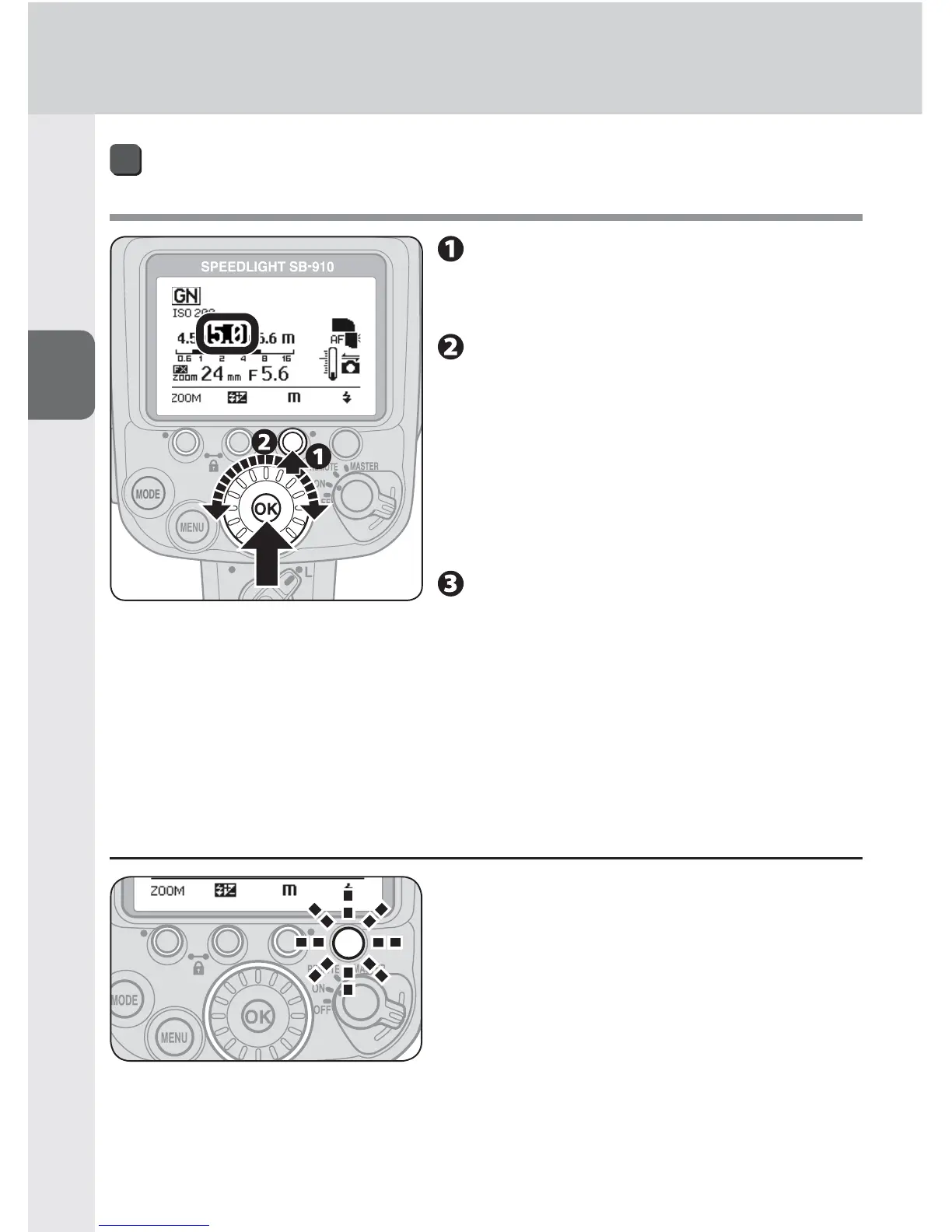
Press function button 3 to
highlight fl ash-to-subject
distance.
Set the fl ash-to-subject distance
with the selector dial, and then
press the [OK] button.
The flash-to-subject distance can be set •
with function button 3 as well.
The flash-to-subject distance varies •
depending on ISO sensitivity within a
range of between 0.3 m and 20 m.
Confi rm the fl ash-ready
indicator is on, and then shoot.
Flash-to-subject distance range in distance-priority manual flash
mode
Flash-to-subject distance range of between 0.3 m and 20 m•
If the desired flash-to-subject distance is not displayed, select a shorter flash-to-•
subject distance. E.g., if the flash-to-subject distance is 2.7 m, select 2.5 m.
v When insuffi cient fl ash output for correct exposure is indicated
When the fl ash-ready indicators on the
SB-910 and in the camera’s viewfi nder blink
for approx. 3 seconds after a picture is taken,
underexposure due to insuffi cient fl ash output
may have occurred. To compensate, use a
wider aperture or higher ISO sensitivity and
reshoot.



 To Next Page