VI Maintenance Menu
1 Indicating Program Version and Checksum
- 57 -
VI
VI
Maintenance Menu
1 Indicating Program Version and Checksum
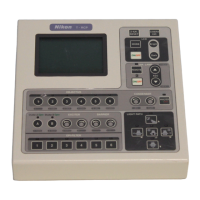
Indicate the program version of the remote control pad and the HUB controller and the checksum on the LCD.
1
Turn on the power to the HUB controller while holding
down the MODE key.
After the MAINTENANCE MENU screen appears, release
the MODE key.
2
Press the [
] key.
MAINTENANCE MENU
1.Version
2.TEST1
3.TEST2
4.PAD Data
5.HUB Data
6.Control Data
a.All Control Data
b.Revoiving Nosepiece
c.Condenser Cassette
d.Light Path
e.Filter Block
f.Exciter Filter
g.Barrier Filter
h.AUX Filter
3
The program versions and the checksum appear on the
LCD.
VERSION
T-RCP REMOTE CONTROL PAD
V1.00 Sum1234h
T-HUBC HUB CONTROLLER
MAIN-cpu: V1.00 Sum5678h
SUB-cpu : V1.00 SumABCDh
4
Press the MODE key to return to the OPERATION screen.


 To Next Page