5 Installing the TWAIN driver
30
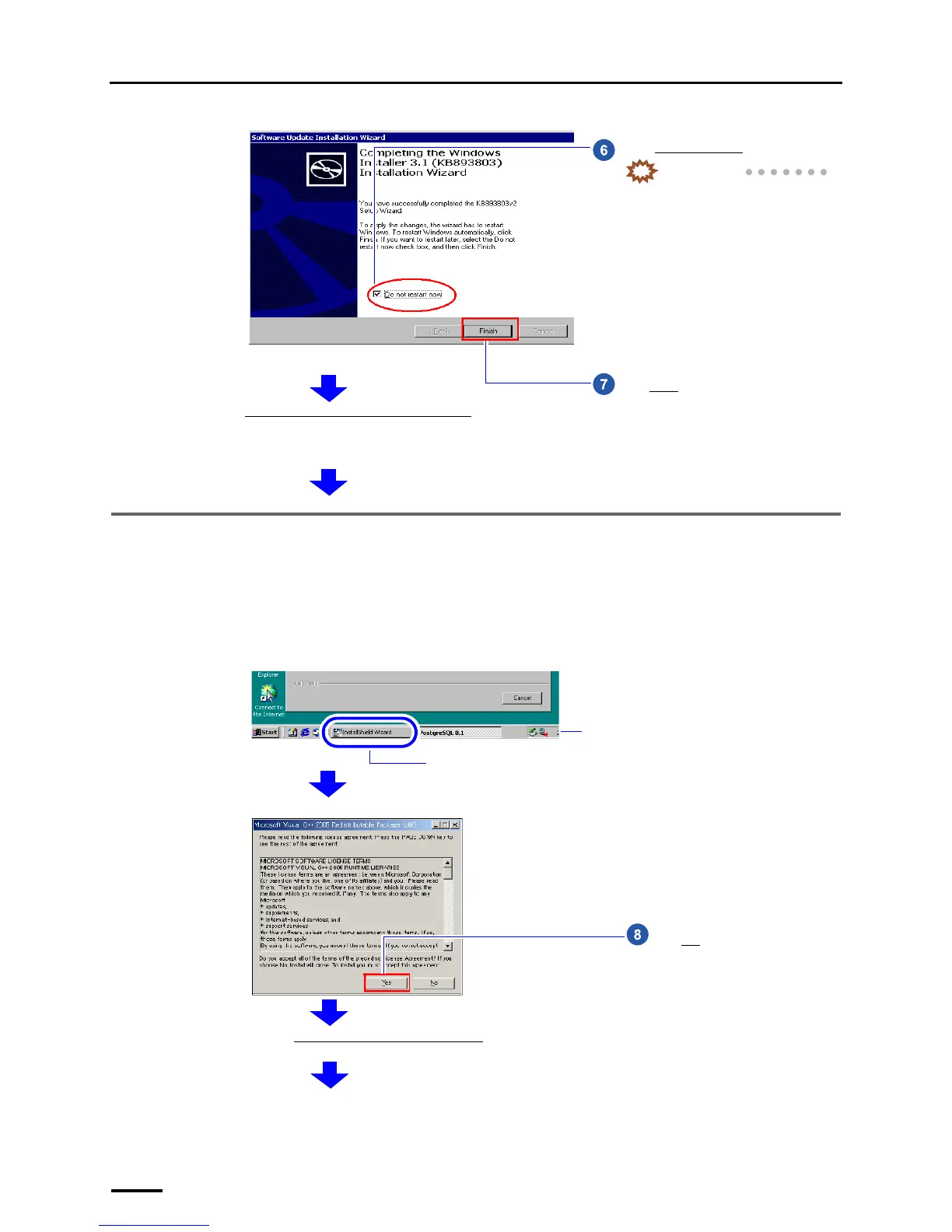
5.3 Installing the Microsoft Visual C++ 2005 SP1 Redistributable
If the installation display for the Microsoft Visual C++ 2005 SP1 Redistributable is not shown, go to ☞5.4 Installing the
Microsoft .NET Framework Version 3.0.
Select Do not restart now.
IMPORTANT
• The installation is continued even if
you do not select it. However, be
sure to select it otherwise the
restarting performed at the end of
the installation may take several
minutes.
Click Finish.
Next, install Microsoft Visual C++ 2005 SP1 Redistributable
.
Terms of use is shown.
S087702
If the display does not change to the following installation display, click the button of the screen newly displayed on the taskbar. The
screen newly displayed comes to the front.
Button of the screen newly displayed
Taskbar
Example:
S088428
Click Yes.
Next, install the Microsoft .NET Framework Version 3.0.
S087703



 To Next Page