4-7
4 ESM System Operation
4. ESM System Op.
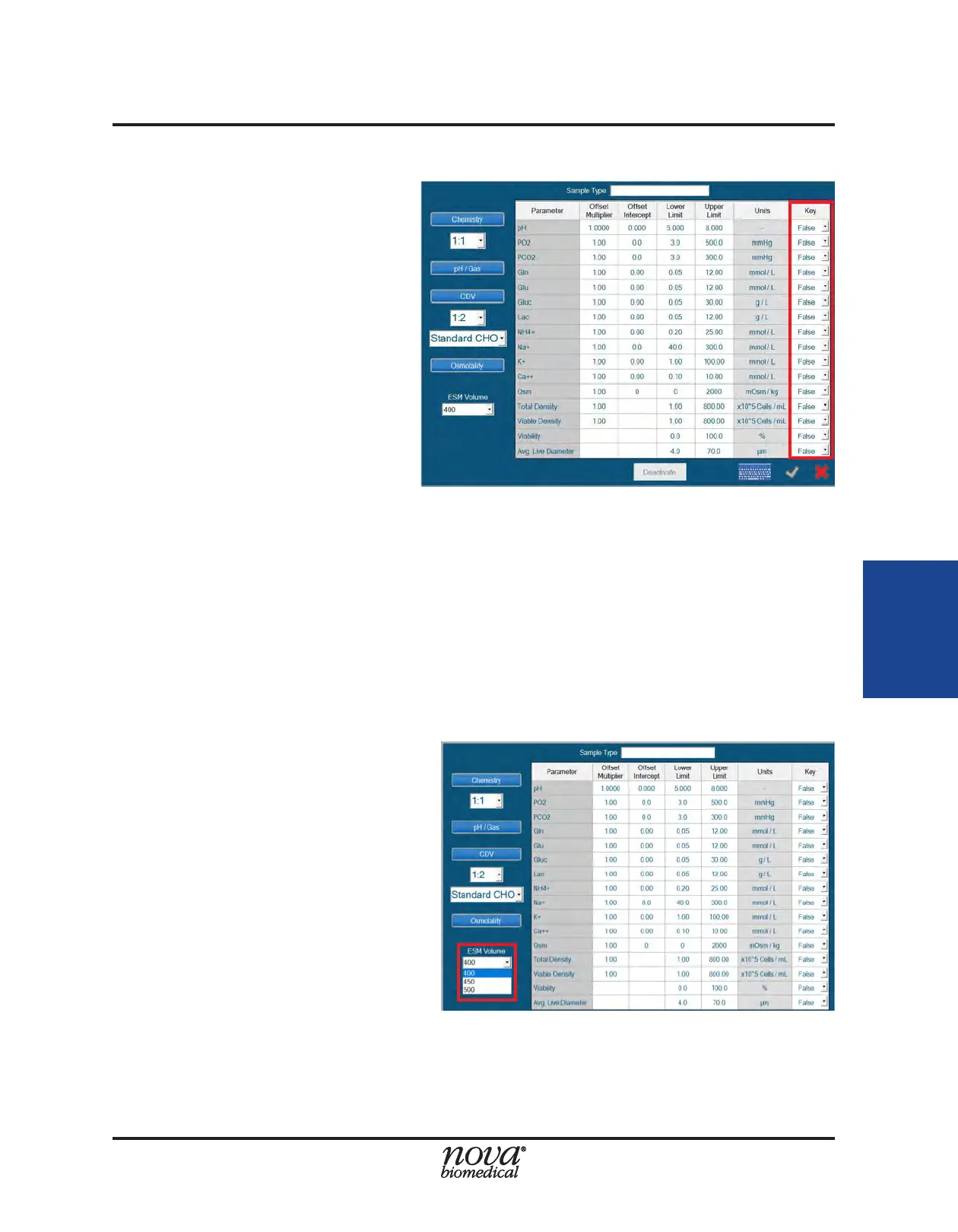
4.3.1.1 Key Parameters
The Key Parameters function
provides a means of suppressing
analysis of online samples when
specic "key" parameters are not
available due to calibration failure
or Quality Control failure (if QC
Lockout is enabled). The Key
Parameters function only applies
to samples supplied to the FLEX2
by the External Sampling Module
(ESM); it does not apply to the
Manual or Load-N-Go carousel
sampling modes. An operator
has the option of identifying
which parameters are "key" when
creating or modifying a Sample Type.
To congure Key Parameters:
1. From the Sample Type menu (Fig. 4.10) select "True" from the drop down in the
column labeled "Key" for the parameter of interest.
2. Press the green checkmark to save the Sample Type.
If an online sample is scheduled for analysis using a FLEX2 Sample Type that has Key
Parameters enabled, all Key Parameters must be available for the analysis to proceed.
If a Key Parameter is unavailable for any reason (QC Lockout included), any online
sample analyses with that parameter included in the analysis panel will not run. This
feature prevents the loss of sample material when there may be limited volume.
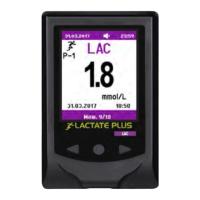
4.3.1.2 ESM Sampling Volume
In the bottom left corner of the
Sample Type menu is a dropdown
labeled "ESM Volume." For FLEX2
+ ESM systems, this volume is the
sample acquisition volume from
the microbioreactor system. For
FLEX2's integrated with ESM15,
there is a choice of 3 different
sample volumes: 400µL, 450µL or
500µL. For FLEX2's integrated with
ESM250, there is only one default
sampling volume: 675 µL.
NOTE: To determine which volume is optimal for sampling from the ambr® 15, Nova
Biomedical recommends performing a correlation study to test similarity of
results between manual sampling and ESM15 sampling at the three different
acquisition volumes.
Figure 4.10 Congure Key Parameters
Figure 4.11 ESM Sampling Volume


 To Next Page