NTI ENTERPRISE ENVIRONMENT MONITORING SYSTEM
105
HOW TO SETUP SNMP
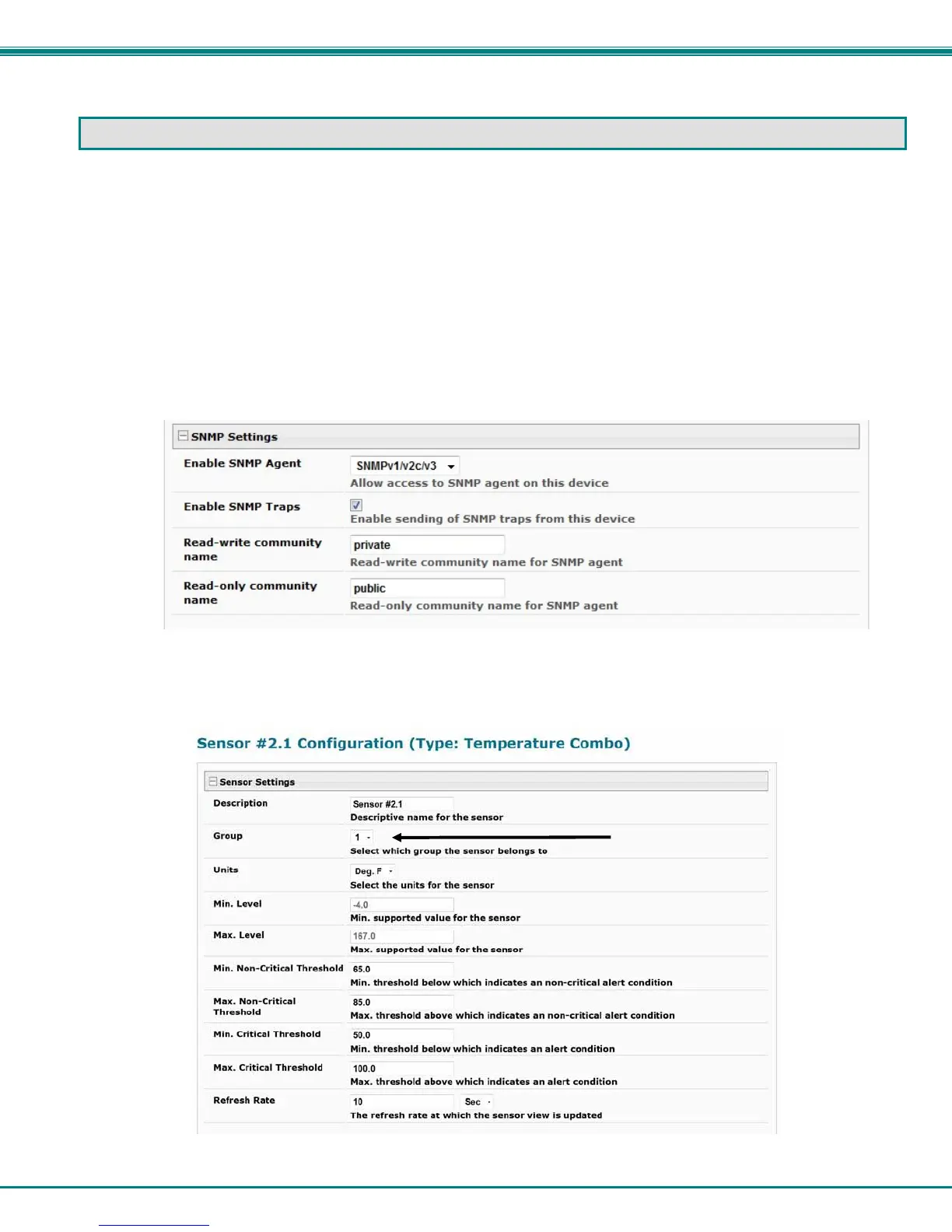
Follow these steps to prepare the ENVIROMUX to send SNMP traps to ENVIROMUX users.
Under Network Settings:
1. Enable the proper SNMP Agent type (v1/v2c , v1/v2c/v3, or just v3) depending upon what type of SNMP browser you use.
• v1/v2c = no security required
• v1/v2c/v3 = messages with or without security
• v3= only secure messages will be sent
2. Place a checkmark in “Enable SNMP Traps”.
3. Enter names for the Read-write community and Read-only community (usually just “private” and “public” as shown).
Figure 109- SNMP Settings under Network Settings
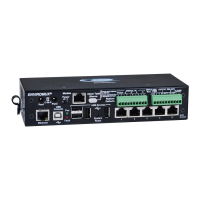
Under Sensor Configuration:
4. Under the sensor configuration for each sensor, enter a Group number that the sensor should belong to. Users can receive
alert messages from some, all, or no sensor groups, as configured under User Settings.
Figure 110- Enter at least one group number to sensor configuration


 To Next Page