NTI ENTERPRISE ENVIRONMENT MONITORING SYSTEM
59
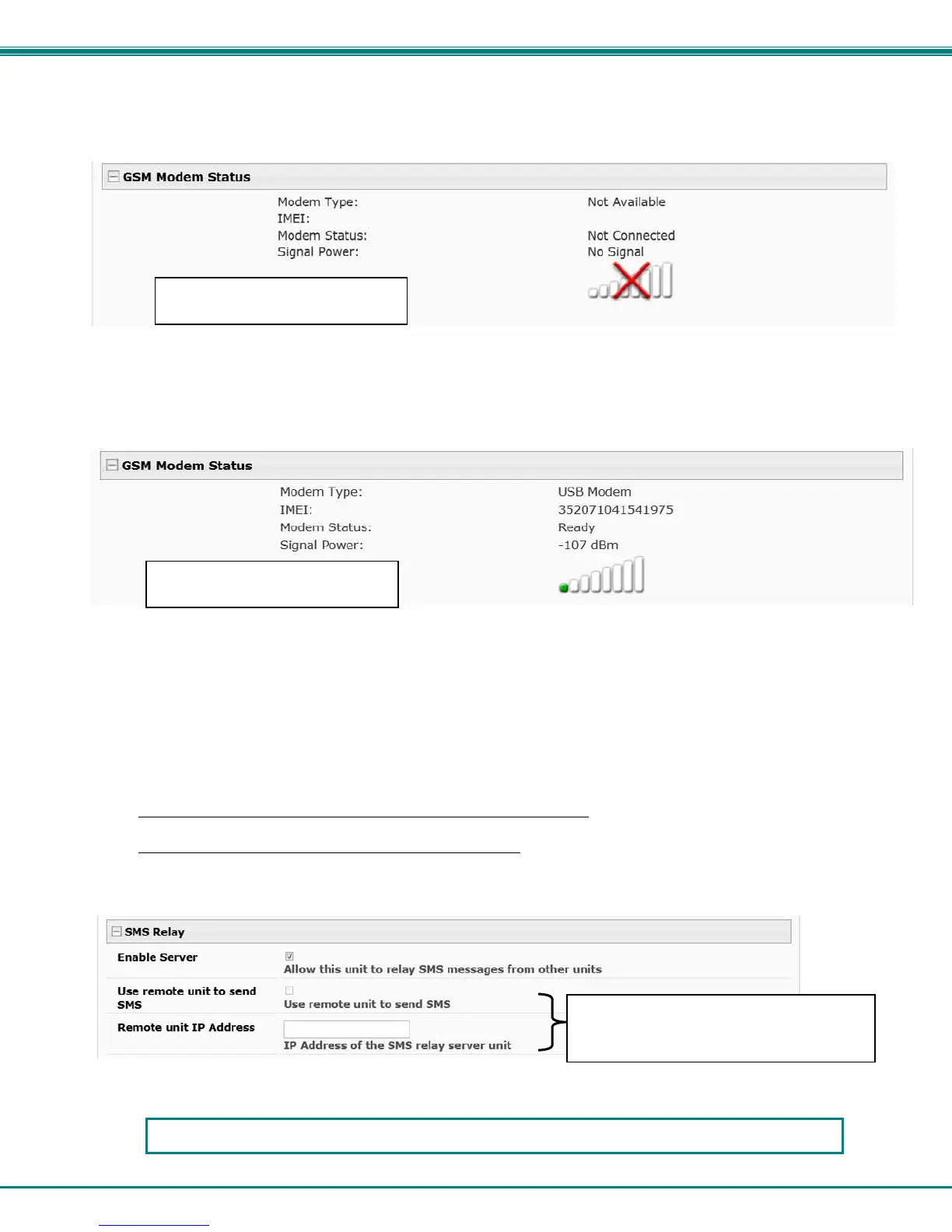
GSM Modem Status
If a modem has not yet been connected, the message "Not Available" will appear on the setup menu. The modem must be
powered ON and connected before the ENVIROMUX is powered ON.
The connected modem must have a GSM type SIM card configured for SMS messaging and should be “unlocked” to prevent it
from being limited to use in just this modem without further configuration.
When a modem is present, the type, status, IMEI number, and signal strength will be displayed. The modem will work with a
signal strength between -111dBm (weak) and -51dBm (strong).
Figure 65- GSM Modem Status
Enable SMS Relay
If your network includes more than one ENVIROMUX (ENVIROMUX-16D, ENVIROMUX-5D and/or ENVIROMUX-2D), only one
GSM modem is required for all the ENVIROMUX units to send SMS messages. That GSM modem can be connected to any of
the ENVIROMUX units. Using the SMS Relay feature, all ENVIROMUX units can send SMS messages through the single GSM
modem.
To use the SMS Relay feature;
- If the GSM modem is connected to the ENVIROMUX you are configuring
, place a checkmark in “Enable Server” block.
- If the GSM modem is connected to another ENVIROMUX unit
, leave “Enable Server” unchecked and instead place a
checkmark in “Use remote unit to send SMS” and enter the IP address of the ENVIROMUX unit that has the GSM
modem connected to it in the block “Remote unit IP Address”.
Be sure to click “Save” to save the configuration.
Figure 66- SMS Relay Configuration
(Information displayed when
modem is present)
(Information displayed when
modem is not present)
These are used if the GSM modem for
SMS alert messages is connected to
another ENVIROMUX on the network.
If your network has only one ENVIROMUX connected to it, the SMS Relay feature will have no effect



 To Next Page