NTI ENTERPRISE ENVIRONMENT MONITORING SYSTEM
62
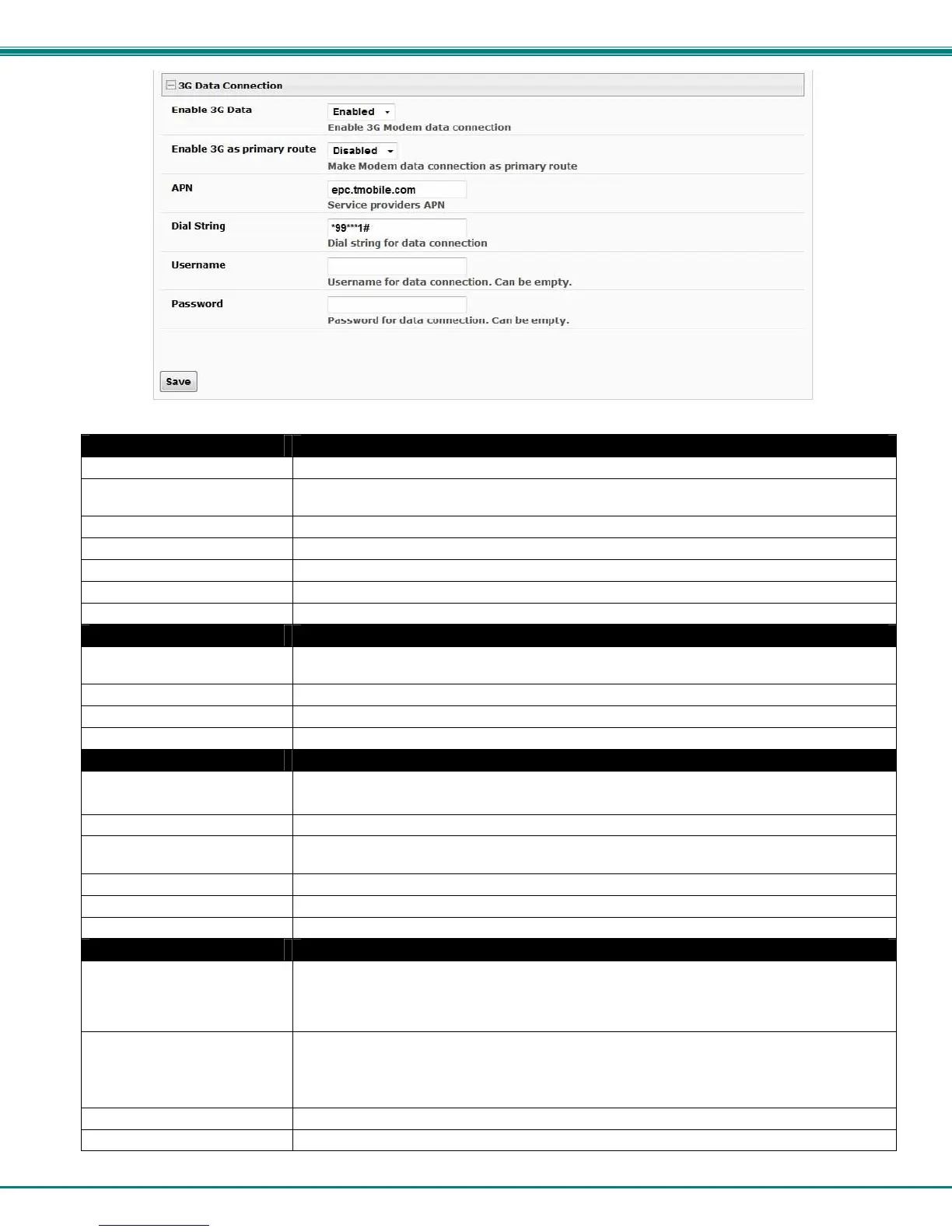
Figure 70- Configure 3G Data Connection
SMTP Settings Description
SMTP Server Enter a valid SMTP server name (e.g. yourcompany.com)
Port Enter a valid port number (default port is 25, for SSL most use 465, for STARTTLS most use
587)
Use SSL Place a checkmark in the box if the SMTP server supports SSL
Use STARTLS Place a checkmark in the box if the SMTP server supports TLS
Use Authentication Place a checkmark in the box if the SMTP server requires authentication to send email
Username Enter a valid username to be used by the ENVIROMUX to send emails
Password Enter a valid password assigned to the ENVIROMUX username
SNMP Settings
Enable SNMP agent Place a checkmark in the box to enable access to the SNMP agent. Choose between v1/v2c,
v3 only (maximum security), or v1/v2c/v3.
Enable SNMP traps Place a checkmark in the box to allow SNMP traps to be sent
Read-write community name Enter applicable name (commonly used- “private”)
Read-only community name Enter applicable name (commonly used- “public”)
Server Settings
Enable Telnet Place a checkmark in the box to enable access to the ENVIROMUX via Telnet
The default is disabled.
Enable SSH Place a checkmark in the box to enable access to the ENVIROMUX via SSH
Enabe HTTP access Place a checkmark in the box to enable access to the ENVIROMUX via standard (non-secure)
HTTP requests
HTTP Port Port to be used for standard HTTP requests
HTTPS Port Port to be used for HTTPS requests
Web Timeout Number of minutes after which idle web uses will be logged-out (enter 0 to disable this feature)
3G Data Connection
Enable 3G Data Enable if you want the option to have the ENVIROMUX send alert messages through the USB
modem and the option to access the web interface using the IP address assigned to the SIM
card account. The default is disabled. NOTE: In order to access the web interface
through the modem, the SIM card must have a “public” IP address (page 17).
Enable 3G as primary route Enable if you want all messages that are sent by the ENVIROMUX to go through the modem
connection instead of the Ethernet. The default is disabled.
Note: If this feature is enabled, and then later disabled, the ENVIROMUX must be
rebooted to reset outgoing messaging parameters.
APN Enter the APN address of the service provider (provided by the service provider)
Dial String Enter the dial string required for data connection(provided by the service provider)



 To Next Page